What Is GMX Mail? Free Email, Limits, IMAP Settings and Export
GMX Mail is free webmail from 1&1 Mail & Media. Learn its limits, IMAP and POP3 settings, spam handling and how to move GMX email into MBOX or PST files.

GMX Mail is free webmail from 1&1 Mail & Media. Learn its limits, IMAP and POP3 settings, spam handling and how to move GMX email into MBOX or PST files.
GMX Mail is free webmail that 1&1 Mail & Media GmbH operates. GMX email also works in Thunderbird and Outlook through IMAP or POP3.
Your GMX mail stays on GMX servers until you copy it. GMX.com lists 65 GB of space and 50 MB attachments. External access is off by default. You switch it on first.
Set up your mail program with the settings in section 5. Copy mail out through Thunderbird or Outlook if you want MBOX or PST files.
GMX Mail is a free webmail service from Germany. You read GMX email in a browser or in the GMX Mail app. A mail program like Thunderbird reads GMX Mail too.
GMX names 1&1 Mail & Media GmbH as the operator of GMX Mail on the GMX about page. United Internet describes the free accounts in its group as ad financed.
Most readers land here with one of three goals. You want to know what GMX Mail costs. You want GMX email in Outlook or Thunderbird. Or you want your messages out of GMX.
This page about GMX Mail sticks to the GMX help pages and other primary sources. Where those sources disagree or stay silent you see that stated and not guessed.
GMX Mail is free webmail from 1&1 Mail & Media with IMAP, POP3 and SMTP access. GMX.com lists 65 GB of mailbox space and 50 MB attachments. You switch on external access before a mail program connects.
Comparing mailboxes? Yandex Mail, Protonmail and Zimbra Mail have pages in the email application guides.
GMX began in 1997 and 1&1 Mail & Media GmbH operates it. United Internet lists GMX among its consumer email brands.
The Wikipedia entry on GMX Mail dates GMX Mail to 1997. GMX pages list Montabaur as the head office. A branch office sits at Brauerstr. 48 in Karlsruhe.
The about page states that GMX Mail is a service provided by 1&1 Mail & Media GmbH. That company holds the copyright line on the GMX UK about page too.
The United Internet 2025 annual report calls GMX and WEB.DE the most widely used email providers for German consumers. It says the mail operations sit under 1&1 Mail & Media Applications SE.
The same report counts over 29 million fee based contracts and around 39 million ad financed free accounts across the United Internet brands. It gives no figure for GMX Mail alone.
The sources disagree. The GMX UK about page promotes 13 million users while Wikipedia lists 11 million active users. This page gives no user count for GMX Mail.
Wikipedia's text calls GMX a subsidiary of Ionos SE while its infobox names United Internet. FileFix follows the GMX about page and the United Internet report.
The Wikipedia entry on United Internet says WEB.DE and GMX merged their email business into 1&1 Mail & Media GmbH.
| Fact | Value | Source |
|---|---|---|
| Operator | 1&1 Mail & Media GmbH | GMX about page |
| Head office | Montabaur | GMX about page |
| Branch office | Karlsruhe | GMX about page |
| Group segment | Consumer Applications | United Internet report |
| Launch year | 1997 | Wikipedia |
GMX.com lists free webmail with 65 GB of space. The German site sells ProMail at 3.99 euros a month with 5 GB. Limits depend on the site you join.
Free is the core promise of GMX Mail. The GMX.com mail page describes GMX Mail as completely free and lists 65 GB of mailbox space.
Pay plans exist for GMX email too. United Internet says its consumer brands sell fee based subscriptions next to ad financed free accounts.
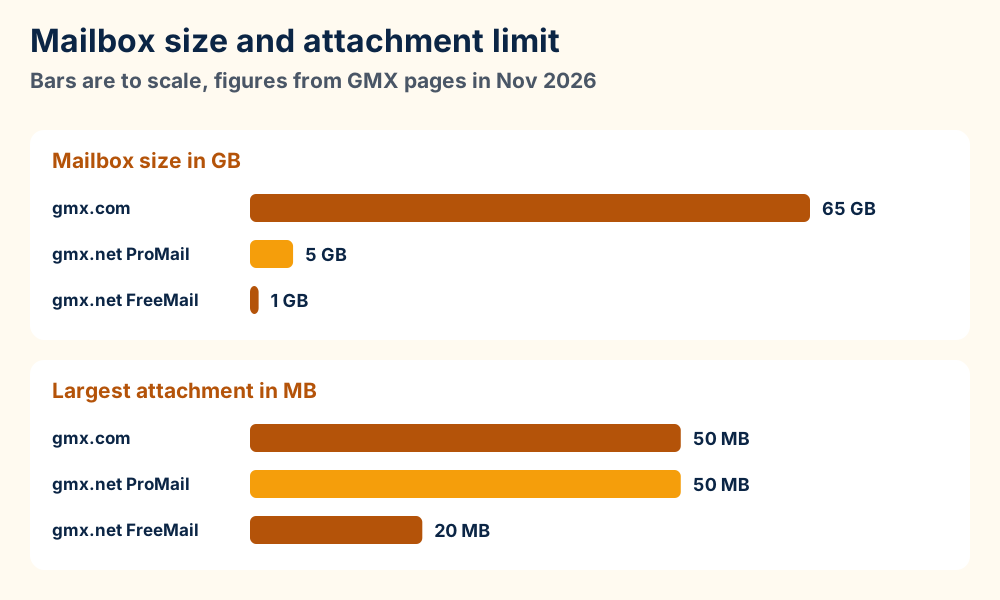
| Plan | Mailbox | Attachment | Cloud | Price |
|---|---|---|---|---|
| GMX.com account | 65 GB | 50 MB | 2 GB | Free |
| gmx.net FreeMail | 1 GB | 20 MB | 4 GB | 0 euros |
| gmx.net ProMail | 5 GB | 50 MB | 9 GB | 3.99 euros a month |
The gmx.com rows come from the GMX storage page and the GMX sign up page. The gmx.net rows come from the German gmx.net mail page, which is in German.
None of the GMX.com pages checked in Nov 2026 name a paid plan for GMX Mail. That does not prove that none exists. Look in the account settings after you sign in.
Wikipedia lists gmx.net as the German site and gmx.com as the English one. Choose a site that matches your region because the limits and the prices differ.
United Internet calls its free accounts ad financed. The GMX pages checked give no ad count and no way to remove the ads from a free account.
GMX.com lists 65 GB of space, 50 MB attachments and 10 aliases. Sign up offers gmx.com and gmx.us. GMX can erase mail after 6 months without a login.
GMX says a GMX Mail account stores up to 65 GB of email, about 500,000 messages. Attachments reach 50 MB per email. A file above that size needs another route.
GMX Cloud offers 2 GB of free space that you can also use to share files, per the GMX sign up page.
You can create up to 10 alias addresses for GMX Mail. They share one inbox and one password. GMX does not let you edit an alias. You delete it and create a new one, per the GMX help page on alias addresses.
Your first address stays fixed. The GMX help page on your address says GMX cannot assign it twice or let you change it. The address also serves as your user name.
The sign up page lists gmx.com and gmx.us. The GMX alias page shows gmx.co.uk and gmx.ca as examples and gives no full list.
The Mail Collector in GMX Mail pulls mail from up to 10 outside accounts over IMAP. The GMX help page on the Mail Collector names 24 supported providers. The originals stay in the other mailbox.
GMX spam and virus checks skip collected mail. Filter rules do not apply to it either.
The GMX terms and conditions say GMX can erase the stored messages after 6 months without a login. GMX needs no warning first.
After 1 year of inactivity GMX can release your address to the other customers. A free account can also lose access after 6 months.
| Limit | Value | Source |
|---|---|---|
| Mailbox space | Up to 65 GB | GMX storage page |
| Attachment size | 50 MB per email | GMX.com mail page |
| Alias addresses | Up to 10 | GMX alias help page |
| Mail Collector accounts | Up to 10 | GMX Mail Collector help page |
| Spam folder storage | Up to 30 days | GMX storage page |
| Inactivity before deletion | 6 months | GMX terms |
| Inactivity before address release | 1 year | GMX terms |
GMX Mail asks for at least eight characters in a password. It also asks for upper and lower case letters and a number and a symbol. The sign up page asks for a mobile number to recover your password.
IMAP uses imap.gmx.com on port 993 and POP3 uses pop.gmx.com on port 995. SMTP uses mail.gmx.com on port 587 or 465. GMX leaves external access off until you switch it on.
Choose IMAP if you read a mailbox on more than one device. The Mozilla article on IMAP and POP3 says IMAP keeps messages and folders on the server. POP3 downloads mail to your computer.
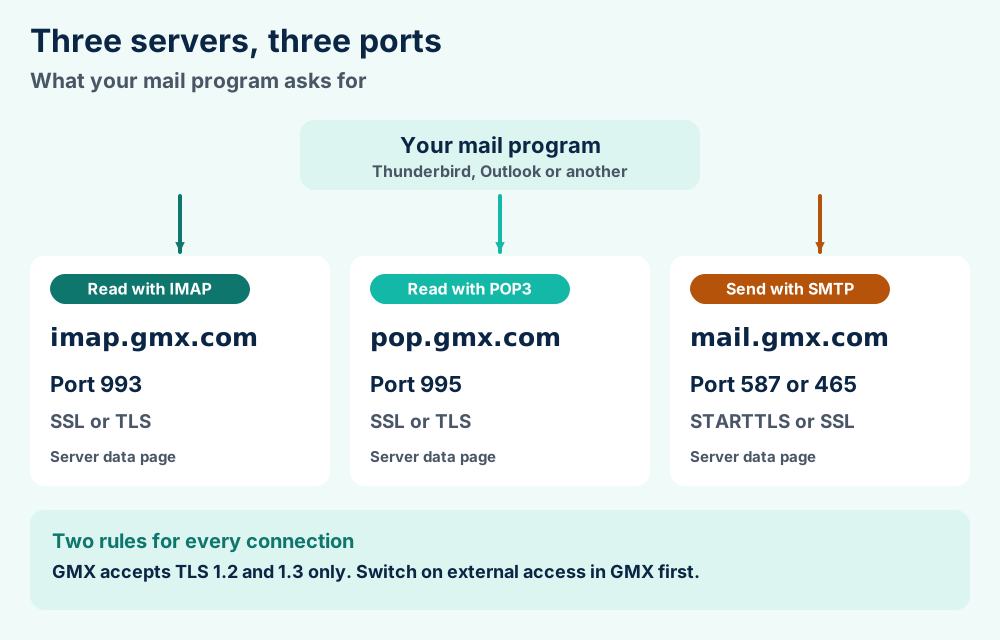
| Job | Server | Port | Encryption |
|---|---|---|---|
| Read with IMAP | imap.gmx.com | 993 | SSL or TLS |
| Read with POP3 | pop.gmx.com | 995 | SSL or TLS |
| Send with SMTP | mail.gmx.com | 587 | STARTTLS |
| Send with SMTP | mail.gmx.com | 465 | SSL or TLS |
The GMX IMAP server data page lists IMAP and SMTP. The GMX Outlook POP3 setup page lists POP3. Your login is your full GMX email address and your password.
Port 143 is a fallback for IMAP if 993 fails. GMX says that port 143 is not encrypted by default. You must enable STARTTLS in your program to encrypt the connection.
GMX Mail supports TLS 1.2 and 1.3 only. A mail program that speaks TLS 1.0 or 1.1 cannot connect.
The Outlook pages word the same option as Send and receive emails via external program. Both labels sit in the same place.
"POP3/IMAP sync is deactivated by default."GMX help page on POP3 and IMAP access
GMX also switches the option off for security when you stop using POP3 or IMAP for a longer period. The help page gives no number of days.
GMX Mail offers 2FA with an authentication app, per the GMX help page on 2FA. That page does not say how 2FA affects the POP3 or IMAP logins. Check your security settings before you rely on a guess.
Switch on external access first. Thunderbird finds the GMX servers on its own after you choose IMAP. Outlook needs the server values from section 5.
GMX publishes its own steps for GMX email in Thunderbird and Outlook. Both paths start after you switch on external access in section 5.
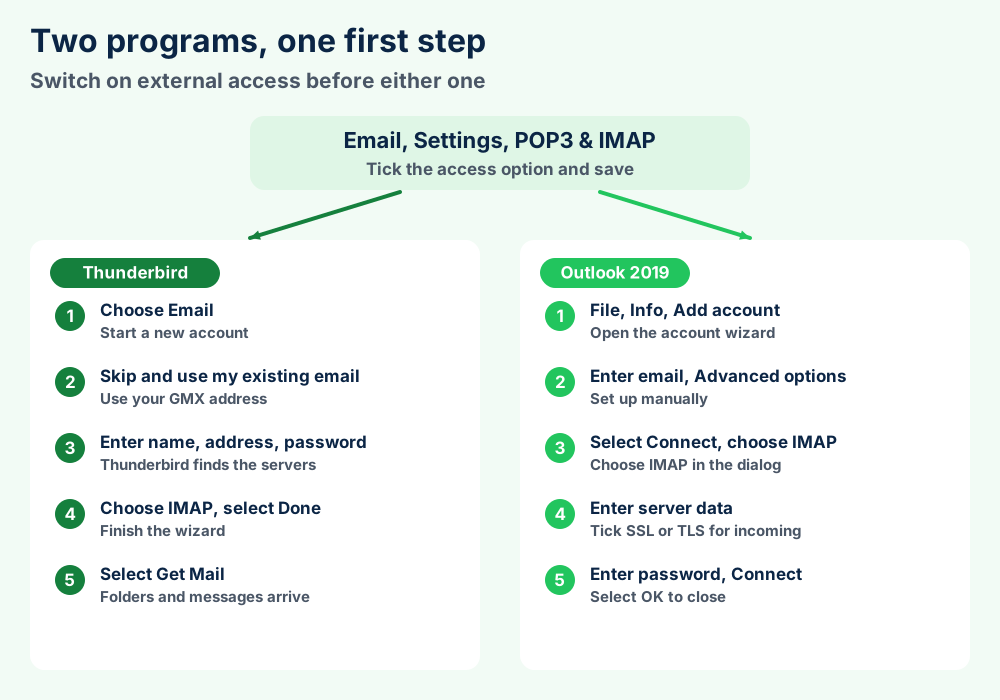
The GMX Thunderbird setup page shows five steps for GMX Mail. Mozilla Thunderbird finds the server settings for you.
GMX also recommends linking folders. Open Settings and then Server Settings and move deleted messages to Trash. Under Copies & Folders point Sent and Drafts at the GMX folders.
Thunderbird keeps only the headers for an IMAP folder until you open a message. Tick Keep messages for this account on this computer to download everything, per the Mozilla article on IMAP synchronization.
The GMX Outlook IMAP setup page covers Outlook 2019, 2016, 2013 and 2010. The GMX Outlook POP3 setup page covers Outlook 2019, 2016, 2010 and 2007. Steps for 2019 follow.
Outlook must use TLS 1.2 or 1.3 to reach the GMX servers. Outlook 2010 and 2013 also need My outgoing server requires authentication ticked on the Outgoing Server tab.
POP3 in Outlook 2010 and 2007 offers Leave a copy of messages on the server. The 2016 and 2019 steps do not mention it.
Any IMAP program asks for the values in section 5 to reach GMX Mail. Windows Mail and Apple Mail have their own pages. Microsoft Outlook has one too.
GMX moves unwanted mail to the Spam folder and deletes it after at most 30 days. Spam and Not Spam buttons train your personal filter.
GMX Mail has spam protection built into the mailbox. The GMX help page on spam protection says built in filters move unsolicited mail to the Spam folder.
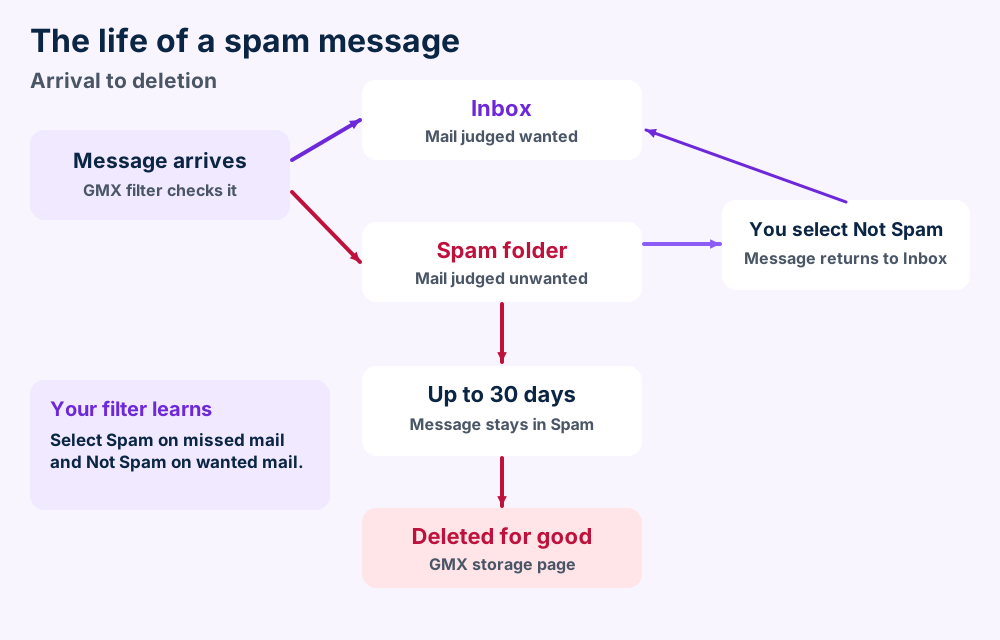
The GMX storage page says GMX keeps spam for a maximum of 30 days before deleting it for good. Trash storage time is unlimited by default and you can set it to 30 days.
Select Spam on a message that slipped through. GMX Mail then treats that sender and similar text as spam. Select Not Spam on a wanted message in the Spam folder to move it back.
Spam messages hide the external content so a sender cannot tell that you opened them. Select Show all if you trust the sender of a message.
| Setting | What it does |
|---|---|
| Spam Protection | On by default and sends unsolicited mail to Spam |
| Reset Personal Spam Filter | Erases your training so you can start over |
| Contacts | Keeps mail from your contacts in the Inbox |
| Send daily spam report | Lists new spam for people who use POP3 access |
The GMX spam protection settings page lists these four options. A filter rule can also send chosen senders straight to Spam or Trash.
The GMX spam filter page says the spam filter works alongside GMX antivirus software. It lists no detection rate for GMX Mail. Collected mail skips both checks.
The GMX help pages checked do not name the Spam folder in Thunderbird or Outlook. Open the folder list after the first sync and look for it.
GMX says data stays in Europe and offers 2FA and PGP. GMX holds your mail on its servers. Keep your own copy.
GMX says data is secured only in Europe under European data protection standards, per the GMX.com mail page. That is a GMX claim and not an audit.
GMX Mail adds a few optional locks that you switch on yourself.
2FA asks for a code from an authentication app after your password. GMX says a stolen password alone cannot open your mailbox, per the GMX help page on 2FA.
GMX lists PGP features for encrypted mail. The GMX help page on Mailvelope names Mailvelope as a German security partner. It adds that you manage keys in the Mailvelope browser extension.
The GMX spam filter page says GMX learns from mail you move between Inbox and Spam. It also says other messages remain untouched and private. You can revoke that learning in your account settings.
| Feature | What GMX says | Source |
|---|---|---|
| Data location | Secured only in Europe | GMX.com mail page |
| 2FA | Authentication app adds a code step | GMX 2FA help page |
| PGP | Keys live in Mailvelope | GMX Mailvelope help page |
| Spam learning | Learns from moved mail only | GMX spam filter page |
| Phone number | Used for password recovery | GMX sign up page |
The server copy still depends on your account staying active. Section 4 explains the inactivity rules and section 10 explains how to keep your own copy.
Check external access first and then ports and the TLS version. One March 2026 timeout report has no confirmed cause.
Check these six GMX Mail faults in a fixed order. Start with a look at the access switch.
Users in a Mozilla support thread on GMX timeouts reported timeouts from about 22 March 2026. One user reached GMX through a VPN in France. The thread ends with no confirmed cause or fix.
FileFix cannot say whether that problem still exists. Test your login in a browser first to separate a mail program fault from an account fault in GMX Mail.
Link Sent, Drafts and Trash to the GMX folders as section 6 shows. Thunderbird and Outlook 2010 both have that step on the GMX help pages.
Add the account by IMAP and let the program download everything. Thunderbird then holds MBOX files and Outlook can export a PST file.
The GMX help pages checked describe no one click mailbox export. You copy the mail out through a mail program instead.
IMAP keeps messages on the server. The program must download the messages first. Thunderbird gives you MBOX files and Outlook gives you a PST file.
Thunderbird stores mail in MBOX with one file per folder, per the Mozilla article on Maildir. Read MBOX files to see what those files hold.
The Mozilla article on the profile folder shows how to find the profile folder on Windows and macOS and Linux.
Microsoft says to add the account to Outlook and wait for all its email to appear. The Microsoft article on exporting to a PST file covers the export step.
New Outlook exports through Settings, Files and Export. Select Get started and follow the wizard. PST files explain what the result holds.
No. Open the copy and check a few folders you use most. Delete mail from GMX Mail only after the copy opens.
The GMX migration service page says GMX imports Outlook and Google calendar items in iCalendar format. Read ICS files for that format.
GMX can erase the mail after 6 months of inactivity. A copy made earlier is then your only one. OST files and EDB files cover other mail stores you could hold.
GMX holds your mailbox on a server and offers no file. Thunderbird writes MBOX and Outlook writes PST once you download the mail.
GMX Mail keeps your master mailbox on the GMX servers. No file on your side holds it until a mail program makes one.
| Place | What it holds | Format |
|---|---|---|
| GMX server | Master mailbox | No file for you to copy |
| Thunderbird profile | Downloaded messages | MBOX, one file per folder |
| Thunderbird with Maildir | Downloaded messages | One file per message, off by default |
| Outlook export | Messages and other items | PST |
Mozilla says that Maildir stores one file per email in the EML data format. It also says that the existing accounts keep using MBOX.
MBOX files pack many messages into a single file. Thunderbird uses one of those files for every folder.
Microsoft says that Outlook Data Files (.pst) contain Outlook messages and other items. PST files go deeper on the structure.
what a file format is explains how formats differ from programs. The file format guides cover more formats that other mail programs write.
Check the switch and the ports. Section 5 lists both.
Copy it through a mail program. Section 10 shows the steps.
Want GMX Mail in a desktop program? Thunderbird keeps your mail in the files that MBOX files explain.
Using Outlook for work? Microsoft Outlook has its own guide. Its data files are described in PST files and OST files.
Comparing GMX Mail with other mailboxes? Yandex Mail and Protonmail have pages here. Zimbra Mail covers a business mail server.
Prefer the mail program that came with your computer? Windows Mail and Apple Mail both have a guide.
Holding mail from an older program? Windows Live Mail and Outlook Express have guides. Trojitá is a small IMAP client. Pegasus Mail and SeaMonkey are two more.
Need another topic? Open the FileFix category index or start at the FileFix home page. The Windows error guides begin with the error text. Send us the file details when GMX Mail behaves in a way this page leaves unanswered.