Postbox Mail Specification
| Email client | Postbox |
| Type | News client, Email client, feed reader |
| Developed By | Postbox |
| Operating Systems | OS X, Windows |
| Email client | Postbox |
| Type | News client, Email client, feed reader |
| Developed By | Postbox |
| Operating Systems | OS X, Windows |
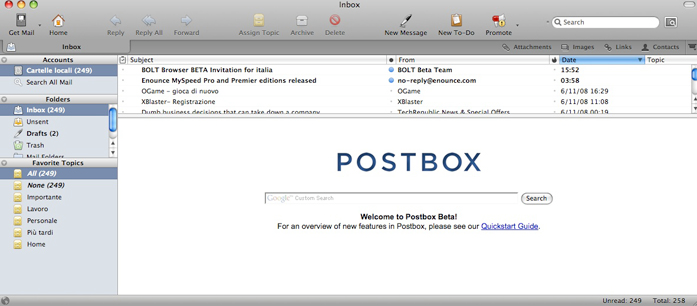
Postbox is a latest email client application that helps you manage your work life and get stuff done. Postbox has all the simplicity and elegance of apple mail. Easy to handle the most demanding workloads. It provides a several type features like instantly find the emails, contacts, attachments, links, images etc. It provide a chronological message views. It will automatically determine your connection settings for you. Postbox emails are available in several language such as English, French, Spanish(Spain), English (British), Swedish and Portuguese etc. The main advantage of Postbox emails is, it handled email confidently and quickly. Postbox is favorite email clients specially for Mac users. It also supports many great add-ons and extension that can make it even better. It is a cross platform and even though it’s powerful out of the box, user can easily add even more features with plug-ins and extensions. Postbox interface looks similar to Mozilla’s email client, but there are a few differences. In addition, it makes available unified folders that you can access to display emails from all or select account together. Postbox have lots of clever features like focus pane, gmail integration etc. It support threaded conversation, o all emails sharing the same subject can be grouped together making it easy to follow a lengthy conversation. It’s configuration is very simple. When you open the postbox mail, it will automatically ask your email ID when first launched, which is all it needs to configure itself automatically for most popular email services, such as Google mail. Postbox is very cheaper compared to Thunderbird. Postbox also provide an encryption facilities.
| Postbox | Thunderbird | |
| Company | Postbox, Inc | Mozilla Foundation |
| Initial Release | - | 2003 |
| Latest stable Release Versions | v5 | V45.4.0 |
| Software License | Proprietary | Open source/free |
| Features |
|
|
| Authentication |
|
|
| Protocol |
|
|
| Interface | It provide graphical user interface (GUI). | It also provide Graphical User Interface. |
| Platform Supported |
|
|
STEP 1: Firstly, download the extensions , then install the Import/Export Add-on.
STEP 2: Now, after installing the add-on go to tools>> Import Export Tools >> Import all EML files from a directory to and locate the folder containing your Windows Live Mail folders for importing.
STEP 3: The folders should get created in Postbox but it may take a little while for the add-on to move all of the messages into the folders depending on how many messages you have.
Below some given points to fixed this issue:-
STEP 1: Firstly Go into preferences>> Accounts>> Advanced and see the number of server connections.
STEP 2: Now, change the maximum number of server connection to cache.
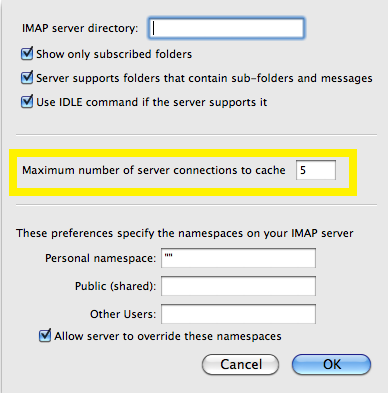
STEP 3: Restart Postbox.
In this article describe the concept What is Postbox mail. It is a desktop based email application. Postbox email application mostly used by Mac OS. Also describe the steps of importing message into WLM and IMAP account settings. Also discussed about Postbox and Thunderbird. I hope given information helpful for you.