What Is Proton Mail?Encryption, Bridge Clients and How to Export or Import Mail
Proton Mail is the encrypted email service from Proton AG. Learn how Proton Mail protects your mail and how Bridge connects desktop clients. See how to move mail in or out.
By Neeraj Singh ~20 min Updated Nov 2026 Facts checked Nov 2026
Proton Mail is an encrypted email service from Proton AG in Switzerland. Scientists who met at CERN founded Proton in 2014 and Proton Mail stores your mail with zero access encryption.
Desktop clients reach Proton Mail through Bridge on a paid plan. The Export Tool saves your mail as EML files and Easy Switch imports mail from other providers.
Save your recovery phrase before you need it. Data stays locked after a password reset until you use a recovery method.
1What Is Proton Mail?A Swiss email service that Proton itself cannot read
Proton Mail is an encrypted email service from Proton AG in Switzerland. Proton Mail keeps your messages on Proton servers in a form that Proton cannot read.
Proton Mail works as a normal inbox. You read and send mail as in any other service while the encryption happens in the background.
You sign in on the web or in a mobile app. Desktop clients like Outlook and Thunderbird reach Proton Mail through a free helper called Bridge.
People search for Proton Mail for three reasons. Some want to know how the encryption works. Some want mail in a desktop client and others need to export or import mail.
Proton Mail does not give you a mail file on your own disk by default. Your mail stays online until you export it or let Bridge keep a cache of it.
This page covers who makes Proton Mail and how the encryption works. You also learn what Bridge does and which export formats exist.
Proton Mail is an email service from Proton AG with zero access storage. Bridge links it to desktop clients and the Export Tool saves mail as EML files.
Proton AG makes Proton Mail. Scientists who met at CERN founded Proton in 2014 and the company is based in Geneva.
2Who Makes Proton Mail and Where Is It Based?CERN scientists, a Geneva office and open code since 2015
Proton AG makes Proton Mail. The Proton ownership page says the company is based in Switzerland with headquarters in Geneva and its main datacenter in Zurich.
The same page says scientists who met at CERN founded Proton in 2014. The Proton anniversary post names Andy Yen as founder and CEO and says he worked as a research scientist at CERN.
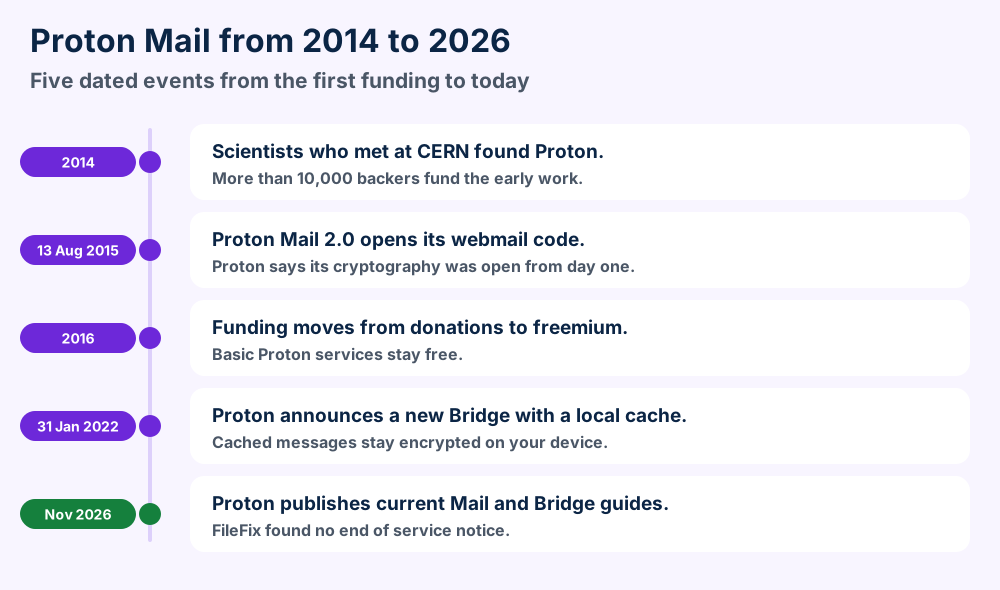
Five dated events from the first funding to the current guides.
How was Proton funded at the start?
The anniversary post says more than 10,000 community members raised over $500,000 in 2014. Proton moved from donations to a freemium subscription model in 2016.
Who owns Proton Mail today?
The ownership page names the Proton Foundation as the primary shareholder. It describes the Foundation as a Swiss nonprofit.
Employees hold most of the remaining shares. FONGIT and Proton users also hold shares according to the same page.
When did Proton open its code?
Proton announced Proton Mail 2.0 on 13 August 2015. The Proton Mail 2.0 announcement says the entire webmail client became open source and that cryptography had been open from day one.
The anniversary post later says Proton has made all of its apps open source. Neither page names the licenses.
Proton milestones with the Proton source named.
Date
Fact
Source
2014
Proton founded by scientists from CERN
Proton ownership page
2014
Over $500,000 raised from backers
Proton anniversary post
13 Aug 2015
Proton Mail 2.0 opens webmail code
Proton announcement
2016
Donations give way to freemium
Proton anniversary post
31 Jan 2022
New Bridge with local cache
Proton Bridge post
Proton Mail now sits inside a wider Proton account. The recovery guide says Proton also encrypts calendar and drive and password data.
Want other privacy minded providers?GMX Mail and Yandex Mail show how different regions build mail.
Yes. Proton keeps current guides for Proton Mail and offers a free tier. Bridge needs a paid plan and POP3 is not offered.
3Is Proton Mail Free and Still Active?A free tier exists but Bridge needs a paid plan
Yes. Proton publishes current support pages for Proton Mail and Bridge and for the Export Tool. FileFix found no page that announces an end of service.
Proton Mail has a free tier. The anniversary post says all basic Proton services remain free.
Proton Mail asks for a paid plan only when you need Bridge or extra addresses. Everyday web mail works on the free tier.
What stays free and what needs a paid plan?
A free account gets one primary email address according to the Proton address and alias page. Paid plans add more addresses and custom domains.
Bridge is a paid feature. Proton says the app is available only with a paid plan that includes Proton Mail. FileFix lists no prices because Proton changes them.
Password protected emails work on every plan including the free one. Any recipient can read them without a Proton account.
Can Proton delete an unused account?
Free accounts can face deletion after a long stretch without a sign in. The Proton inactive accounts page words the interval in two ways. Read the current page for the exact period.
Proton sends reminder emails 30 days and 15 days and 7 days before the scheduled deletion. Deletion removes emails and contacts and calendars for good.
Paid accounts follow another rule. Proton says it never deletes a paid account because of the inactivity.
Does Proton Mail support POP3?
No. The Proton IMAP and SMTP page states that Proton does not offer POP3 support. Bridge handles the connection for a desktop client instead.
Status facts and where they come from.
Item
What the source says
Source
Service status
Current guides for Mail and Bridge
Proton support pages
Basic services
Remain free
Proton anniversary post
Bridge
Paid plan only
Proton Bridge page
POP3
Not offered
Proton IMAP page
Paid inactivity deletion
Never
Proton inactive accounts page
Prices
Not listed here
Held back on purpose
Check your own plan before you plan a desktop setup. A mail client that needs POP3 will not connect directly to the service.
Proton Mail stores mail with zero access encryption and sends Proton to Proton mail end to end encrypted. Subject lines stay unencrypted.
4How Does Proton Mail Encryption Work?Zero access storage plus end to end encryption for some routes
Proton Mail uses two kinds of protection. Zero access encryption covers mail stored on Proton servers. End to end encryption covers mail that moves between the right people.
The Proton encryption guide says zero access means nobody else can read your emails and that includes Proton. Message bodies and attachments get that shield.
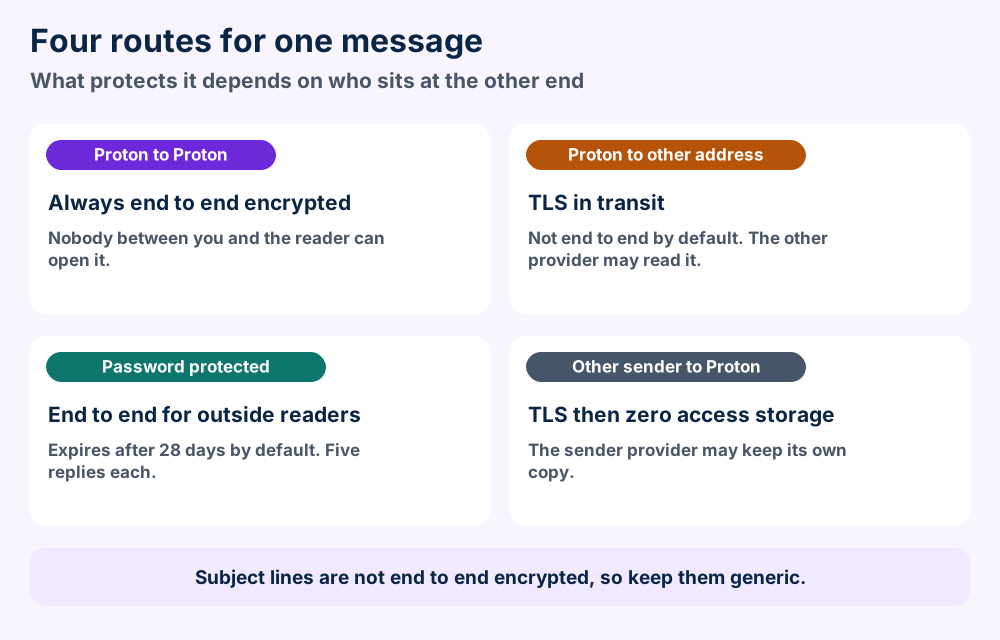
Four routes and what protects a message on one route.
Proton Mail applies the same protection to contacts and calendar events. The recovery guide lists them as encrypted data next to emails.
When is a message end to end encrypted?
The messages between two Proton Mail users are always end to end encrypted. Messages to other providers travel over TLS and the other provider can read them.
Mail from another provider arrives over TLS first. Proton then stores it with zero access encryption.
What stays visible in Proton Mail?
Subject lines are not end to end encrypted. Proton says PGP puts the subject in an open header packet. Proton keeps it that way so mail systems work together.
Proton recommends generic subject lines. Treat the subject like a postcard and keep the secrets in the body.
How do you send private mail to someone outside Proton?
Use a password protected email for the outside reader. The Proton page on password protected emails says the sender sets a message password and an optional hint in the composer.
The email expires after 28 days by default and 28 days is the maximum. The recipient opens it in a browser and can reply up to five times.
Share the password in the other channel. Your own reply is not encrypted by default once the recipient sends an answer.
Does Proton Mail use PGP?
Yes. Proton states that Proton Mail follows the OpenPGP standard. You can export your Proton Mail PGP key so a contact outside Proton can use PGP with you.
Encryption terms as Proton uses them.
Term
Plain meaning
Source
Zero access
Stored mail that Proton cannot read
Proton encryption guide
End to end
Mail only the sender and reader can open
Proton encryption guide
TLS
Protects mail in transit to other providers
Proton encryption guide
Password protected
End to end mail for outside readers
Proton password page
OpenPGP
Standard that Proton Mail follows
Proton encryption guide
Compare this with Hushmail if you weigh other encrypted services. The what a file format is background helps when you meet PGP and EML terms.
Proton Mail defaults to proton.me and also offers protonmail.com and pm.me. Hide my email aliases and custom domains add more addresses.
5Which Addresses and Aliases Does Proton Mail Offer?Four Proton domains plus aliases and custom domains
Proton Mail gives you an address on a Proton domain. The Proton address and alias page says proton.me is the default for new accounts.
Which domains can you use?
You can choose protonmail.com at signup. Paid plans also allow pm.me and extra protonmail.com addresses.
Protonmail.ch is the original domain. People who joined before 2016 can see it as their default.
How do Proton Mail aliases work?
A hide my email alias is a random address that forwards to your mailbox. Senders never see your real address.
Free and Mail Plus users can create up to 10 of them. Higher plans like Proton Unlimited allow unlimited aliases.
Plus aliases need no setup. Add a plus sign and a word after your username and you get name+bills@proton.me.
Can you use your own domain?
Yes on any paid Proton Mail plan. You can create addresses like contact@yourdomain.com. Paid plans also let you add at least 10 extra addresses.
Bridge needs one more step for custom domains. Thunderbird will not detect the server settings and you must enter them by hand.
Proton Mail address options.
Option
Who can use it
Source
proton.me
Default for new accounts
Proton address page
protonmail.com
Choice at signup
Proton address page
pm.me
Paid plans
Proton address page
Hide my email aliases
Up to 10 on Free and Mail Plus
Proton address page
Custom domain
Any paid plan
Proton address page
The aliases help when you sign up for a newsletter. A throwaway alias keeps the main Proton Mail address out of the marketing lists.
Many clients treat an alias as a separate identity. The Thunderbird guide from Proton shows how to add one under Manage Identities.
Install Proton Mail Bridge on a paid plan and sign in. Then add your address to Thunderbird or Outlook with the Bridge password.
6How Do You Use Proton Mail in Outlook or Thunderbird?Bridge adds a local server between the client and Proton
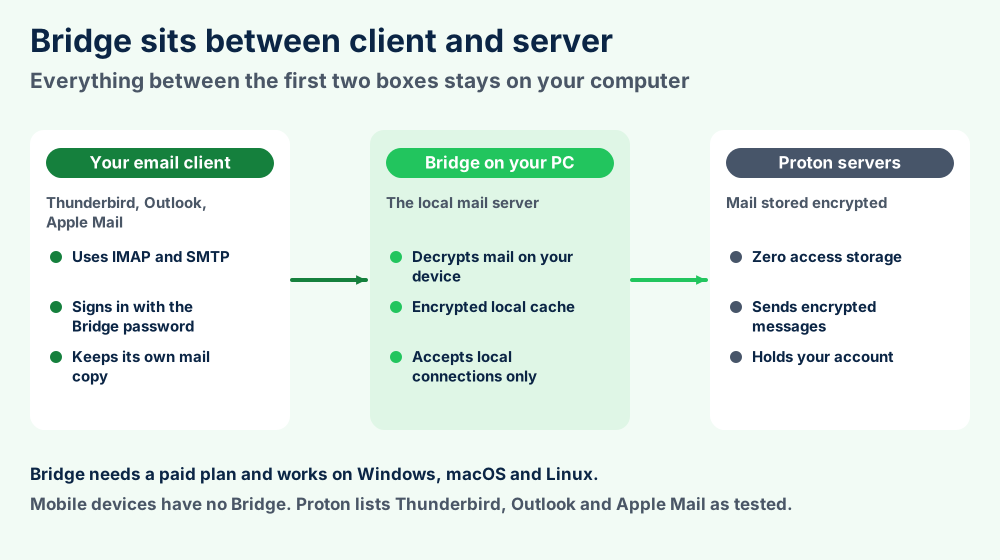
Proton Mail Bridge is a desktop app that connects a mail client to your Proton Mail account. The Proton Bridge page says Bridge creates a local mail server on your computer.
Your client talks to that server over IMAP and SMTP. Bridge encrypts and decrypts the messages in the background.
Bridge sits between your client and the Proton servers.
Which clients does Proton Mail support?
The list of clients that Bridge supports names tested clients per system. Windows gets Thunderbird and Outlook 2010 through 2021. macOS gets Thunderbird and Apple Mail and Outlook.
Linux gets Thunderbird only. Proton says Bridge should work with other clients but warns about crashes and bugs because every client treats IMAP a little differently.
Which systems does Bridge work on?
The IMAP page says Bridge exists for macOS and Windows and Linux. It does not exist for a mobile device.
FileFix found no minimum system versions on the Proton pages it could load. Check the Bridge install guide first.
How do you set up Proton Mail Bridge?
1Install Bridge. Download it from the Bridge page for your system. A paid plan is required.
2Sign in. Enter your Proton Mail account details in Bridge and select Sign in.
3Open the account. Select your account on the left of Bridge to see its mailbox details.
4Add the account to your client. Use the Bridge password from those details and not your Proton password.
5Confirm the certificate. Accept the local certificate when the client asks.
The Proton Thunderbird guide for Bridge says Bridge uses a certificate that exists only on your device. No certificate authority signs it so Thunderbird asks you to confirm an exception.
Thunderbird confirms the SMTP certificate only after you send a test message. If an error shows up you dismiss the error and send again.
What is split addresses mode?
Combined addresses mode is the default and puts all your addresses in one mailbox. The Bridge installation guide explains the Split addresses switch for people who want separate mailboxes.
Compare clients first because Proton Mail works with several. Mozilla Thunderbird and Apple Mail have their own FileFix guides.
Proton Mail stores your mail on Proton servers. Bridge adds an encrypted local cache and your client or the Export Tool can write copies to disk.
7Where Does Proton Mail Store Your Emails?Servers first and then a cache or an export on your disk
Proton Mail keeps your mail on Proton servers with zero access encryption. Nothing sits on your disk until you use a client or an export.
What does Proton Mail Bridge keep on your computer?
Proton announced a new Bridge on 31 January 2022. The Proton post on the new Bridge says the main change is a local cache that now holds full message bodies.
The post says Bridge stores those messages encrypted on your device. It also says you can move the cache in Advanced settings.
An older Proton article on the Bridge security model says Bridge ignores connections that do not come from the same computer. Treat that article as background because the cache came later.
Proton Mail never forces a local copy on you. The choice to cache or to export belongs to you.
What does your client keep?
Your client holds its own copy once Bridge hands the mail over. The Proton page on importing and exporting emails says Bridge stores downloaded emails locally and that you can export them with the client.
The Proton Mail Export Tool writes plain EML files and JSON files to a folder. The default location creates a folder named after your username.
The Proton guide does not say those files are encrypted. Store them somewhere safe.
Where Proton Mail data sits.
Place
What it holds
Source
Proton servers
Mail with zero access encryption
Proton encryption guide
Bridge cache
Encrypted message copies on your device
Proton Bridge post
Client store
The mail copy your client builds
Proton import and export page
Export folder
EML files and JSON metadata
Proton Export Tool guide
Cache path
Not listed on the pages FileFix loaded
Not verified
Use the Proton Mail Export Tool to save all emails as EML files with JSON metadata. One message exports from its three dot menu.
8How Do You Export Emails From Proton Mail?The Export Tool saves EML files and JSON metadata
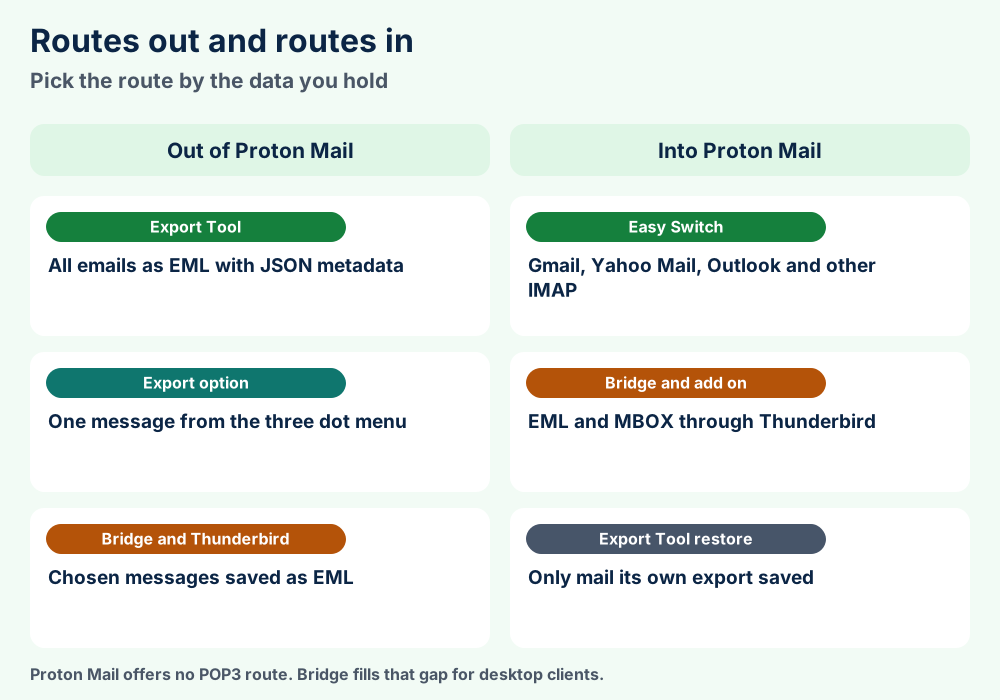
Proton Mail gives you three ways to take your mail out. The Proton page on importing and exporting emails lists them. The right route depends on whether you need all mail or one message.
How does the Proton Mail Export Tool work?
The Proton Mail Export Tool guide says the tool saves emails as EML files with metadata in JSON files. It works from the command line on Windows and macOS and Linux.
1Download the tool. Extract the archive for your system and launch proton-mail-export-cli.
2Sign in. Enter your username and password plus your 2FA code or mailbox password if you use them.
3Select backup. Choose the default folder or type a custom path.
4Wait for the finish. A progress bar shows the status until the tool prints Export finished.
You cannot pause an export and continue later. A large inbox or a slow connection can take minutes or hours.
What does the Proton Mail Export Tool include?
It exports Proton Mail emails only. Calendar events and Drive files and Pass items are not included.
The guide does not say how labels or folders appear in the export. FileFix keeps that question open until Proton documents it.
Which systems does it support?
The guide lists Windows 10 and macOS 10.15 on Intel and macOS 11.0 on Apple Silicon. It also lists Ubuntu 20.04 LTS.
How do you save a single email?
Open the message and select the three dot More icon below the sender details. Choose Export and select a location.
Can you export Proton Mail through Bridge?
Yes. Bridge with Thunderbird saves a chosen set of Proton Mail messages as EML. Proton says this route fits a specific folder while the Export Tool fits backups.
Open Search Messages and set your filters in Thunderbird. Enable the server search option and save the result as a folder. That saved search lives only in Thunderbird.
Export routes compared.
Route
Output
Source
Export Tool
EML files with JSON metadata
Proton Export Tool guide
Three dot Export
One message
Proton import and export page
Bridge and Thunderbird
EML files from chosen messages
Proton MBOX and EML guide
MBOX output
Not mentioned by the Export Tool page
Not verified
Want the file details? Read the EML files guide for what sits inside a message file.
Use Easy Switch for Gmail or Yahoo Mail or Outlook accounts. Use Bridge with Thunderbird and ImportExportTools NG for EML and MBOX files.
9How Do You Import Emails Into Proton Mail?Easy Switch for providers and Thunderbird for files
Proton Mail offers two main import routes. Easy Switch pulls mail from another provider. Bridge with Thunderbird takes EML and MBOX files you already hold.
Three routes out of Proton Mail and three routes in.
What does Easy Switch import into Proton Mail?
The Easy Switch guide says Easy Switch moves emails from any IMAP based provider. The page names Gmail and Yahoo Mail and Microsoft Outlook.
Calendars and contacts depend on the provider. The page confirms Yahoo Mail offers all three and Outlook offers emails and calendars.
What limits does Easy Switch have?
You can transfer from two email accounts at once and only one transfer per account. Imports start with the most recent messages in the mailbox.
Import ranges are all messages and the last 12 months and the last 3 months and the last month. Long used accounts can take days.
Folder names over 100 characters or more than 2,000 folders can force you to adjust settings. Proton Mail supports three folder levels and reorganizes deeper trees.
How do you import EML and MBOX files?
The Proton guide to MBOX and EML with Bridge covers this route. Proton says it suits providers without IMAP and single folders while the Export Tool and Easy Switch suit backups and migrations.
1Connect Thunderbird. Install Bridge and add your Proton account to Thunderbird. Let the sync finish first.
2Add the add on. Install ImportExportTools NG from the Thunderbird add ons page.
3Import MBOX into Local Folders. MBOX files cannot go straight into Proton Mail.
4Copy the folder across. Select the messages and use Copy To for your Proton account.
Raise the mailnews.tcptimeout setting in the Config Editor so large imports keep the connection. Import in batches of 100 to 500 messages according to Proton.
Proton Mail limits folders to three levels so plan the tree before you import. A flat layout moves with less trouble.
Can you import a PST file?
The Proton guide for moving from Outlook lists Easy Switch and mail forwarding and Bridge. It does not mention PST files and FileFix found no Proton page that does.
Use a recovery phrase or recovery file or old password to open data. A recovery email or phone resets the password only.
10What Do You Do When Proton Mail Data Stays Locked?Recovery methods and the common Bridge snags
Proton Mail splits recovery into two stages. You first reset the password and then restore access to your encrypted data. The Proton data recovery guide explains both.
Why does mail look locked after a reset?
A password reset can leave your encrypted data locked. Locked data appears as random characters or as a message that it is not available or could not be decrypted.
Emails and contacts and calendar events and Drive files all count as encrypted data. They stay locked until you use a data recovery method.
Which methods restore access?
Recovery phrase.The 12 word phrase opens your data when you enter the words in the correct order.
Recovery file.Upload the file on the File tab of the same screen.
Old password.Enter a previous password on the Password tab and then authenticate with the new one.
Device data backup.Sign in on a trusted device. Web apps enable this by default.
Recovery email or phone.These reset the password only and never open the data.
Find the screen at Settings and then Recovery. Select the notice that says some of your encrypted data is locked. The page says some methods work only once so regenerate any method after you use it.
What if you lose every method?
FileFix found no Proton page that offers a back door. The guide says Proton built it this way so that a person with your recovery email or phone cannot read your mail.
Check your password manager for old passwords. An older password can restore access.
What breaks Bridge and imports?
Wrong password.Bridge needs its own Bridge password and not your Proton password.
Certificate prompt.Confirm the local certificate exception in the client.
Unsupported client.Proton warns of crashes and bugs outside the tested list.
Bad message headers.Messages without proper headers can fail and land in the Recovered Messages folder.
Timeouts.Raise the Thunderbird timeout and import smaller batches.
Thunderbird and Bridge must both stay open until the import ends. IMAP imports go one message at a time so they can be slow.
Proton Mail exports EML files with JSON metadata. MBOX files cannot enter Proton Mail directly and must pass through Thunderbird.
11What Are the Proton Mail File Formats and Structure?EML messages and JSON metadata with MBOX only on the way in
Proton Mail publishes no mailbox file format because your mail lives on servers. The formats below come from the Proton support pages.
Proton Mail files at a glance
EML
.eml, one message per file from the Export Tool
JSON
.json, metadata for every exported message
MBOX
Imports through Thunderbird Local Folders only
PGP key
OpenPGP key that you can export
Recovery file
File that opens your data on the Recovery screen
Recovery phrase
12 words in order
Folder depth
Three levels including the parent folder
What is an EML file?
An EML file holds one email message as text with headers and body. Read the EML files guide for the layout.
Many clients open EML files. Proton says you can import them into Thunderbird or Outlook.
Does Proton Mail accept MBOX directly?
No. Proton says MBOX files cannot go directly into Proton Mail. Import them into Thunderbird Local Folders first and then copy them across.
The mailbox layout itself is explained in the guide to MBOX files.
What about contacts and calendars?
Contacts travel as VCF contact files and calendars as ICS calendar files. FileFix found no Proton page that lists the import file types for them.
Easy Switch can carry contacts and calendars from some providers. The Export Tool does not export them.
Which facts stay unverified?
FileFix could not confirm the exact Bridge ports and the local cache folder. It could not confirm how the Export Tool shows labels either.
Proton Mail lets you export your PGP key for outside contacts. That key is a separate item from the mail files.
Doubt any converter that promises exact results. Test it on a copy and compare message counts.
Proton Mail is an encrypted email service from Proton AG in Switzerland. Scientists who met at CERN founded Proton in 2014. Proton stores your mail with zero access encryption so Proton cannot read it. You use it on the web or in mobile apps and reach desktop clients through Bridge.
Is Proton Mail free?
Proton says all basic Proton services remain free. A free account gets one primary email address. Bridge and pm.me addresses and custom domains need a paid plan. FileFix lists no prices because Proton changes them.
Who owns Proton Mail?
Proton AG provides Proton Mail. Proton says the Proton Foundation is the primary shareholder and calls it a Swiss nonprofit. Employees own most of the remaining shares. The headquarters sit in Geneva and the main datacenter sits in Zurich.
Is Proton Mail end to end encrypted?
Only on some routes. Messages between Proton users are always end to end encrypted and so are password protected emails. Mail to other providers travels over TLS and is not end to end encrypted by default. Subject lines are never end to end encrypted.
Does Proton Mail work with Outlook and Thunderbird?
Yes through Bridge on a paid plan. Proton lists Thunderbird and Outlook 2010 through 2021 as tested on Windows. macOS gets Thunderbird and Apple Mail and Outlook. Linux gets Thunderbird only.
Does Proton Mail support IMAP or POP3?
Proton does not offer POP3 support. Desktop clients connect over IMAP and SMTP through Bridge on your own computer. Business plans can send mail through SMTP submission from apps and devices.
How do I export my Proton Mail emails?
Use the Proton Mail Export Tool. It saves your emails as EML files with metadata in JSON files. It works from the command line on Windows and macOS and Linux. You can also export a single message from its three dot menu.
Can I import MBOX files into Proton Mail?
Not directly. Proton says a Proton Mail import of MBOX files must go into Thunderbird Local Folders first. Then you copy the messages to your Proton account through Bridge. Proton suggests batches of 100 to 500 messages.
How do I move Gmail or Outlook mail into Proton Mail?
Use Easy Switch in your Proton account settings. Easy Switch moves mail from Gmail and Yahoo Mail and Outlook and other IMAP providers. Imports start with the newest messages. Long used accounts can take days.
What happens if I forget my Proton Mail password?
A reset can leave your encrypted data locked. Open it with your 12 word recovery phrase or your recovery file or an old password. A recovery email or phone resets the password only. It does not open the data.
Do the Proton Mail Export Tool files stay encrypted?
Proton does not say the files are encrypted in a Proton Mail export. The tool saves plain EML files and JSON files to a folder. Keep that folder on a drive you protect. FileFix found no Proton statement about file encryption.
Can Proton delete an inactive account?
Free accounts can face deletion after a long stretch without a sign in. Proton words the interval two ways so read the current page. Proton says it never deletes a paid account for inactivity. Reminder emails come 30 days and 15 days and 7 days ahead.
Still Stuck With Proton Mail?Six places to try next
Data locked?
Try the recovery phrase.Section 10 lists every recovery method.
Bridge refuses to connect?
Check the Bridge password.Section 6 lists the setup steps.