What Is Trojitá? IMAP Email Client, Status and Where Mail Lives
Trojitá is the Qt IMAP email client that KDE hosts. Learn who made it, what its release record shows, where it keeps your mail and how to move that mail.

Trojitá is the Qt IMAP email client that KDE hosts. Learn who made it, what its release record shows, where it keeps your mail and how to move that mail.
Trojitá is a free Qt email client that reads mail over IMAP. Jan Kundrát started Trojitá in 2006 and KDE hosts the code now.
Your mail lives on the server and Trojitá keeps only a cache. The newest release found is version 0.7 from June 2016. No mail file exists to import elsewhere.
Add the same IMAP account to your new client and let it sync. Write down your settings first because they stay on your computer.
Trojitá is a free email client built with the Qt toolkit. It reads your mail over IMAP and sends it over SMTP.
Jan Kundrát started Trojitá in 2006 and KDE hosts it now. KDE calls Trojitá a stand alone program for fast, efficient mailbox access.
Most readers land here for one of two reasons. They found Trojitá in a Linux package list or they inherited a machine that has it.
This page sticks to what primary sources confirm. You get the history and the release record. You also learn where Trojitá keeps your mail and how to move away from it.
Trojitá is a Qt IMAP email client under KDE. Your mail lives on the server while Trojitá keeps a cache. The newest release found is 0.7 from June 2016.
Comparing mail clients? Mozilla Thunderbird and Microsoft Outlook have their own pages in the email application guides.
Jan Kundrát started Trojitá in 2006. Its first release came in 2009 and KDE took it in during autumn 2012.
The Wikipedia entry on Trojitá says Jan Kundrát began the project in 2006 as a personal programming project. It grew into his bachelor thesis and later master thesis. Wikipedia lists the first release as 31 August 2009.
The Linux Magazine report from 2009 fills in the early picture. Kundrát wrote an IMAP library in Python first. He then rewrote it in C++ and Qt for his bachelor thesis at Charles University in Prague.
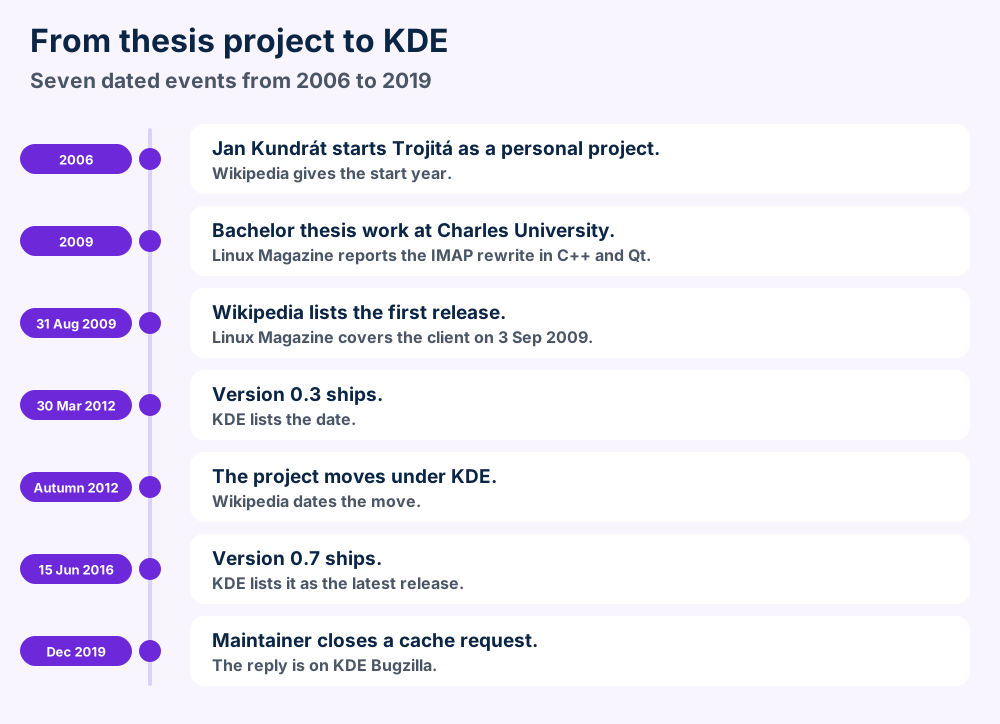
Wikipedia says the project moved under the KDE umbrella in autumn 2012. KDE now hosts the code and the bug tracker. The KDE app page for Trojitá lists it as a KDE application.
Since 2012 Trojitá has taken part in Google Code-In and Google Summer of Code, per the same entry. Wikipedia counts more than sixty contributors and 33 languages as of 2016.
xTuple's Postbooks ERP project used Trojitá to synchronize mail, according to Wikipedia. Canonical planned it for Ubuntu Touch and then forked the code. That plan ended.
Wikipedia gives only the pronunciation, written as [trɔjɪtaː] in IPA. No primary source checked explains the name. FileFix gives no meaning for it.
| Date | Fact | Source |
|---|---|---|
| 2006 | Project started by Jan Kundrát | Wikipedia |
| 31 Aug 2009 | First release | Wikipedia |
| 3 Sep 2009 | Press report on the new client | Linux Magazine |
| 30 Mar 2012 | Version 0.3 | KDE app page |
| Autumn 2012 | Project joins KDE | Wikipedia |
| 15 Jun 2016 | Version 0.7 | KDE app page |
Trojitá loads mail on demand over IMAP, works offline from its cache and handles HTML mail safely. KDE lists those as the core features.
Trojitá email client design puts speed, efficiency and open standards first, according to the KDE app page for Trojitá. Everything else follows from that.
Lazy loading is the headline feature. Trojitá fetches message lists and body parts when you ask for them. A big mailbox opens without a full download.
Offline IMAP works from the cache. A bandwidth saving mode targets mobile connections. The version 0.3 announcement lists both.
IMAP over SSH offers a tunnel in place of an SSL socket. HTML mail gets safe handling. KDE screenshots also show collapsed quoted text.
Encrypted and signed mail shows a plain English status line, per KDE screenshots. The sources checked name no cipher or key tool.
The Phoronix report on version 0.6 lists a plugin based address book, usability fixes and a smoother keyboard flow. It also notes that 0.6 was the last planned release for Qt4.
Wikipedia says Trojitá can manage contacts in the abook format. Version 0.6 added plugins for the address book. KDE calls Trojitá a stand alone program and not a personal information suite.
Calendars sit outside that scope. Read ICS files if you need to move events from another program.
| Feature | What the source says | Source |
|---|---|---|
| Lazy loading | Message lists and body parts load on demand | KDE app page |
| Offline mode | Offline IMAP support | KDE app page |
| Mobile mode | Bandwidth saving mode | KDE app page |
| Tunnel | IMAP over SSH | KDE app page |
| Address book | Plugin based since 0.6 | Phoronix |
The newest release found is 0.7 from 15 June 2016. The source mirror shows no archive notice and no later release.
Sources show no release after version 0.7. The KDE app page lists it as the latest and dates it 15 June 2016.
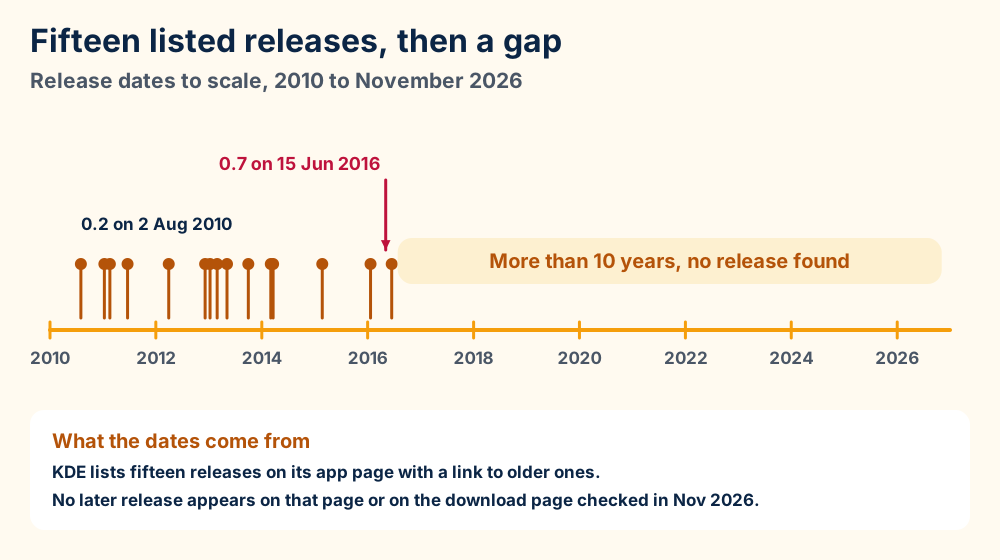
The Trojitá download page also calls 0.7 the latest release. It adds that prebuilt binaries for Linux distributions and Windows are gone because nobody maintains them.
No archive notice appears on the GitHub mirror in Nov 2026. It shows 7,273 commits on master and an empty releases list.
Maintainers were answering bug reports in late 2019. In KDE bug 412648 Jan Kundrát closed a request on 5 December 2019.
FileFix found no date for the newest commit. The same goes for any plan for a version 0.8. This page states no more than the sources show.
Treat Trojitá as a client with no recent release. Your distribution can still ship a package. Check its version before you rely on it for daily mail.
Section 9 covers the safety side. Section 8 covers how to move mail out.
Install Trojitá from your Linux package manager or build version 0.7 from source. Prebuilt Windows and Linux binaries from the project are gone.
Linux is the platform KDE documents today. The KDE app page shows an install button for Linux that works with Discover and other AppStream stores. Your distribution's package manager is the other route.
Windows and macOS are less clear. The version 0.3 announcement says Trojitá worked on Linux, Mac OS X and Windows. It also says Trojitá should work on any platform Qt supports.
The Trojitá download page says prebuilt binaries for Windows once existed and are no longer available. It does not mention macOS builds at all.
Steps follow the download page, which gives no exact commands. Check your Qt version first.
Qt5 became the default in version 0.6. Phoronix says that release was the last planned one for Qt4.
KDE says Trojitá aims to work on everything from desktops to small cellphones. Wikipedia adds that Canonical forked the code for Ubuntu Touch. No source lists a current phone build.
Trojitá keeps mail on the IMAP server and only a cache on disk. Settings sit in the config folder. On Linux both folders use flaska.net as the name.
Your mail lives on the IMAP server. Trojitá keeps a cache on your disk and a set of settings.
The Wikipedia entry on IMAP explains why. IMAP keeps the mailbox and its state on the server so several clients can manage the same mailbox.
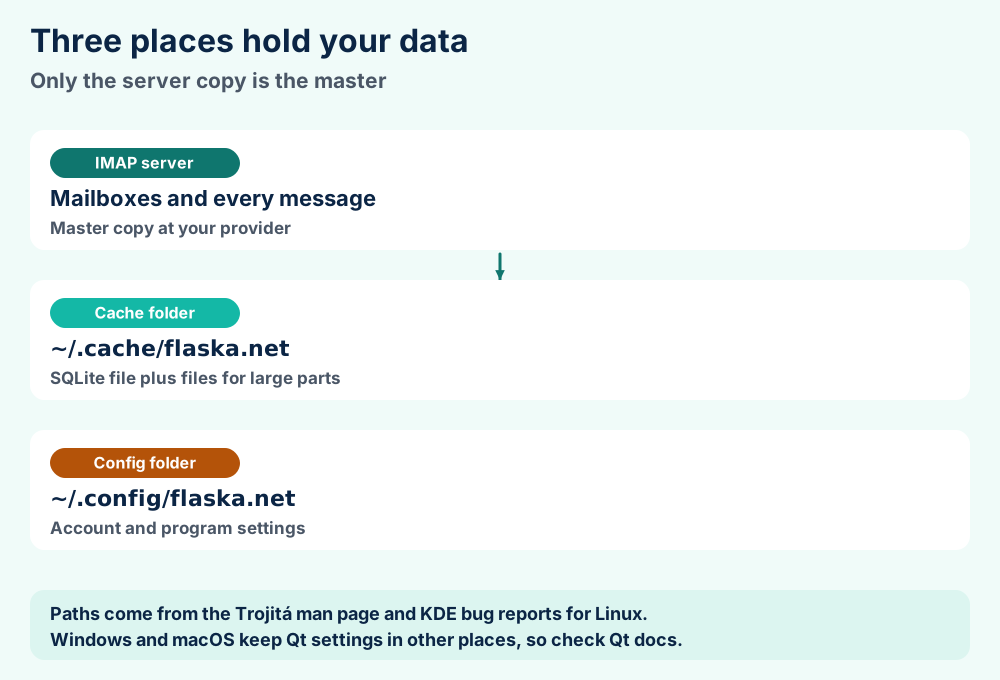
The CombinedCache source file calls the cache a hybrid. It uses both SQLite and on disk files. A wrapper switches to files for items above a size limit.
Bug reports name the SQLite file imap.cache.sqlite. In KDE bug 320830 a user found mailbox names in its child_mailboxes table.
The Trojitá man page says Trojitá keeps configuration in ~/.config/flaska.net and the cache in ~/.cache/flaska.net on XDG systems. Qt decides these locations.
The XDG Base Directory specification sets defaults of $HOME/.config and $HOME/.cache unless variables point elsewhere. Other platforms follow the Qt QSettings documentation.
Not from inside Trojitá. In KDE bug 412648 the maintainer said Trojitá follows the XDG rules. No setting exists. Set the XDG variables or link the cache file.
The man page lists a -p option that starts Trojitá with a named profile. It also lists -l to log traffic to disk at startup.
Trojitá keeps a rebuildable cache. Thunderbird defaults to mbox while Outlook uses PST. None of the three opens the others' files.
Trojitá and Thunderbird both read IMAP mail. They differ in scope and in storage. This table sticks to checked differences.
| Question | Trojitá | Thunderbird | Outlook |
|---|---|---|---|
| Local mail store | SQLite cache plus files | mbox by default | PST for data files |
| Source for storage | KDE source code | Mozilla | Microsoft |
Storage is the sharpest split. Thunderbird keeps a mail file per folder in mbox by default, per the Mozilla article on Maildir. Trojitá keeps a cache it can rebuild from the server.
It does the mail job. Mozilla Thunderbird adds a wider feature list than Trojitá.
Read MBOX files to see what Thunderbird writes to disk.
Microsoft Outlook also does the mail job. Its local data files are PST files, as the Microsoft article on Outlook data files shows. Read PST files and OST files for the details.
FileFix has pages on Sylpheed, SeaMonkey and Pegasus Mail. Opera Mail and Spicebird have pages too. Those pages cover their own storage and status.
Add the same IMAP account to the new client and let it sync. Write down settings and contacts first because they stay on your computer.
Moving off Trojitá is easy for mail and manual for the rest. IMAP keeps your mailboxes on the server. A new client can fetch them again.
The RFC 3501 describes that design. It says IMAP lets a client work with messages on a server and lets an offline client resynchronize.
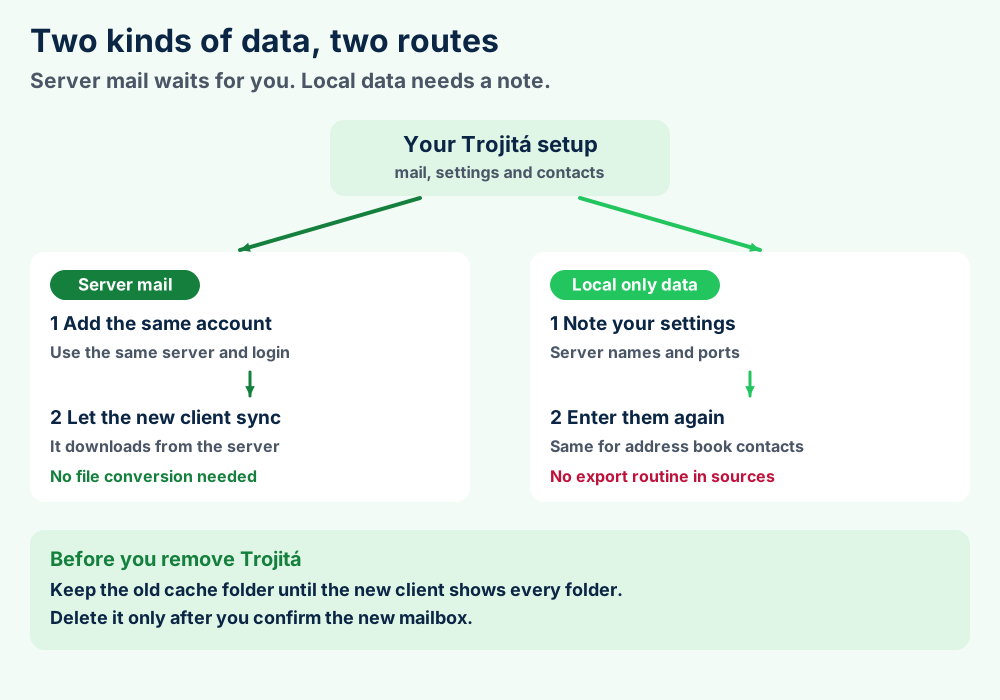
These steps follow standard IMAP behavior and not a Trojitá guide. The project site documents no migration routine.
The cache is not a mail format. A SQLite file with side files cannot be imported into Thunderbird or Outlook. Read what a file format is for the difference between a cache and a mail file.
Check with your provider if folders look short. FileFix found no source that calls the Trojitá cache a safe copy of your mail.
Add the account as an IMAP account in Microsoft Outlook or Apple Mail. Outlook then builds its own local file, covered in OST files. Mac users can read the macOS guides.
Trojitá is fine for old mail but weak for a main account. The newest release found is from 2016 and FileFix found no named flaw.
Trojitá suits reading old mail. Keep two limits in mind. The project shows no release since 2016 and it ships no prebuilt binaries.
An email client reads messages from strangers all day. A client without new releases can carry flaws that nobody fixes. FileFix found no named flaw in Trojitá.
KDE lists safe handling of HTML mail and IMAP over SSH. It also shows status lines for encrypted and signed mail. Those are design goals and not an audit.
Move on if Trojitá handles your main account. Choose a client that still gets updates. Mozilla Thunderbird and Apple Mail are two with their own FileFix pages.
Check the install route first and the cache second. Most Trojitá trouble comes from missing binaries or an old cache.
Four faults cover most Trojitá questions. Check them in this order.
A cache can hold old folder names. The fix in bug 320830 removed mailboxes from the cache when the server removes them. Update to a build that includes that fix.
Start Trojitá with -l to log traffic to disk, per the man page. Use it for your own account only. Logs can hold private mail text.
Close Trojitá and rename the cache folder. Open Trojitá again and let it fetch from the server. This follows from the cache design and not from a project guide.
A Trojitá cache file still puzzling you? Send us the file details and we will read it with you.
Trojitá uses a hybrid cache of SQLite and files. No vendor spec exists. The layout comes from source code and bug reports.
No vendor spec for the Trojitá cache exists in the sources checked. Source code and bug reports supply what follows.
CombinedCache, hybrid of SQLite and on disk filesimap.cache.sqlite in the cache folderchild_mailboxes holds mailbox names~/.cache/flaska.net~/.config/flaska.netNo. It is a cache of server data. Real mail formats like MBOX files and PST files hold the mail itself.
No source publishes the full SQLite table layout or the size limit for disk files. Qt decides config locations on Windows and macOS. Check the Qt docs there.
| Item | Role | Source |
|---|---|---|
imap.cache.sqlite | Offline IMAP cache | KDE bug 412648 |
child_mailboxes | Mailbox names table | KDE bug 320830 |
| Config folder | Settings | Man page |
| Cache folder | Non essential data | XDG specification |
what a file format is explains why a cache differs from a data file. The file format guides list every format written up so far.
Check the server first. Section 8 shows the routes.
Look in the XDG folders. Section 6 lists the paths.
Moving your IMAP account to Thunderbird? Mozilla Thunderbird is the usual next stop for IMAP users. MBOX files describe how it stores local mail.
Heading to Outlook? Microsoft Outlook covers Microsoft's client. Local Outlook mail lives in PST files and OST files.
Trying another light client? Sylpheed and IncrediMail have their own guides. Windows Mail and Windows Live Mail sit in the same list.
Managing a company mail server? Exchange Server and Zimbra Mail are two common ones. EDB files hold Exchange data.
Using a Mac now? Apple Mail is the built in client. OLK files hold Outlook for Mac data. macOS guides collect macOS fixes.
Looking for something else? Browse the FileFix category index or the FileFix home page. Windows error guides start from the error message. Send us the file details when Trojitá behaves in a way this page leaves unanswered.