What Is Yandex Mail? Who Operates It, Limits and IMAP Settings
Yandex Mail is the free email service from Yandex. Learn who operates it, what limits apply, which IMAP settings and app password you need and how to get mail out.

Yandex Mail is the free email service from Yandex. Learn who operates it, what limits apply, which IMAP settings and app password you need and how to get mail out.
Yandex Mail is the free email service that comes with a Yandex account. Yandex operates Yandex Mail and Yandex N.V. sold its Russian businesses in 2024.
Free accounts get 5 GB shared with Yandex Disk. Desktop clients need IMAP on imap.yandex.com port 993 and an app password. Yandex gives no POP3 guarantee.
Add Yandex Mail to Thunderbird for MBOX data or to Outlook for a PST export. Delete nothing in a client until you check the copy.
Yandex Mail is the free email service that comes with a Yandex account. You open Yandex Mail in a browser at mail.yandex.com or in the Mobile Yandex Mail app.
Your Yandex email address ends in yandex.com or one of its domain aliases. Yandex help describes the service as email with spam and virus protection.
Most readers arrive with one of three needs. You want to know who operates Yandex Mail or you need IMAP settings for a desktop client. Some of you want old mail out as MBOX or PST data.
Every setting and limit on this page comes from Yandex help pages read in Nov 2026. Where a page gives no number you will see that said plainly.
Yandex Mail is the free Yandex email service. Desktop clients connect over IMAP with an app password. Free accounts get 5 GB shared with Yandex Disk.
imap.yandex.com port 993, SSLsmtp.yandex.com port 465, SSLComparing mail programs? Mozilla Thunderbird and Microsoft Outlook both connect to Yandex Mail. The email application guides cover more of them.
Yandex operates Yandex Mail. Yandex N.V. sold its Russian businesses in 2024 and became Nebius Group while Yandex Group reports separately.
Wikipedia gives 26 June 2000 as the day Yandex Mail started. The Wikipedia entry on Yandex Mail lists Yandex as the developer.
Yandex announced a new webmail on 18 April 2006 with short ya.ru addresses. The Yandex press release of 18 April 2006 said mailboxes had unlimited size and about 6 million people used Yandex webmail per month.
Storage works differently now. Yandex help says emails and attachments share space with files on Yandex Disk.
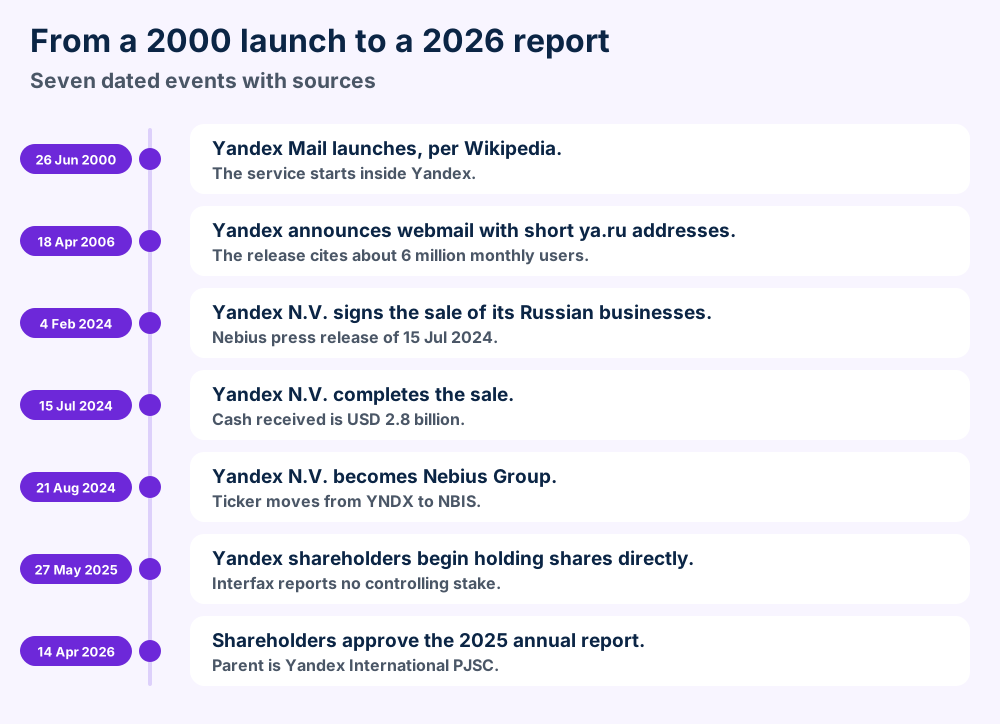
Yandex N.V. announced on 15 July 2024 that it had completed the sale of all its businesses in Russia and certain international markets. The Nebius press release of 15 July 2024 gives a valuation of about USD 5.4 billion and USD 2.8 billion in cash received.
The Dutch parent kept the remaining businesses. It took the name Nebius Group on 21 August 2024 and its Nasdaq ticker moved from YNDX to NBIS, per the Nebius name change notice.
Yandex Group publishes its own annual report. The Yandex annual report for 2025 names Yandex International Public Joint-Stock Company as the parent of Yandex Group and lists Mail among its services.
Interfax reported on 27.05.2025 that the core owner began moving shares directly to the consortium participants. The same Interfax report of 27.05.2025 quotes Yandex saying that no shareholder will have a controlling stake.
The report puts Yandex 360 at 102 million monthly active users across 13 integrated services. It gives no separate user figure for Yandex Mail alone.
Terms of use differ between versions. The version dated 15.05.2025 names Air Smart Advertising Solutions FZ-LLC in Dubai Media City as the provider.
The current Yandex Mail terms carry a publication date of 13 July 2026 and name only Yandex. Read them for your own account before you rely on a limit.
| Date | Fact | Source |
|---|---|---|
| 26 Jun 2000 | Yandex Mail starts | Wikipedia |
| 18 Apr 2006 | ya.ru webmail announced | Yandex press release |
| 15 Jul 2024 | Sale of Russian businesses completes | Nebius |
| 21 Aug 2024 | Yandex N.V. becomes Nebius Group | Nebius |
| 27.05.2025 | Share transfer to consortium participants begins | Interfax |
| 14 Apr 2026 | 2025 annual report approved | Yandex annual report |
Free accounts get 5 GB shared with Yandex Disk. Attachments reach 1 GB and Spam clears after 10 days while Trash clears after 30.
Yandex Mail gives you a mailbox with set limits. Free accounts get 5 GB by default according to the Yandex Disk storage page. That space holds your emails and attachments together with your Yandex Disk files.
Attachments follow their own rules. The Yandex attachments page sets the maximum attachment size at 1 GB and says larger files need a Yandex 360 plan.
| Limit | Value | Source |
|---|---|---|
| Free storage without a plan | 5 GB shared with Disk | Disk storage page |
| Largest email attachment | 1 GB | Attachments page |
| Files sent as Disk links | Above 25 MB automatically | Attachments page |
| Largest Disk file you can attach | 10 GB | Attachments page |
| Recipients in 24 hours | 500 | Spam page |
| Recipients on one message from the site | 50 | Spam page |
| Recipients on one message from a client | 35 | Spam page |
| Personal folders | Up to 1017 with 32 nested levels | Folders page |
| Spam folder | Deleted after 10 days | Spam page |
| Trash folder | Deleted after 30 days | Deleting page |
Large Disk uploads follow their own rules. The browser cannot upload a file above 2 GB to Yandex Disk and Yandex points you to Yandex Disk for desktop. Files above 1 GB need a Yandex 360 plan.
Yandex says it can lower the sending limits if Anti-Spam detects mass or template mailing. After complaints about your address sending stops for 24 hours.
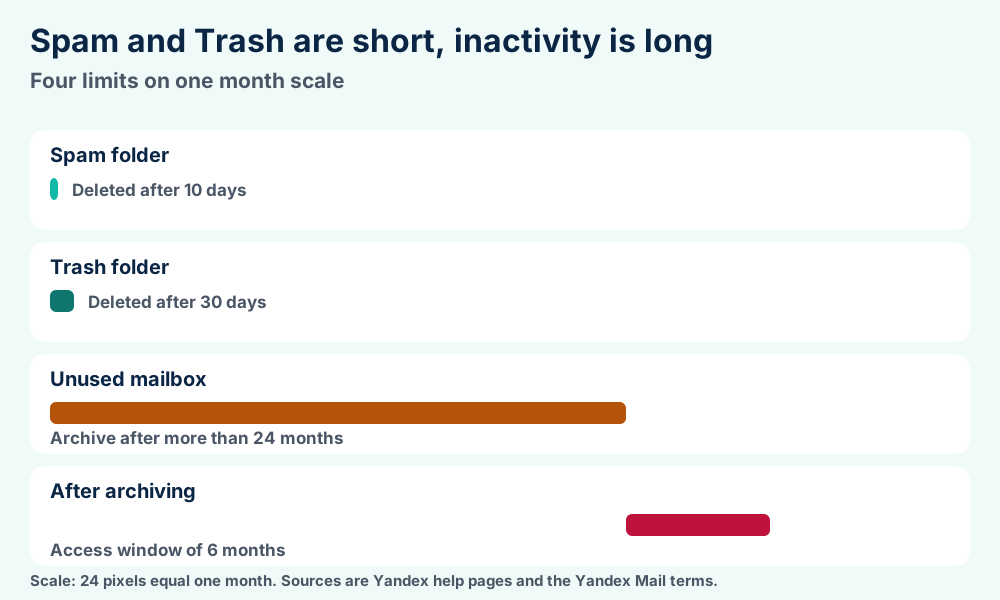
The current Yandex Mail terms say Yandex can archive a mailbox you have not used for more than 24 months. You can access it within 6 months after the archive is created.
A mailbox you never open again after archiving can be deleted. The terms add that incoming and outgoing emails are deleted with it.
The Yandex registration page says your address is your username plus yandex.com or one of its domain aliases. You cannot change the username after you register.
Registration asks for a mobile number and an SMS code. You can also add a plus sign and a word to your username to make a variant address. That mail reaches your Inbox unless you set a rule.
Passwords cannot contain the characters ~ or the apostrophe. Yandex gives no minimum length on that page.
The Yandex 360 plans page lists no ads in web versions and apps. It also lists highlighted priority emails and an exclusive email address. Support answers within three hours.
The pages checked give no plan sizes or prices. FileFix lists none for that reason.
The Yandex Disk storage page also mentions a 10 GB bonus from Yandex Plus during a promotion. Yandex says that space is no longer added once the promotion ends.
Use imap.yandex.com on port 993 and smtp.yandex.com on port 465 with SSL. Sign in with the part before the @ and an app password.
Yandex Mail speaks IMAP and SMTP to desktop clients. The Yandex help for other mail clients lists the settings and tells you to sign in with an app password instead of the account password.
IMAP keeps the mailbox on the server so several programs can see the same messages. RFC 3501 defines that protocol.
| Setting | Incoming (IMAP) | Outgoing (SMTP) |
|---|---|---|
| Server | imap.yandex.com | smtp.yandex.com |
| Port | 993 | 465 |
| Security | SSL | SSL |
| Fallback | None listed | Port 587 if the client connects without encryption |
| Username | Part before the @ | Part before the @ |
| Password | App password | App password |
Outside Russia Yandex lists imap.ya.ru as an alternative to imap.yandex.com. Business mailboxes use the full address as the username.
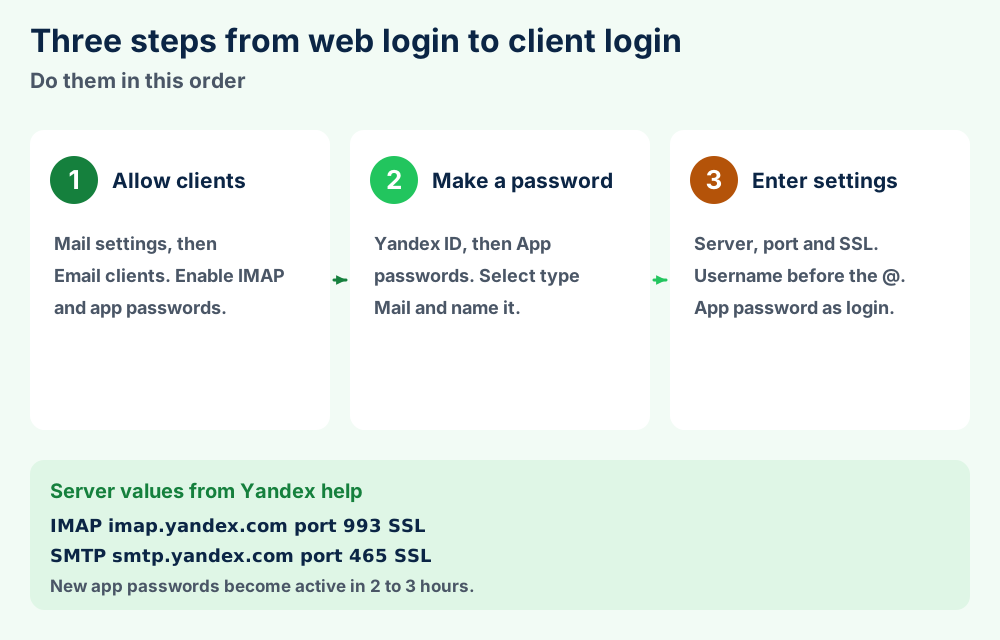
The steps follow the Yandex help pages. The Yandex help for other mail clients adds that IMAP switches on by itself the first time you sign in from a mail program.
The Yandex ID page on app passwords says third party apps get their own passwords so they never need your main one. Every app needs its own password and you can delete one to cut that app off.
The Yandex ID page on two factor sign in says third party apps and email importers need app passwords once one time password sign in is on. Yandex also recommends OAuth where your client offers it.
Yandex gives no POP3 server settings in the pages checked. The same help page says Yandex cannot guarantee that a client works over POP3 and that the developers no longer update POP3.
Choose IMAP. The Yandex mail importer is the one place POP3 appears and only for pulling mail from another service into Yandex Mail.
Yes. The Yandex help for other mail clients describes a send only route for programs and scripts. You allow client access and create an app password as before. Then you enter only the SMTP settings.
Yandex also advises against sending mail in your Yandex name through another provider's mail server. Use smtp.yandex.com for that job.
Anti-Spam learns from complaints and you cannot disable it. Spam clears after 10 days and Yandex Mail has eight default folders.
Yandex Mail filters spam for you and you cannot switch the filter off. The Yandex page on fighting spam says the Anti-Spam service learns from spam complaints and filters incoming and outgoing mail.
Suspicious messages land in the Spam folder and clear after 10 days. Yandex warns that deleted spam cannot be recovered.
Select the message and choose It's spam! to move it and send the report. After several complaints about similar mail Anti-Spam starts routing that kind of mail to Spam automatically.
Choose Not spam! on a message that landed there by mistake. New mail from that sender then goes to your Inbox. Check your filters too if the sender keeps landing in Spam.
The Yandex folders page lists these default folders. You cannot edit them and Archive is the only one you can delete.
| Folder | Detail from Yandex help |
|---|---|
| Inbox | Standard folder you cannot edit |
| Sent | Standard folder you cannot edit |
| Drafts | Standard folder you cannot edit |
| Outbox | Standard folder you cannot edit |
| Remind me later | Standard folder you cannot edit |
| Trash | Cleared after 30 days |
| Spam | Cleared after 10 days |
| Archive | The only default folder you can delete |
Your own folders sit under My folders. You can make up to 1017 with 32 nested levels. Deleting a folder deletes its messages too.
Color labels sort mail inside folders. Filters move or delete incoming mail by rule. Filters can delete incoming messages or move them to other folders.
Check your filters first when mail seems to vanish. The Yandex page on missing messages lists filters as one cause and a disabled subscription as another.
Mail from a sender whose subscription you disabled goes to Trash. A filter can also form on its own when you answer Yes to a prompt that offers to move similar messages into a folder.
Yes. The Yandex mail importer page describes a mail importer that pulls messages from other mailboxes into Yandex Mail. IMAP copies the entire folder structure and POP3 lets you choose one target folder.
The first import starts a few minutes after setup. Later checks happen between several times per hour and once every few days and you cannot change that interval.
Add Yandex Mail as an IMAP account with the app password. Thunderbird wants Manual setup and Outlook wants the manual route.
Thunderbird and Outlook both work with Yandex Mail over IMAP. Yandex publishes a setup page for both programs and the settings match the table in section 4.
Mozilla Thunderbird asks for your name and address first. The Yandex help for Thunderbird says to enter the app password in that first box and select Manual setup after.
imap.yandex.com on port 993 with SSL/TLS. Set SMTP to smtp.yandex.com on port 465 with SSL/TLS.Thunderbird mail lives in your profile folder. Read Mozilla Thunderbird for how Thunderbird organizes it.
The Yandex help for Outlook starts with the same prerequisites as above. Then you enter your address in Microsoft Outlook and choose the manual route.
Yandex warns against creating subfolders directly under Inbox in Outlook. That can cause trouble when you move the folders of a Yandex Mail account.
The Yandex page on mobile access gives the same IMAP and SMTP servers for Android. On iOS you add the account under system settings with your address and app password.
Other programs follow the same pattern when they support IMAP and SMTP with an app password. FileFix has pages on SeaMonkey, Pegasus Mail and Trojitá. Sylpheed and Outlook Express have pages too.
Add Yandex Mail to Thunderbird for MBOX data or to Outlook for a PST export. Delete nothing in the client until you check the copy.
The Yandex help pages checked describe no export file for Yandex Mail. A client downloads the mailbox first and then the client writes the file.
Thunderbird writes MBOX data and Outlook writes PST data. Which one you want depends on the program you move to next.
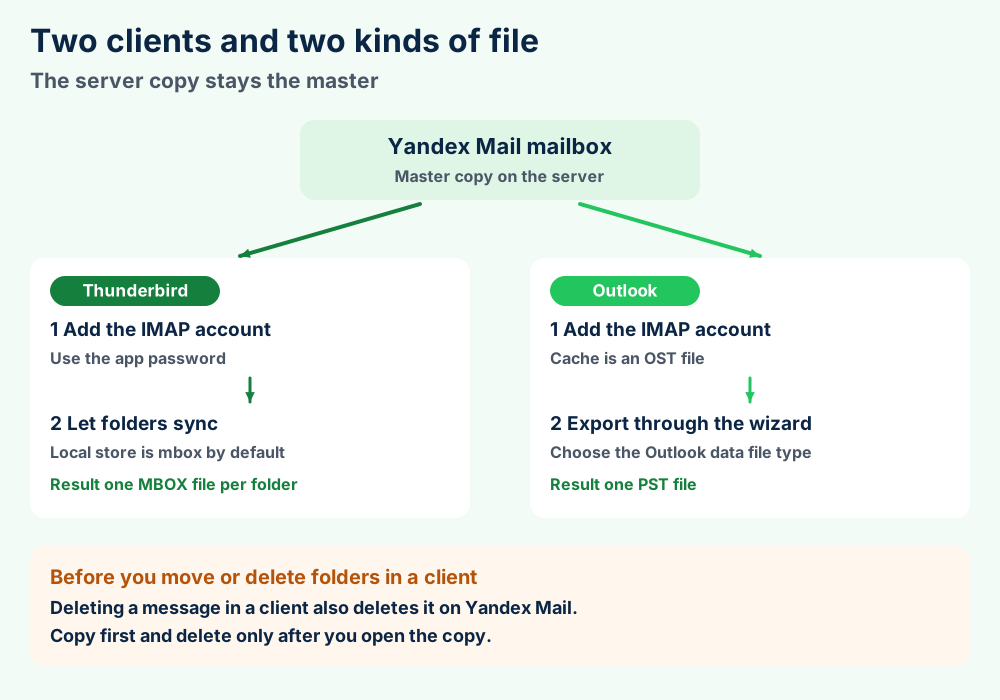
The Mozilla article on mbox and Maildir calls mbox the default format with one file per folder. Maildir is off by default and stores one file per message.
Add Yandex Mail as in section 6 and let your folders sync. Then open the profile folder from the Help menu and Troubleshooting Information as the Mozilla article on profiles describes. Open MBOX files for the structure of those files.
The Microsoft article on Outlook data files says IMAP accounts keep their data in an OST file. Microsoft calls that file a synced copy of the server messages.
An OST file is not your export. Export to a PST file instead. New Outlook offers Settings then Files then Export and the Microsoft article on exporting to a PST file describes the wizard. Read PST files and OST files for the difference.
The Yandex page on missing messages says deleting a message in a client also deletes it on Yandex Mail. The inbox syncs with the service.
Copy folders first and delete nothing until you open the copy. Check the message counts folder by folder.
Yandex Mail also gives you a Spam folder and a Trash folder that clear on a timer. Move anything you want to keep into another folder before you export.
No. The importer pulls mail into Yandex Mail from other services. Use a client when you want mail to leave.
Moving to a different mailbox service? GMX Mail and Protonmail have pages with their own settings. Zimbra Mail covers a server you can host yourself.
Yandex states that Yandex Mail uses HTTPS and DKIM checks. Its terms also reserve automatic analysis of mail for quality and protection.
Yandex Mail protects your mailbox with HTTPS and DKIM checks. The Yandex page on mailbox security says HTTPS encrypts your data before it reaches the server and that Yandex verifies senders by their DKIM signature.
The same page says the mailbox log keeps the history of changes and the IP addresses of sign ins. That log covers about 2,000 actions according to the Yandex page on missing messages.
App passwords reset when you restore your account or select Log out on all devices, according to the Yandex ID page on app passwords.
Section 2.11 of the current Yandex Mail terms says Yandex reserves the right to analyze letters in automatic mode using computer algorithms. The stated aims are service quality and protection from malware and spam.
Section 2.5 says one flight feature does not imply access to the contents of your mailbox. The terms set no general limit beyond those two points.
A phone number goes in at registration and your username stays fixed. Close an account you stop using because Yandex can archive it after 24 months. Yandex Mail also keeps a history of changes in a log that you can read.
Yandex Mail works well over IMAP. It needs a phone number and a fixed username and it shares 5 GB with Disk.
Yandex Mail suits you when you want a free address and an IMAP login that works in Thunderbird or Outlook. Yandex Mail asks more of you than a plain mailbox does.
| Question | Answer from Yandex |
|---|---|
| Do you need a phone number? | Yes. Registration asks for one and an SMS code |
| Can you rename the address? | No. The username is fixed after registration |
| Is storage separate from Disk? | No. Mail and Disk share 5 GB on free accounts |
| Does POP3 work? | Yandex gives no guarantee |
| Does an idle mailbox last? | Yandex can archive after more than 24 months |
Every row comes from a Yandex help page or its terms. None of them is a verdict.
GMX Mail and Protonmail have separate pages with separate limits. Read Unibox if you want one program for several mailboxes.
Any IMAP client with app password support can read Yandex Mail. Mozilla Thunderbird and Microsoft Outlook are two clients that Yandex documents.
Yandex also publishes pages for Mail on macOS and for The Bat! and Opera Mail. FileFix covers Apple Mail and Opera Mail on their own pages.
Choose another service if you need a promised POP3 path or a fixed storage figure from a plan page. Read the terms of any provider before you move your main address.
Create an app password first and wait the 2 to 3 hours. Then check the IMAP option and the port.
Five faults cover most Yandex Mail client trouble. Check them in this order.
Yandex Mail warns that subfolders created directly under Inbox cause trouble when you move folders. Place the subfolder one level above and next to Inbox.
Open Trash and select the messages. Choose the To folder button and select a destination. Yandex says you can recover mail deleted less than a month ago.
Spam messages cannot be recovered after 10 days. Search all folders by sender or by subject before you give up.
One message from a client reaches 35 recipients at most. One message from the site reaches 50 and your total is 500 in 24 hours.
Stuck on a Yandex Mail export that looks wrong? Send us the file details and we will look at it with you.
Yandex Mail keeps mail on the server. Clients write MBOX or OST files and you export PST data from Outlook.
Yandex Mail is a service and not a file format. Your mail sits on Yandex servers and clients hold copies in their own formats.
No. Yandex defines no export file of its own in the pages checked. Formats like MBOX files and PST files come from the client.
Yandex pages give no plan sizes or prices and no minimum password length. They name no folder to place in an export.
what a file format is explains why a cache differs from a data file. The file format guides index every format FileFix has covered. EDB files and OLK files cover Exchange and Mac Outlook data.
| Item | Location | Source |
|---|---|---|
| Mailbox | Yandex server | Yandex help |
| Thunderbird mail | MBOX file per folder | Mozilla |
| Outlook IMAP data | OST file | Microsoft |
| Outlook export | PST file | Microsoft |
| Large attachment | Yandex Disk folder | Yandex help |
Other mail systems have similar pages. See Exchange Server, Zarafa and Lotus Notes.
Make an app password. Section 4 lists the steps.
Use a client to export. Section 7 shows both routes.
Moving your mail into Thunderbird? Mozilla Thunderbird explains the program. MBOX files describe what it writes to disk.
Heading to Outlook? Microsoft Outlook covers Microsoft's client. Its local data sits in PST files and OST files.
Looking at another mailbox service? GMX Mail and Protonmail have guides. Unibox handles several mailboxes together.
Hosting a company mail server? Exchange Server and Zimbra Mail are two to read. EDB files hold Exchange data.
Using a Mac? Apple Mail ships with macOS. OLK files store Outlook for Mac data. macOS guides gather macOS fixes.
Need a different topic? Try the FileFix category index or the FileFix home page. Windows error guides begin with the error text. Send us the file details if Yandex Mail does something this page leaves unanswered.