What Is an ISO File? A Disc Saved as One File, and How to Open It
ISO files hold a full disc image in one file. Windows 11 mounts them as a virtual drive in two clicks. Jump to your question below, or work through it in order.

ISO files hold a full disc image in one file. Windows 11 mounts them as a virtual drive in two clicks. Jump to your question below, or work through it in order.
ISO files hold the full contents of an optical disc in one file. The file keeps the disc file system and every file on it. Most use the ISO 9660 layout or UDF.
What sets an ISO file apart is its sector layout. Sector size is 2,048 bytes, the first 16 sectors form the system area and the text CD001 sits at offset 0x8001.
Windows 11 mounts ISO files as a virtual drive from the right click menu. Section 3 shows the steps and section 4 fixes the failures.
You download an installer or a Linux release and the file ends in .iso. The download page never says what to do with it.
Every ISO file stores the contents of an optical disc in one binary file. It is a sector by sector copy of a CD or DVD with no compression and no container around it, says Wikipedia's optical disc image article.
Most ISO files hold the ISO 9660 file system. Ecma International publishes the same layout as ECMA-119 and dates its first edition to December 1986.
Newer discs favor UDF. An ISO file can hold either layout and some hold both, since a bridge disc carries an ISO 9660 structure that points to files in a UDF volume.
The .iso extension is the common label. Some tools write the same kind of data as .img. IMG files can hold other content. Check before you rename one.
Whatever the disc carried now sits inside the file. Setup programs, game data like DDS textures, movies in MKV files and scanned papers as PDF files all travel the same way.
ISO files are disc images. One file holds the file system and every file from a CD or DVD, ready to mount, extract or burn.
.isoCD001 at offset 0x8001application/vnd.efi.iso, registered with IANA in 2017Searching for a database file? MDF files belong to SQL Server. Section 11 shows how MDF disc images differ.
ISO files grew out of the High Sierra format of 1985 and 1986. ECMA-119 and ISO 9660 followed. UDF and El Torito added bigger discs and boot support.
The format began with a meeting in Nevada. The High Sierra Group met in November 1985 at the High Sierra Hotel and Casino in Stateline. It took its name from the venue, says Wikipedia on the High Sierra format.
Apple, AT&T, Digital Equipment, Hitachi, Microsoft, 3M, Philips and Sony sent people. The group released its proposal in 1986.
Ecma then issued its first edition of ECMA-119 in December 1986 from that draft. The second edition of December 1987 matched ISO 9660, which the International Organization for Standardization published in 1988.
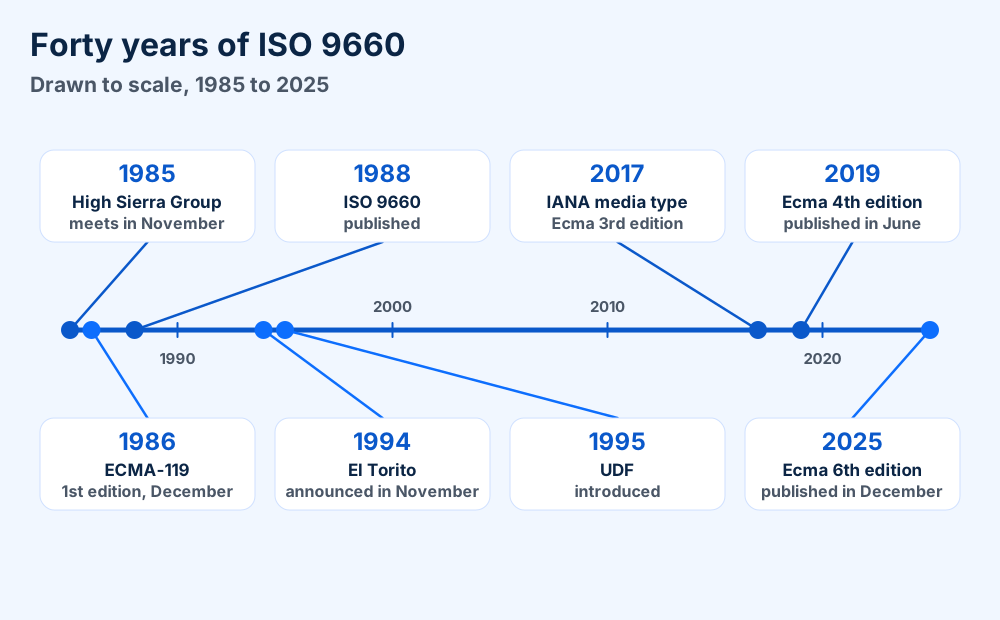
Boot support came next. IBM and Phoenix Technologies announced El Torito in November 1994 and issued it in January 1995, according to Wikipedia on El Torito. El Torito is why a disc can start a computer.
UDF arrived in 1995. It profiles ISO/IEC 13346 and ECMA-167. The UDF 1.02 revision of August 1996 serves DVD-Video discs, says Wikipedia on UDF.
Standards work never stopped. Ecma lists a third edition of ECMA-119 in December 2017 and a fourth in June 2019. The fifth came in December 2024 and the sixth in December 2025.
IANA registered the media type application/vnd.efi.iso on 24 January 2017 for the UEFI Forum, according to the IANA record.
Right click the ISO file in File Explorer and select Mount. A virtual drive appears in This PC and holds the files. Dismount-DiskImage ejects it.
Windows 11 mounts an ISO file as a virtual drive. Microsoft says to right click the file and select Mount, as on its Windows 11 download page.
Mounting an ISO file does not unpack anything. The cmdlet that does this work makes the image appear as a normal disk, says the Mount-DiskImage page on Microsoft Learn.
Microsoft warns that setup.exe inside a Windows 11 ISO starts an upgrade of the current system. Use that route only when you want the upgrade.
Open PowerShell and give the full path to the ISO file. The cmdlet needs the full path.
Mount-DiskImage -ImagePath "C:\Users\You\Downloads\file.iso"
Windows mounts ISO files as read only whatever access value you give. Add -NoDriveLetter if you do not want a letter.
To eject the image, call Dismount-DiskImage with the same path.
Dismount-DiskImage -ImagePath "C:\Users\You\Downloads\file.iso"
Not sure whether an image is still attached? Get-DiskImage reports the attached state for a path.
Linux mounts the file straight from a terminal. The mount manual lists iso9660 as the CD-ROM file system. It also describes an option that stops the automatic loop device for a regular file. See the mount manual.
sudo mount -r ~/Downloads/file.iso /mnt
Mac readers can start from the macOS guides because Apple documents disk images in its Disk Utility help.
Another program can claim the .iso extension. Set Opens with to Windows Explorer in the file Properties. If Mount still fails, check the download hash.
Check one setting first. Another program can claim the .iso extension.
One Microsoft Learn thread lists the file type as VLC.iso. That points to a media player owning the extension. Double click then opens a program picker. See the Microsoft Learn thread.
A registry fix file also circulates in that Microsoft thread. A volunteer wrote it. Users report mixed results. Try the Properties route first.
The already mounted case has its own message. Microsoft documents it as the process cannot access the file because another process is using it. Use Get-DiskImage to confirm the state and Dismount-DiskImage to clear it.
A damaged file calls for a checksum. Section 8 shows the PowerShell command and what a mismatch means.
Mount an ISO file to browse or install. Extract it to copy files out. Burn it only when a disc is the goal.
Your goal decides what to do with an ISO file. The figure below sorts the routes in one look.
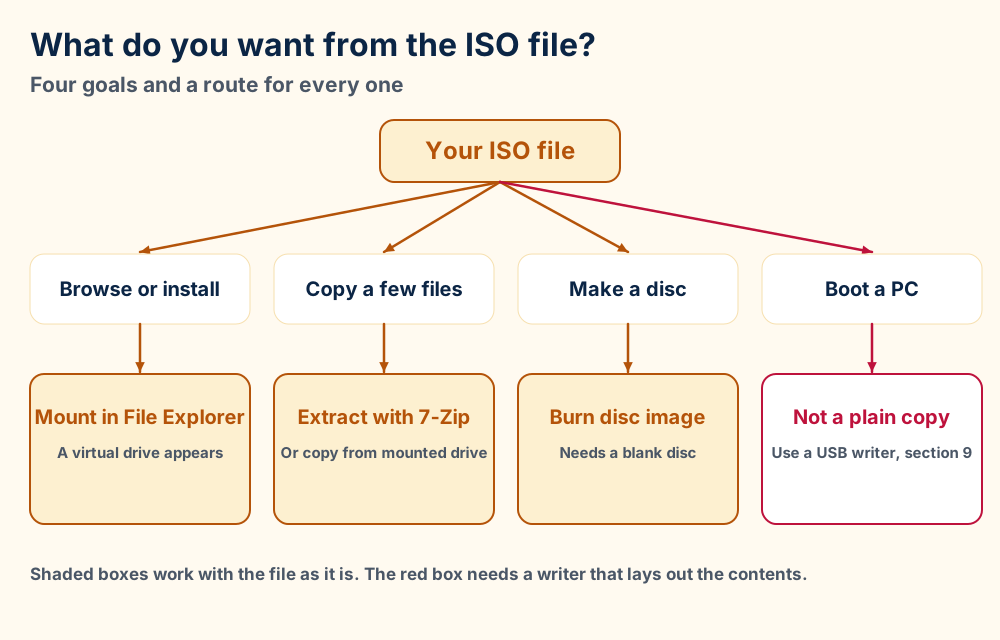
| Job | Route | What you need |
|---|---|---|
| Browse files or install | Mount in File Explorer | Windows 11 and the file |
| Copy a few files | Extract with 7-Zip or copy from the mounted drive | Free disk space |
| Make a disc | Burn disc image | A burner and a blank disc |
| Boot a PC from it | Write bootable USB media | A USB drive of 8 GB or more for Windows media |
Mounting is the safe default for any ISO file. Windows mounts an ISO file read only. Nothing inside changes while you look.
Extraction suits one or two files from an ISO file. Burning only pays off when a disc is the target. An old machine with a DVD drive is the classic case.
Mount the ISO file and copy what you need. Or open it in 7-Zip and use the Extract command. Both keep the original image untouched.
You can pull files out of an ISO file with no disc at all. The built in route is a mount followed by a normal copy from the new drive.
A free archiver also opens ISO files directly. 7-Zip lists ISO and UDF among the formats it can unpack. Most of its code uses the GNU LGPL.
Mount the ISO file as in section 3. Then copy files from the new drive like files from any folder.
Nothing writes back to the ISO file. The drive stays read only.
ISO 9660 names follow strict rules. The base layout allows names of 8 characters plus a 3 character extension at Level 1, as section 11 shows.
Joliet and Rock Ridge add longer names on top. A tool that reads only the base layer shows the short names.
Extraction also leaves the disc behavior behind. Boot code and the volume descriptors do not travel with the copied files. An extracted folder will not start a computer.
Set Opens with to Windows Explorer, then right click the ISO file and select Burn disc image. Use a Dual Layer DVD if Windows says the image is too large.
Microsoft documents one route for burning on its download page. Open the file Properties and set Opens with to Windows Explorer. Then Burn disc image appears in the right click menu.
Another burning program handles ISO files too. Right click the file and use Open with to select it, as Microsoft notes.
Burn the image and never copy the ISO file to the disc as plain data. A data copy leaves one big file on the disc and the disc cannot start a computer.
A single sided DVD holds 4.7 GB, according to the Microsoft page on splitting a Windows image. Some ISO files outgrow it.
Microsoft says the message about a disc image file being too large calls for Dual Layer DVD media. It gives that advice on its Windows 11 and Windows 10 download pages.
A USB drive solves the same problem without a disc. The next sections cover the checksum and the bootable USB boundary.
Use Get-FileHash on the ISO file in PowerShell and compare the SHA256 value with the publisher's hash. Download the file again if the values differ.
A checksum proves your ISO file matches the file the publisher posted. A mismatch means damage in transit or a changed file.
Microsoft tells you to use Get-FileHash in PowerShell and compare the SHA256 output with the hash table for your language. A match confirms the file is not corrupted or altered, says the Microsoft download page.
Get-FileHash C:\Users\You\Downloads\file.iso and press Enter. SHA256 is the default algorithm, says the Get-FileHash page.Other algorithms are one switch away for any ISO file. Add -Algorithm SHA384 or SHA512 when the publisher lists those.
Microsoft notes that MD5 and SHA1 are no longer secure. Use them only to spot accidental changes and never to detect tampering.
Check the hash on the publisher page and not on a mirror. Matching hashes from third party sites prove nothing about the source.
IANA adds a safety warning to its media type record. An ISO image can hold any content including active content. Verify signatures before you use one.
No. Copying an ISO file to a USB drive only stores the file. Bootable media needs the image contents laid out on the drive by a USB writer like Microsoft's Media Creation Tool.
Copying an ISO file onto a USB drive stores one file on the drive. It does not make the drive bootable.
Boot support lives in structures inside the image. El Torito adds a boot record to an ISO 9660 disc. UEFI systems accept El Torito records with platform ID 0xEF, says Wikipedia.
That record points to a FAT image with an EFI system partition and an EFI folder. A USB writer lays that content out on the drive. A plain copy of the ISO file does not.
Microsoft's Media Creation Tool builds the media for you. You need a blank USB drive with 8 GB or more because any content on the drive is deleted, as the Microsoft media page explains.
Select Download Now under Create Windows 11 installation media and follow the guided process. Choose an ISO file in that tool only for a virtual machine or a DVD.
FAT32 keys cannot hold files over 4 GB. Microsoft says many UEFI PCs need FAT32 to boot. A large install.wim will not copy to such a key as one file.
The documented workaround is to split the image. This command comes from Microsoft Learn and uses its DVD sized example.
Dism /Split-Image /ImageFile:C:\sources\install.wim /SWMFile:C:\sources\install.swm /FileSize:4700
The size value is in megabytes. FAT32 keys need a smaller value like 3800 since 4700 exceeds the 4 GB cap.
Boot problems after a correct USB build from an ISO file point to firmware settings. The Secure Boot guide and the Secure Boot state unsupported fix cover the common ones. BitLocker prompts after firmware changes have their own page on the E_FVE Secure Boot error.
Most ISO files hold ISO 9660 with Joliet or Rock Ridge names on top. UDF is the newer file system for DVD and Blu-ray images. Some images carry both.
One ISO file can carry several naming layers. They stack. Software reads the layer it understands.
ISO 9660 is the base of most ISO files. Joliet, Rock Ridge and ISO 9660:1999 widen what names can hold.
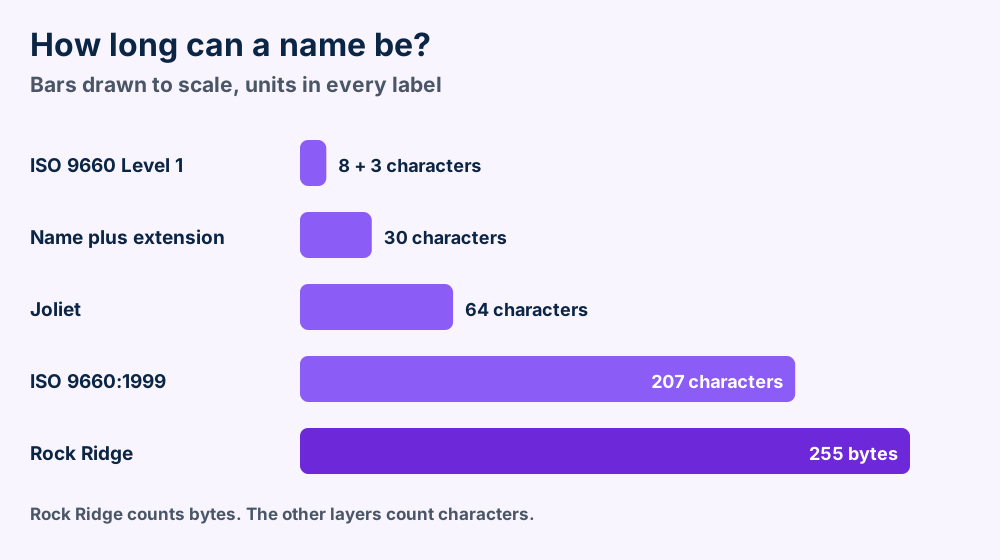
Microsoft specified and endorsed Joliet. Windows 95 and Windows NT 4.0 support it, says Wikipedia on Joliet.
Joliet stores extra names in a supplementary volume descriptor. ISO 9660 software ignores that set. Old readers still work.
Rock Ridge adds POSIX file system semantics for Unix systems. It is standardized as IEEE P1282 on top of SUSP, the IEEE P1281 protocol, says Wikipedia on Rock Ridge.
It allows names up to 255 bytes along with symbolic links and deeper folder trees.
UDF is a separate file system built on ISO/IEC 13346 and ECMA-167. Ecma lists ECMA-167 with a third edition of June 1997.
OSTA maintained UDF and Wikipedia calls it the file system most used on DVDs and newer discs. A bridge ISO file holds ISO 9660 and UDF together since UDF 1.50.
Wondering which one your file holds? The text CD001 at offset 0x8001 shows ISO 9660 structures. Section 11 explains why.
The ISO file format is the ECMA-119 layout with a 32,768 byte system area, then 2,048 byte volume descriptors that carry the text CD001. No compression applies.
This section gathers the checkable ISO file facts. Every number comes from Ecma International, IANA or a named record.
CD0010x8001 in a plain ISO fileapplication/vnd.efi.iso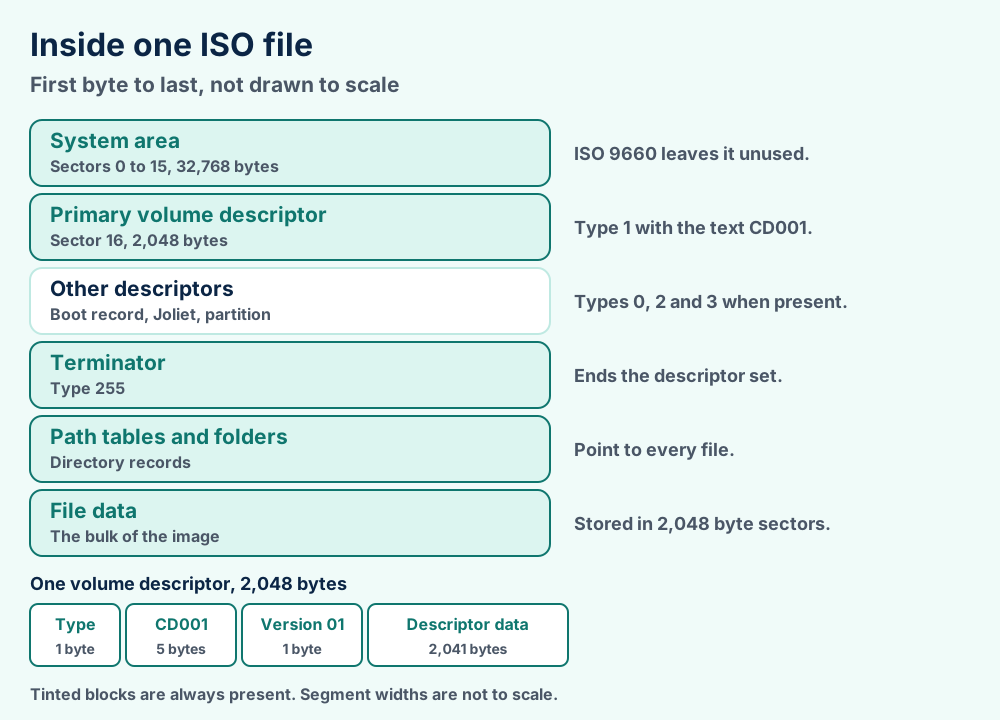
| Type | Meaning |
|---|---|
0 | Boot record, used by El Torito |
1 | Primary volume descriptor |
2 | Supplementary or Enhanced volume descriptor |
3 | Volume partition descriptor |
255 | Volume descriptor set terminator |
Wikipedia lists the type codes and the five byte identifier. ECMA-119 confirms type 2 for the supplementary and Enhanced descriptors and type 3 for the partition descriptor.
| Level | File sections | Names |
|---|---|---|
| Level 1 | One for every file | 8 character name and a 3 character extension |
| Level 2 | One for every file | Name and extension up to 30 characters together |
| Level 3 | No restriction | No added limit |
A 32 bit data length caps one file section at 4,294,967,295 bytes. Level 1 and Level 2 allow one section for every file. Those files stay under 4 GiB.
| Format | Stores | Holds audio CDs |
|---|---|---|
| ISO | The 2,048 byte user data of every sector | No |
| CUE and BIN | Raw multi track image with a companion file | Yes |
| CCD and IMG | Raw multi track image with a companion file | Yes |
| MDS and MDF | Raw multi track image with a companion file | Yes |
Wikipedia gives these comparisons for ISO files and raw images. ISO files omit control headers and error correction. They come out slightly smaller than raw images.
An MDF disc image is not the same thing as an SQL Server data file. The MDF file guide covers the database side.
An ISO file is not a ZIP. It has no compression. Its size is a multiple of 2,048 bytes.
An ISO file is not bootable by itself either. Boot support depends on El Torito records or a USB writer, as section 9 explains.
Ecma International supplies the layout rules and the edition dates. IANA supplies the media type and the offset. Microsoft Learn supplies the PowerShell behavior.
Wikipedia supplies the history of High Sierra, Joliet, Rock Ridge and El Torito. The file format guide defines the terms used here. Browse the format index for sibling guides or the what is hub for software explainers.
The ECMA-119 fourth edition PDF is the text behind the sector and depth rules. Read the ECMA-119 4th edition for the clauses.
Check the default app. Section 4 shows how to hand the extension back to File Explorer.
Extract them. Section 6 covers 7-Zip and the mounted drive.
Did the disc hold movies? See MP4 files, AVI files and FLV files for container details and playback fixes.
Was it a music disc? MP3 files, M4A files and WMA files have their own guides.
Did scans come off the disc? TIFF files and BMP files explain the image formats you will find.
Was the disc a mail archive? PST files and MBOX files cover the two common mailbox containers.
Does the trouble sit with your PC and not the image? The Windows error guides begin with the message on your screen.
Do file extensions still confuse you? The file format primer starts from zero. Nothing matched? Tell us what happened and we will look.