What Is an M4A File? AAC, Apple Lossless and the MPEG-4 Container Explained
M4A files hold audio in the MPEG-4 container. Apple Music opens them and so does VLC. Jump to your question below, or work through it in order.

M4A files hold audio in the MPEG-4 container. Apple Music opens them and so does VLC. Jump to your question below, or work through it in order.
M4A files hold audio in the MPEG-4 container, saved as AAC or Apple Lossless. The extension is .m4a. Library of Congress says Apple adopted it for files without DRM.
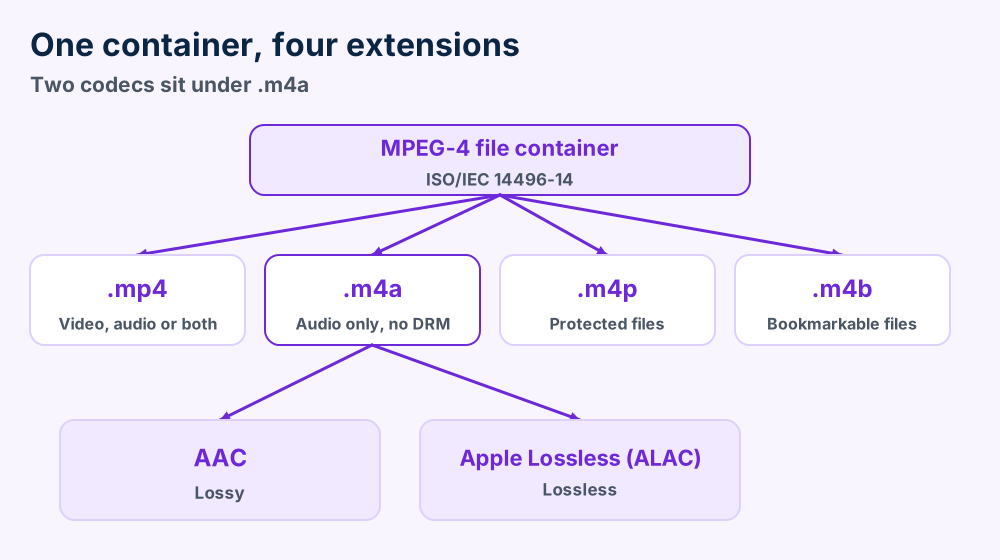
What sets an M4A file apart is the choice of codec inside. Two codecs share one extension. AAC is lossy and Apple Lossless keeps every bit.
Free software opens an M4A file in seconds. Apple Music, Windows Media Player 12 and VLC cost nothing. Section 4 lists more. Section 6 covers protected files.
Songs from iTunes, CDs imported with Apple's Music app and shared recordings all land in your folder with one odd ending. The names end in .m4a and some players skip them. That M4A file is not broken. It follows an Apple habit built on the MPEG-4 file format.
Library of Congress calls .m4a the extension for MPEG-4 files that hold audio only. Its format record adds that Apple adopted the extension for files without DRM. See the MPEG-4 file format record for the wording.
Two codecs fill a single box. Some M4A files carry lossy AAC sound and others carry Apple Lossless. Section 2 shows how you tell them apart.
MP4 files use the same container design and add video. Section 3 explains where the two names split. Section 11 opens an M4A file and shows its bytes.
M4A files hold audio in the MPEG-4 container. The extension is .m4a. Inside sits AAC or Apple Lossless sound and no video.
.m4a.m4b and .m4paudio/mp4M4A with a trailing spaceftyp at offset 4.m4a. Protected files use .m4p.m4a listed. Apple Lossless not listed.m4a. The names .m4b and .m4p point to audiobooks and protected files.ffprobe -show_streams -select_streams a song.m4a. FFmpeg's documentation says that command prints details for the audio stream.Looking for the format every old player knows? MP3 files tell that story. Section 7 sets M4A and MP3 side by side.
Both. Some M4A files hold lossy AAC audio and others hold lossless Apple Lossless audio. The .m4a extension is the same for both.
Every M4A file wraps one of two codecs. The extension stays .m4a for both. National Archives of the United Kingdom says so in its PRONOM record for M4A audio.
AAC is Part 3 of the MPEG-4 standard. Library of Congress names it ISO/IEC 14496-3 in its AAC record. The same record says AAC beats MP3 at a given data rate.
AAC first appeared in 1997 as part of MPEG-2 and joined MPEG-4 in 1999. Apple announced iTunes and iPod support in April 2003, according to Wikipedia's AAC article.
Apple still defaults to AAC when you import a CD. Apple's import page names AAC as the default encoding format. Its iTunes Plus tracks use 256 kbps AAC.
Apple Lossless keeps every bit of the source. Apple's 2021 Apple Music announcement says Apple uses ALAC to preserve every single bit of the original audio.
Apple introduced ALAC in April 2004 and released the source code in October 2011. The release came under an Apache license, per Apple's own mailing list post.
| Codec | Kind | What the sources say |
|---|---|---|
| AAC | Lossy | ISO/IEC 14496-3. Library of Congress lists royalties for encoders and decoders |
| Apple Lossless | Lossless | Apple calls it bit for bit. Source code is open under Apache |
The same extension makes the codec invisible from the name alone. Section 4 lists players that open both kinds of M4A file. Section 5 explains why one player can open the AAC kind and fail on the Apple Lossless kind.
Which codec is your M4A file? Enter the ffprobe command from section 1. The stream details name the codec.
Nearly. An M4A file and an MP4 file use the same MPEG-4 container. M4A files hold audio only and MP4 files can also carry video.
M4A files and MP4 files share a container and split on purpose. Library of Congress says .mp4 covers MPEG-4 video, video with audio or audio alone. It says .m4a holds only MPEG-4 audio.
Think of a shipping box with two labels. A label on the outside tells your player what to expect. That split lets a player sort sound files from video files.
| Extension | What it holds | Media type |
|---|---|---|
.mp4 | Video, video with audio or audio alone | video/mp4 or audio/mp4 |
.m4a | MPEG-4 audio only. Apple adopted it for files without DRM | audio/mp4 |
.m4p | Protected files | audio/mp4 |
.m4b | Bookmarkable files | audio/mp4 |
RFC 4337 registers audio/mp4 for an MP4 file with audio but without visual presentation. It registers video/mp4 for files that carry pictures. MDN lists audio/mp4 with the .m4a extension.
The MPEG-4 container grew out of QuickTime. Library of Congress says both MPEG-4 file format versions draw on the QuickTime format. QuickTime and the first MPEG-4 version call the building blocks atoms. The second version calls them boxes.
ISO/IEC 14496-14 appeared in 2003 and sits on the base media format from Part 12. The Library of Congress record lists the Part 12 edition as 2004. Section 11 shows the boxes inside an M4A file.
MP4 files have their own guide. MKV files and AVI files wrap audio too and use different layouts. FLV files carried Flash video. MTS files come from camcorders.
None of those formats change what an M4A file is. A file named .m4a holds sound and your player treats it that way. Rename it to .mp4 and the sound stays the same.
Rename an M4A file and nothing converts. The brand inside the file stays put. Section 8 covers real conversion.
Apple Music, Windows Media Player 12 and VLC all open an M4A file at no cost. Android opens the AAC kind.
Apple software opens an M4A file without a second thought. Windows and Android need one free step before an M4A file plays. Not a single option below costs money.
| Software | Platforms | What the source says |
|---|---|---|
| Apple Music app | Mac | Apple's guide names AAC as the default import format |
| Windows Media Player 12 | Windows | Microsoft lists .m4a as a supported file type |
| VLC | Windows, Mac, Ubuntu, Android and iOS | VideoLAN lists AAC and ALAC among its audio formats |
| Android phones | Android | Android's list names AAC LC in .m4a and leaves out ALAC |
| FFmpeg | Command line tool | Lists AAC and Apple lossless audio for decoding |
Double click it. Apple Music and Windows Media Player 12 open the M4A file.
Try VLC first. It opens AAC and Apple Lossless.
Microsoft's own list describes the format in one line. It says .m4a is audio only and is compressed with AAC. It also names Apple Lossless as a second possibility. See Microsoft's file type page.
Android works well for the AAC kind. Android's supported formats page lists AAC LC with MPEG-4 and .m4a. It names FLAC and MP3 as well. Apple Lossless is not on the list.
Mac problems that have nothing to do with sound live in our macOS guides. Windows users find the Windows error guides useful when the player itself fails.
.m4p points to a protected file. Section 6 covers it.Windows opens the wrong app? Right click the M4A file and choose Open with. Select your player and tick the option to always use it.
Check four things. The file can be protected. Your player can miss the codec. The copy can have stopped early. The name can disagree with the contents.
Four causes explain nearly every silent M4A file. Only one of them sits in the audio itself. Start with a cheap check and finish with a rare one.
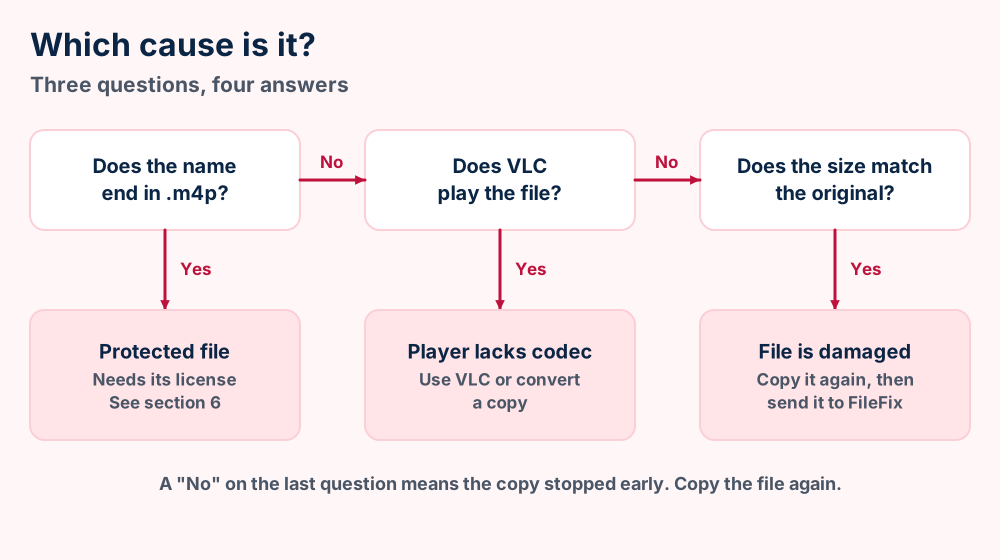
A name that ends in .m4p marks a protected file. Library of Congress says protected files use that extension. Section 6 covers what Apple changed in 2009.
Players differ on Apple Lossless. Android's published list names AAC LC and leaves out ALAC. VideoLAN lists ALAC. A standard AAC file plays on Android while an Apple Lossless file can fail on the same phone.
An MPEG-4 file stores a map of its audio. Apple says you can read the media data atom only with the information in the movie atom. A download that stops before that map arrives leaves an M4A file with audio your player cannot read.
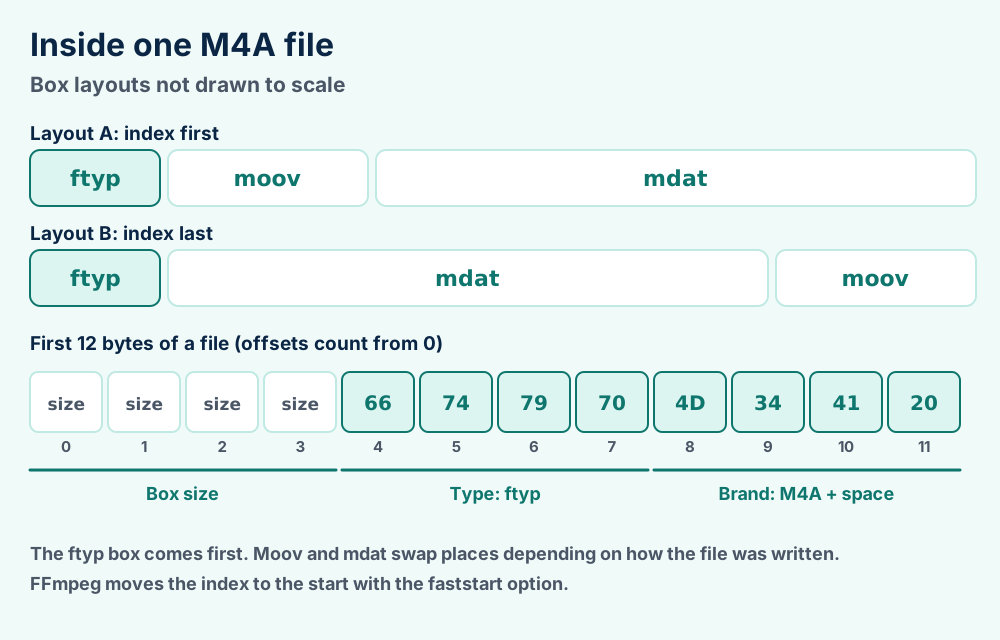
FFmpeg's documentation describes an option that moves the index to the start of the file. FFmpeg leaves that option off by default.
Apple notes that the file type atom conveys more than the extension alone. It adds that QuickTime returns an error for an MPEG-4 file named .mov when the brand inside disagrees. Treat a mismatch between name and contents as a cause when nothing else fits.
Copy the M4A file again from the source. Then try VLC. If both fail, send us the file size and the exact message and we will tell you what the M4A file is.
Audio only? If your M4A file also shows a picture or plays video, you hold an MP4 file. Section 3 explains the split.
M4P files are protected and M4A files are not. Apple moved its store to DRM-free iTunes Plus tracks in 2009.
Protected files carry .m4p and ordinary M4A files carry no protection. Library of Congress states both points in its MPEG-4 record. Apple's store began its move to DRM-free songs in 2009.
Apple announced the change on 6 January 2009. Its release describes iTunes Plus as a DRM-free format with 256 kbps AAC. Eight million of 10 million songs started there and the rest were due by the end of March.
| Extension | What it means | Source |
|---|---|---|
.m4a | Audio without DRM | Library of Congress, MPEG-4 file format record |
.m4p | Protected audio | Library of Congress, MPEG-4 file format record |
.m4b | Bookmarkable audio like audiobooks | Library of Congress, MPEG-4 file format record |
Apple's convert page sets one limit. It says you can convert iTunes Store purchases only if they are iTunes Plus songs. A protected purchase from the old store cannot follow the steps in section 8.
Songs you imported from your own CDs carry no protection. You made those M4A files and you can convert them. The same goes for recordings you made yourself.
Windows has the same idea. Our WMA file guide covers Windows Media DRM and how Microsoft treats licenses for protected tracks.
Not sure whether your M4A file is protected? Check the ending. Names that end in .m4a carry no protection according to Library of Congress.
Sources call AAC the stronger codec at a given data rate. Your players decide which format is better for you.
M4A files and MP3 files solve a shared problem with different codecs. AAC was designed as the successor to MP3, according to Wikipedia. Library of Congress goes further and says AAC beats MP3 at a given data rate.
Neither claim settles your choice. Your devices decide it. Android's published list names AAC, MP3 and FLAC. It names no Windows Media Audio.
| M4A file | MP3 file | WMA file | |
|---|---|---|---|
| Codec | AAC or Apple Lossless | MPEG audio Layer III | Windows Media Audio |
| Maker | Apple adopted the extension | MPEG standards | Microsoft |
| Lossless option | Yes, Apple Lossless | No | Yes, WMA Lossless |
| Android list | AAC LC in .m4a | Listed | Not listed |
| FFmpeg encoding | AAC built in | Needs the LAME library | Windows Media Audio supported |
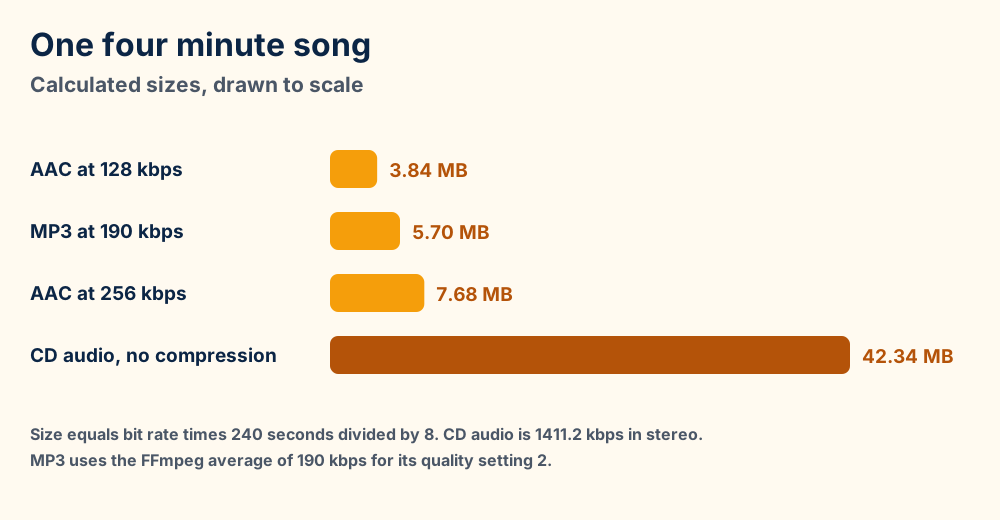
Size shows the practical gap. A four minute song at 128 kbps weighs about 3.8 MB. The figure below compares four common settings and CD audio.
Your devices come from Apple or you want one codec family for lossy and lossless files.
An old player names MP3 only. Check the manual before you convert.
FFmpeg's table shows another difference. It lists AAC with an internal encoder and the libfdk-aac library. It lists MP3 encoding only through LAME.
Royalty rules differ too. Library of Congress says royalties apply to AAC encoders and decoders with no use based fees.
Sorting formats by device? File format basics explains how extension, container and codec fit together.
Use Apple's Music app or FFmpeg. Music handles it with the Convert menu and FFmpeg handles it with one command.
Two free routes convert an M4A file. Apple's Music app handles it with menus. FFmpeg handles it with one line. Keep the original M4A file either way.
Apple's convert page lists the steps. The page limits purchases to iTunes Plus songs. Songs you imported yourself convert freely.
ffmpeg -i song.m4a -codec:a libmp3lame -qscale:a 2 song.mp3The FFmpeg MP3 guide says that setting averages 190 kbps within a range of 170 to 210. The guide adds that settings from 0 to 3 normally produce transparent results. See the FFmpeg MP3 encoding guide.
Going the other way works too. FFmpeg's AAC encoder is the default and it is built in. Set the bit rate with -b:a and FFmpeg's documentation says the default is 128 kbps when you set nothing.
A 256 kbps example reads ffmpeg -i song.wav -c:a aac -b:a 256k song.m4a.
FFmpeg's format notes add a limit. Its ipod muxer writes MPEG-4 audio and holds audio streams only. Video needs an MP4 output.
Need the lossless route? FFmpeg lists Apple lossless audio for encoding and decoding. Apple Lossless to another lossless format keeps every bit.
Sometimes. Converting between lossy formats can lower quality. Converting Apple Lossless to another lossless format loses nothing.
Converting an M4A file costs quality only when lossy codecs meet. Apple states the rule on its convert page. Going from compressed to uncompressed brings no noticeable loss. Going between compressed formats can lower the quality.
| From | To | Result |
|---|---|---|
| Apple Lossless | WAV or AIFF | No loss. Both formats keep every bit |
| Apple Lossless | AAC or MP3 | One lossy pass. Detail the encoder drops is gone |
| AAC | MP3 | A second lossy pass. Quality can drop |
| AAC | WAV or AIFF | No new loss. The M4A file grows and the earlier loss stays |
| WAV or CD audio | AAC | The first lossy pass. Choose the bit rate with care |
Apple gives the clean fix on the same page. It says you should import the music again from the original source using the new format. A fresh import avoids a second lossy pass.
FFmpeg's native AAC encoder explains the scale. Its quality setting of 1 gives roughly 128 kbps for stereo music. Apple's iTunes Plus tracks use 256 kbps.
Higher numbers do not rescue a lossy M4A file. A 256 kbps copy of a 128 kbps source stays a 128 kbps source. The extra bits only add size.
Apple's 2021 announcement gives the ceiling for Apple Lossless in Apple Music. Standard Lossless starts at 16 bit and 44.1 kHz and tops out at 24 bit and 48 kHz. Hi Res Lossless reaches 24 bit and 192 kHz.
Your own files can use other settings. Those numbers describe Apple's service and not the limits of the codec.
One rule covers most cases. Keep the original and convert a copy. You can always make a smaller file later. You cannot rebuild a lost one.
Keep M4A files for everyday listening. Choose Apple Lossless or FLAC for masters. Convert a copy to MP3 only when a device demands it.
Keep M4A files for music you play on Apple devices and on Android. Android's list names AAC LC in .m4a. Apple's Music app uses AAC as its default import format.
Choose lossless for masters you cannot replace. Apple Lossless works well if your library lives in Apple's world. FLAC works well if you want a format that both Android's list and VideoLAN name.
The .m4b extension suits audiobooks. Library of Congress calls those files bookmarkable. National Archives of the United Kingdom lists .m4b beside .m4a in the same record.
Our file format index helps you compare other audio and video formats. Our what is guides explain mail programs and other tools that create files you find next to your music.
Not sure what to do with an old library? Copy it to a backup first. Then try one song in every target format before you convert the rest.
Boxes inside the MPEG-4 container. The ftyp box comes first and names the brand M4A . A moov box maps the audio and mdat holds it.
An M4A file is a stack of labeled boxes. Apple calls them atoms and the ISO standard calls them boxes. Every box starts with a 4 byte size and a 4 byte type.
| Box | Job | Notes from Apple |
|---|---|---|
ftyp | File type and brands | Optional but strongly recommended. When present it must come first |
moov | Movie atom with the track maps | Holds a movie header and one track atom per track |
mdat | Media data | Readable only through the movie atom. Size field set to 1 above 2^32 bytes |
ilst | Metadata item list | Holds the metadata values inside the metadata atom |
The ftyp box carries a major brand, a minor version and a list of compatible brands. Apple says the box tells a reader which file type it holds. The brand sits inside the M4A file where an accidental rename cannot reach it.
For an M4A file the major brand reads M4A with a trailing space. PRONOM gives the signature as the text ftyp at offset 4 followed by that brand. The hex is 667479704D344120.
PRONOM adds one warning. Some AAC files named .m4a carry a generic brand like mp42 or isom. Those files identify as plain MPEG-4 media.
RFC 4337 lists no magic number for audio/mp4. PRONOM identifies M4A audio by the brand inside the ftyp box instead.
.m4a, .m4b or .m4paudio/mp4ftypM4A with a trailing space-movflags +faststartTags live in the item list. Apple documents the ilst atom as the list of metadata values inside the metadata atom.
Try VLC. Section 5 separates player faults from damaged files.
Check the ending. Section 6 explains the .m4p files.
Did the sound come from a video? MP4 files and MKV files hold audio tracks next to the picture.
Want the format every old device plays? The MP3 file guide covers MP3 and the WMA file guide covers the Windows format.
Did the audio come from an old web video? FLV files and SWF files carried web video and animation for years.
Is the sound inside a camcorder clip? MTS files and AVI files are two containers to check.
Did the M4A file arrive as a mail attachment? EML files and MBOX files store saved messages. PST files, OST files and OLK files hold Outlook data. Thunderbird and Microsoft Outlook have their own guides.
Does your music folder also hold album art? JFIF files, BMP files and TIFF files are common image formats. File format basics explains the rest. Our file format index links every guide.
Still holding an M4A file that none of this explains? Send us the file size and the exact error and we will name the file for you. Our Windows guides and our macOS guides cover system faults.