What Is an SWF File? The Flash Movie Format, Ruffle and How to Open It
SWF files hold Flash animation, sound and ActionScript code. Ruffle plays them for free. Jump to your question below, or work through it in order.

SWF files hold Flash animation, sound and ActionScript code. Ruffle plays them for free. Jump to your question below, or work through it in order.
SWF files hold Flash animation, vector art, sound and ActionScript code in one compact file. Adobe's specification says the format is built to be small and to stream.
What sets an SWF file apart is its code. Because the movie carries instructions, it needs a Flash runtime and not a video player.
Free software opens an SWF file in seconds. Flash Player support from Adobe ended on 31 December 2020. Ruffle plays many movies without it. Section 8 shows how to record one as MP4.
You have an old Flash game, a school animation or a banner ad saved as a file ending in .swf. Windows shows a blank icon and a double click does nothing. Your SWF file is fine and only needs the right player.
An SWF file is a compiled Flash movie. Adobe's SWF specification says the format is compressed to be small and supports incremental rendering through streaming. It also lists chapters for shapes, bitmaps, fonts, sounds, buttons, video and actions.
SWF began as an abbreviation for ShockWave Flash. Wikipedia notes that people later read it as Small Web Format and that Adobe never named an official meaning.
Most people meet an SWF file inside an archive folder, a downloaded game or an old online course. The file holds animation and code together. It behaves like a small program. Section 2 explains why that matters.
An SWF file is a Flash movie with vector art, sound and ActionScript code inside. Ruffle plays it for free now that Adobe has ended Flash Player.
.swfapplication/vnd.adobe.flash.movieFWS, CWS or ZWShead -c 3 movie.swf on Mac or Linux. A real SWF file starts with FWS, CWS or ZWS.0x06 means SWF 6. It tells you how old the movie is.Holding a Flash video instead? FLV files have their own page. Section 10 sets the two formats side by side.
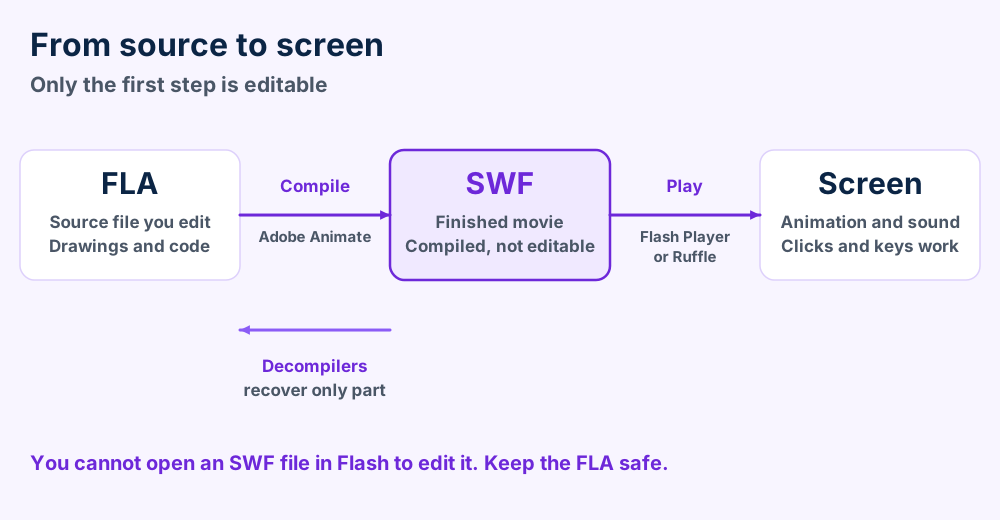
FLA is the file you edit. SWF is the finished movie built from it. Flash Player or Ruffle plays that movie.
Three names get mixed up whenever Flash comes up. FLA is the file a designer edits. SWF is the finished movie that Adobe Animate builds from it.
Wikipedia's Adobe Flash article says Animate compiles FLA files into SWF movie files. Flash Player then plays the SWF file as a browser plugin, a standalone player or a self executing projector.
| Name | What it is | Can you edit it? |
|---|---|---|
| FLA | Editable source with graphics, timeline and assets | Yes, in the authoring program |
| SWF | Compiled movie that players execute | No, only through a decompiler |
| Flash Player | Adobe's plugin and standalone player for SWF files | Not a file |
| Projector | An SWF file wrapped in a self executing program | No |
| ActionScript | The code language inside the movie | Only in the FLA |
Wikipedia says a compiled SWF file cannot be edited in Adobe Flash. Third party decompilers can convert one back to FLA. Flash itself can pull out some assets but not all of them.
Treat your SWF file as finished print. You can play it, copy it and archive it. Changing it needs the original FLA or many hours of patient rebuilding.
SWF stores vector graphics as shapes. Drawings stay sharp at any size. Other formats do the same job for different tools. See AI files for Illustrator art, EPS files for print and CDR files for CorelDRAW.
Technical drawings follow their own rules. DXF files serve CAD programs and PLT files feed plotters. None of them carry code the way an SWF file does.
Adobe stopped supporting Flash Player on 31 December 2020 and blocked Flash content on 12 January 2021. Your SWF file did not change. The player vanished.
Nothing broke inside your SWF file. The player disappeared from every system around it. Adobe announced the end of Flash Player in July 2017 and stopped supporting it on 31 December 2020.
Adobe's end of life page adds that Adobe blocked Flash content from playing beginning 12 January 2021. Adobe also removed the Flash Player download pages from its site.
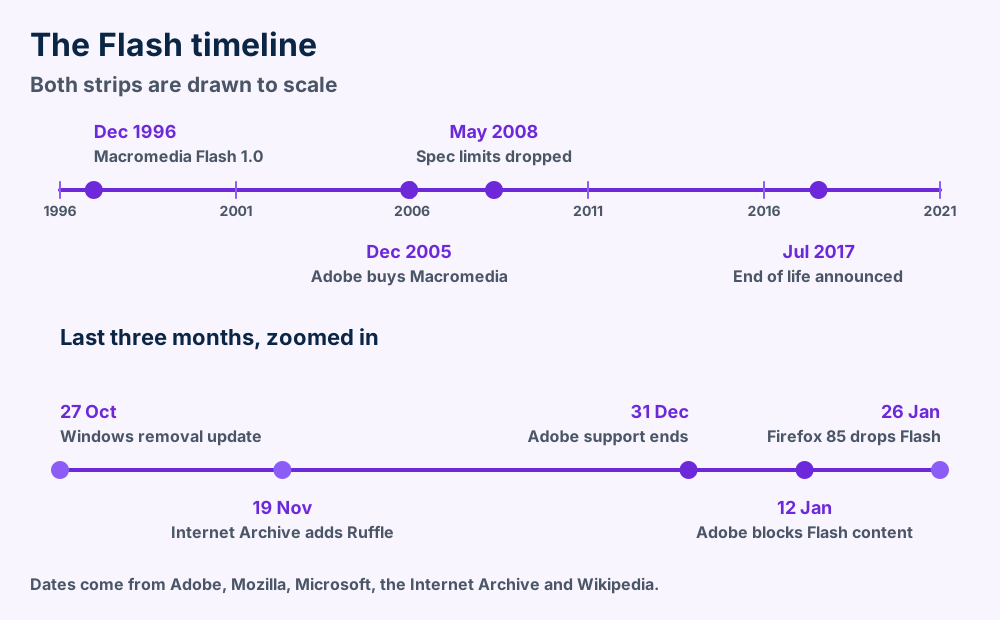
Adobe says Safari 14, released in September 2020, no longer loads Flash Player. Mozilla says Firefox 85, released on 26 January 2021, shipped without Flash support. Its support page says no setting brings Flash back.
Google's Flash roadmap for Chromium targeted full removal from Chrome 88 in January 2021. Chrome 83 in 2020 had already added a notice that Flash Player would lose support after December 2020.
Microsoft shipped update KB4577586 on 27 October 2020. It removes Flash Player from the listed Windows versions and cannot be uninstalled once applied.
Wikipedia says that by 2005 more computers had Flash Player installed than any other web media format. Apple did not support Flash on iOS. Steve Jobs explained why in his 2010 open letter Thoughts on Flash. He cited closed platform concerns and security problems.
Google started its HTML5 by default plan in Chrome 55 in December 2016, according to the roadmap above. Browsers learned to draw animation, play sound and handle input without a plugin.
Wikipedia lists 32.0.0.465 as the last global Flash Player release. It came out on 8 December 2020, three weeks before support ended.
Flash content is part of web history. The Internet Archive began emulating Flash animations and games on 19 November 2020 using Ruffle. Its post says visitors need no Flash plugin and only a browser that supports WebAssembly.
Flashpoint Archive is a community project that preserves web games and animations. Its site says it has saved over 200,000 of these experiences.
Install Ruffle desktop and select your SWF file in the file chooser. Browser extensions handle Flash embeds on websites.
Ruffle is the quickest way to open an SWF file. Its official site describes it as a Flash Player emulator written in Rust that targets desktop and web using WebAssembly. It is licensed MIT and Apache 2.0 and costs nothing.
| Way | Platform | What to know |
|---|---|---|
| Ruffle desktop | Windows, macOS, Linux | A file chooser opens when you start it. You can also enter ruffle movie.swf. |
| Ruffle web demo | Any modern browser | Use the Browse button to load an SWF file from your device. |
| Ruffle extension | Chrome, Firefox, Safari 16.4 and up | Plays Flash embeds on websites. Edge, Opera and Brave use the Chrome extension. |
| Flashpoint | See the Flashpoint site | Community archive for games and animations with its own launcher. |
The Ruffle usage guide lists these routes. It names Scoop for Windows, Homebrew for macOS and Flatpak for Linux as install options next to the direct downloads.
Ruffle is its own project and not Adobe's code. Its README calls it an Adobe Flash Player emulator written in Rust, with the Android version kept in a separate project.
The Ruffle guide says Android users need a Chromium based browser that supports extensions or Firefox for Android. A separate project named ruffle-android also exists on GitHub.
Do not install an old Flash Player to get around this. Adobe says unauthorized copies of Flash Player are a common source of malware. Section 6 covers safety in full.
Check the first three bytes. A real signature means the file is fine and Ruffle desktop should draw the first frame. If it does not, the movie needs a feature Ruffle lacks.
An SWF file that stays blank or freezes has one of four causes. Only one of them damages the file. Sort yours with the chart before you download anything else.
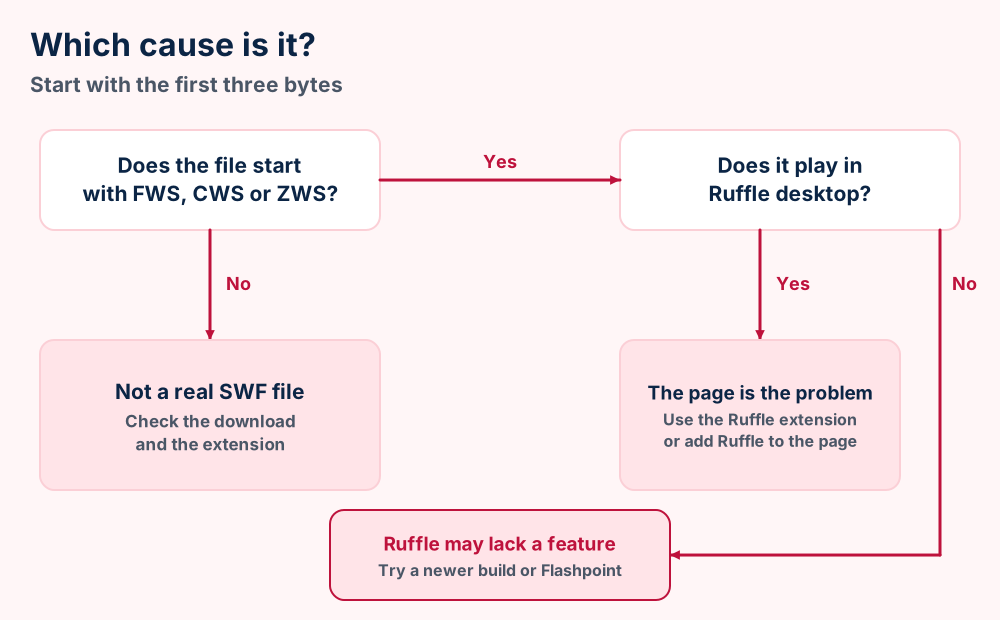
Open the file in Ruffle desktop before you test a browser. Desktop playback removes web page problems from the picture. If it plays there and fails online, the page embeds Flash in an old way.
Update Ruffle next. The project describes itself as unfinished. A newer build can fix a movie that froze on an older one.
The Ruffle guide says its script replaces old style Flash embeds on websites automatically. Section 7 shows how to add it to a page you own. A site you do not own needs the browser extension.
Not sure the extension is a Flash movie at all? File formats explained shows how signatures and extensions differ.
Open unknown SWF files in Ruffle and never install the old Flash Player. Adobe itself says to uninstall it and warns that unofficial copies spread malware.
An SWF file is as safe as the code inside it. The Ruffle project says Flash was known for security pitfalls. Opening a movie in Ruffle is a different risk from installing the old plugin.
Adobe says it strongly recommends all users uninstall Flash Player immediately. The same page warns that Flash Player can remain on your system until you remove it.
Adobe also says unauthorized copies of Flash Player are a common source of malware. That makes every download site with an old installer a bad idea.
The Ruffle site says Rust and WebAssembly let it avoid the security pitfalls Flash was known for. That is the project's own claim and not an audit. Treat any file from an unknown source with care.
Microsoft's update page adds one more limit. Once the update is applied it cannot be uninstalled. Flash Player stays removed.
Adobe's end of life page links manual uninstall steps for Windows and Mac. Follow those steps if you still have the old plugin. The Windows update targets Flash Player on the Windows versions Microsoft lists.
Cannot trust a file? Open it in a throwaway account or a virtual machine. Keep it away from files you value.
Host your SWF file, add the Ruffle script to the page and test it in Chrome and Firefox. No visitor needs to install a plugin.
Add Ruffle to your page and it replaces old Flash embeds on its own. The Ruffle usage guide says the script automatically replaces old style Flash embeds with Ruffle elements. You keep your SWF file and your page markup.
| Option | How it works | Best for |
|---|---|---|
| Self host | Download the web build from the releases page and extract it into a directory on your server. | Sites that want full control |
| npm or a CDN | The guide notes Ruffle is on npm and on CDNs like unpkg. | Sites with a build step |
| JavaScript API | Create a player and load a movie from your own code. | Custom pages |
movie.swf on your web server beside the page that shows it.For custom pages the guide shows the API. Call window.RufflePlayer.newest().createPlayer() to make a player. Then call player.ruffle().load("movie.swf") to play the file.
Visitors need no plugin. The Internet Archive says its Ruffle based playback works in any browser that supports WebAssembly. The Archive's 2020 post said Ruffle compatibility was less than 100 percent.
If your content must work everywhere, plan a rebuild in HTML5 from the FLA. Ruffle keeps the old movie alive while you do that.
Record the movie in Ruffle desktop and save the recording as MP4. A recording keeps one path through the movie and loses interaction.
No setting converts every SWF file into a perfect video. The reason is code. The specification devotes a full chapter to actions. A movie can respond to clicks and keys.
A video file records one path through a movie. An SWF file holds every path. Converting means choosing which path to capture.
| Goal | Best route | What you give up |
|---|---|---|
| Watch it on a phone or TV | Record playback in Ruffle desktop and save as MP4. | Interaction and sharp vector scaling |
| Keep it interactive | Host it with Ruffle (section 7). | Nothing, though visitors need a modern browser |
| Reuse the drawings | Use the FLA when you have it. | Needs the original source |
| Reuse the sound | Record the audio and save it as MP3 or M4A. | Quality of the capture path |
The SWF header stores a frame rate as an 8.8 fixed point number. Record at a similar rate and motion looks as the designer intended.
A recording captures pixels at your screen size. The original movie stored shapes and could scale to any size. Converting to video fixes the picture at one resolution for good.
If the SWF file only wraps a clip of video, look for the original source first. The Flash Video container page explains Flash Video. The MKV file format and AVI file format pages cover other containers.
Keep the SWF file as your master and copy it twice. Replace it only when you hold the FLA source or the rights to rebuild it.
Keep every SWF file as it is and add a second copy. Replace a movie only when you own the FLA or the rights. The SWF file is your master.
Replace a movie when your audience needs a phone friendly version or a search friendly page. HTML5 pages load without any emulator. Rebuild from the FLA if you still hold it.
Public archives help for other people's work. The Internet Archive and Flashpoint preserve many games and animations. Leave their content in place and play it there.
Respect copyright. Files you made belong to you. A game you downloaded belongs to its maker.
SWF holds a program. FLV and MP4 hold video. Choose SWF only for content that responds to the viewer.
SWF holds a program, FLV holds video and MP4 holds video. Only the SWF file can carry ActionScript. That single difference decides which format fits your job.
| Question | SWF | FLV | MP4 |
|---|---|---|---|
| What it holds | Vector art, sound, video and code | Video and audio streams | Video and audio streams |
| Responds to clicks | Yes, through ActionScript | No | No |
| Editable source | FLA | Not applicable | Not applicable |
| Official player | Flash Player, ended 2020 | Flash Player and many others | Almost every modern player |
| Best today | Archive and Ruffle playback | Convert to MP4 | Sharing and streaming |
An SWF file can carry video. Wikipedia adds that FLA source files can embed FLV video. A movie and its clips can travel together.
Wikipedia's Flash Video article covers the video side. The FLV file format page explains why those files are easier to rescue than an SWF movie.
MP4 suits clips that only need to play from start to end. The MP4 file format page explains the container. The MTS file format page covers camcorder video that follows a similar path.
SWF wins when a movie needs buttons, choices or scores. A recording cannot keep those. Keep the SWF file and play it in Ruffle.
HTML5 now draws animation and plays media in the browser. Google's roadmap began its HTML5 by default plan in December 2016. Image and sound formats like JFIF files and WMA files work in this world with no plugin.
An SWF file is a short header followed by tags. ShowFrame tags end every frame and DoABC tags carry ActionScript 3 from SWF 9.
Open this section when you want the byte level facts. The SWF file format is short at the top and flexible below. Every number comes from the sources linked at the end.
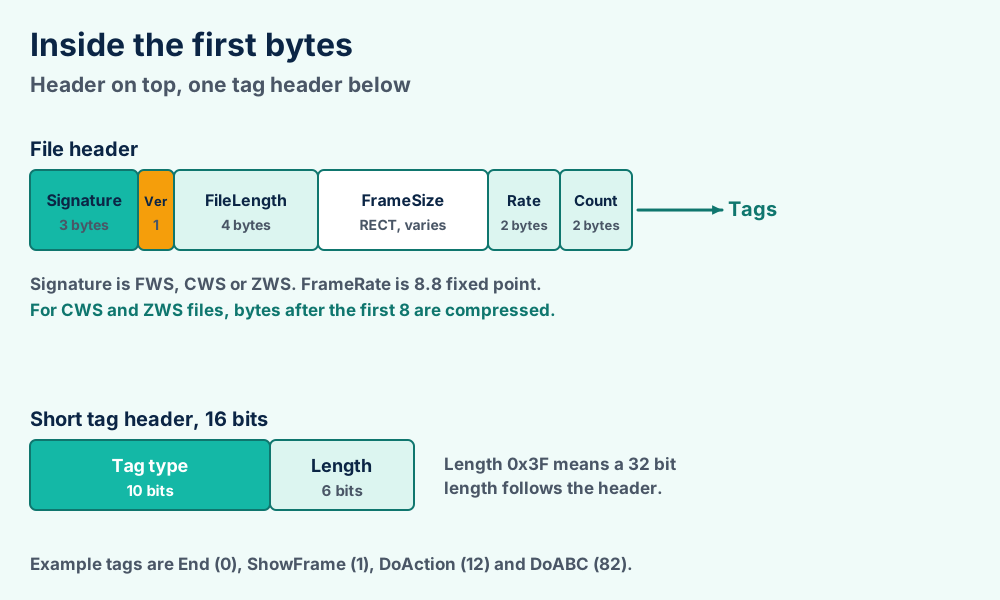
FWS uncompressed, CWS ZLIB, ZWS LZMAAfter the header the file is a list of tags. The specification says Flash Player processes all of the tags until it meets a ShowFrame tag. That tag draws one frame.
Definition tags hold shapes, text, bitmaps and sounds. Control tags place and move them. A definition tag must appear before any control tag that uses it.
| Tag | Number | Job |
|---|---|---|
| End | 0 | Marks the last tag in the file |
| ShowFrame | 1 | Renders the display list for one frame |
| DoAction | 12 | Holds ActionScript for older movies |
| FileAttributes | 69 | Required for SWF 8 and later |
| SymbolClass | 76 | Links symbols to classes |
| Metadata | 77 | Holds descriptive data |
| DoABC | 82 | Holds ActionScript 3 code from SWF 9 |
A short tag header is a 16 bit value. The upper 10 bits give the tag type and the lower 6 bits give the length. Tags with 62 bytes of data or less use it.
Longer tags use a short header whose length reads 0x3F. A 32 bit length follows. That lets one tag hold far more data.
A twip is 1/20 of a pixel. A 550 by 400 pixel stage therefore measures 11,000 by 8,000 twips. The frame rate uses 8.8 fixed point. Twelve frames per second is stored as 12 times 256, which is 3,072 or 0x0C00.
Those two numbers are worked examples from the specification's rules and not values from a real movie.
Adobe's document moves from basic data types and the display list to chapters on shapes, gradients, bitmaps, shape morphing, fonts and text, sounds, buttons, sprites, video and metadata. Appendix A dissects a small SWF file byte by byte.
SWF 9 added the DoABC tag. The ActionScript 3 flag starts at SWF 9 too. When that flag is 1, DoAction contents are ignored. The specification gives one pairing, Flash Player 11.4 with SWF 17.
Wikipedia says SWF 19 matches Flash Player 11.6. Later players kept moving the version number up. Adobe's public specification stops at version 19.
Many pages call an SWF file a video. It is not. The specification covers video in one chapter next to actions, shapes and sounds.
Other pages say SWF means Small Web Format. Wikipedia says the name began as ShockWave Flash and Adobe never settled the question. The IANA registration lists the media type application/vnd.adobe.flash.movie for the .swf extension and the three signatures.
Header and tag facts come from the Adobe SWF specification. End of life dates come from Adobe, Mozilla, Microsoft and Google. Playback facts come from the Ruffle project. History comes from Wikipedia.
The file is fine. Fix the web page, the embed or the browser. Add Ruffle to the page or use its extension.
Check the first three bytes for FWS, CWS or ZWS. If they are right, try a newer Ruffle build or look in an archive project.
Is your Flash file a video? Read the Flash Video files page, then compare it with MP4 video and AVI video.
Do you need the artwork from a movie? See the AI file format and EPS file format pages for vector art. Try TGA files and BMP files for single frames.
Did you record the sound and now hold an audio file you cannot place? Check MP3 files, M4A files and Windows Media Audio.
Is the file name right and the signature wrong? how file extensions work shows how to read a file header.
Does a manual from an old Flash course refuse to open? The PDF guide covers documents. Browse every file format guide when your extension is not listed.
Did Windows or your Mac show an error instead of your movie? Open the Windows fix list or the macOS fix list. Other extensions are listed on the what-is hub and the category page. Send us your error when nothing matches. The FileFix home page holds every guide.