What Is a JFIF File? The JPEG Wrapper Behind the .jfif Name
JFIF files hold JPEG pictures with a small header in front. Jump to your question below, or work through it in order.

JFIF files hold JPEG pictures with a small header in front. Jump to your question below, or work through it in order.
JFIF is the file wrapper around JPEG image data. The name stands for JPEG File Interchange Format. Every file in this layout holds one JPEG picture and a short header that follows the first two bytes.
Only the label sets it apart. Picture data matches any other JPEG. A .jfif file is a .jpg file with another extension. Edge on Windows can save downloads under that name.
Rename a copy to .jpg and every form and viewer accepts it. Section 5 shows why renaming keeps quality while saving again does not.
You saved a picture and the name ends in .jfif. Your photo app shows no thumbnail and a form rejects the upload.
Inside sits one JPEG picture. JFIF stands for JPEG File Interchange Format. Its job is to carry JPEG data between programs and computers in one agreed layout.
Eric Hamilton of C-Cube Microsystems wrote the JFIF specification. Version 1.02 is dated September 1, 1992 and describes JFIF as a minimal format for exchanging JPEG bitstreams.
JFIF pins down color space and pixel density. It also adds one required header, called APP0, right after the first two bytes.
Picture data inside is plain JPEG. Nearly every program that opens a .jpg opens a .jfif. The Library of Congress names .jpg as the most common extension for JFIF and lists .jfif among others.
JFIF files are JPEG pictures with a required APP0 header. The bytes FF D8 FF E0 open the file and the letters JFIF sit at byte 6.
.jfif, with .jpg far more commonFF D8 FF E0 xx xx 4A 46 49 46 00image/jpegfmt/44 for version 1.02| What you see | Why it happens | Where to go |
|---|---|---|
| Saved image ends in .jfif | Registry lookup in Edge | Section 3 |
| No thumbnail or no viewer | Program ignores the extension | Section 4 |
| Need .jpg for school or work | Extension only | Section 5 |
| Upload form says wrong type | Allowed list leaves out .jfif | Section 6 |
| Unsure which label a photo has | Header bytes differ | Section 8 |
Came here about camera files? CR2 files and DNG files hold raw sensor data. Here the data is finished JPEG.
JPEG is the compression and JFIF is one wrapper around it. Exif is the other common wrapper. One file can carry both labels.
Think of JPEG as a recipe and JFIF as a box. Recipes squeeze pictures. Boxes label results so any program reads them alike.
Joint Photographic Experts Group created JPEG in 1992, according to Wikipedia. JFIF came from one company and joined the standards family much later.
| Item | JPEG | JFIF | Exif |
|---|---|---|---|
| What it is | Compression method | File wrapper | Camera metadata wrapper |
| Defined by | Joint Photographic Experts Group | C-Cube, then ITU and ISO | JEITA and CIPA |
| First segment | None required | APP0 | APP1 |
| Holds | Compressed picture data | Version, density, thumbnail | Camera settings, date, GPS |
| Signature letters | None | JFIF | Exif |
Plain JPEG streams, JFIF and Exif all begin with the same two bytes, FF D8. What follows decides the label. JFIF puts APP0 next. Exif puts camera APP1 next.
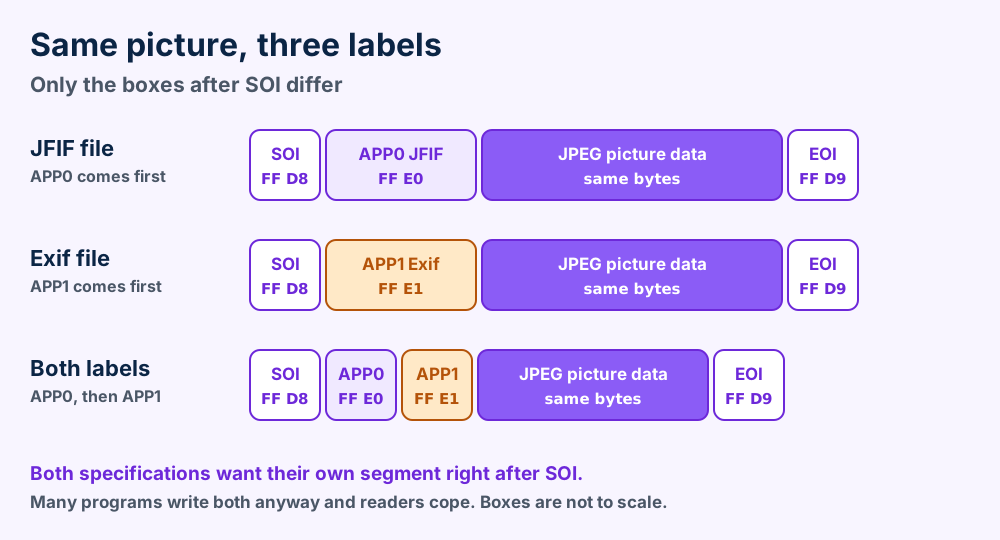
The Library of Congress says an Exif file leads with an APP1 segment starting with the letters Exif. Its page quotes the Exif rule that APP1 must follow SOI immediately.
JFIF makes the same demand for APP0. One file cannot satisfy both rules in strict terms. The Library of Congress says one file cannot legally be both. Wikipedia notes that many cameras and programs write both segments anyway and that most readers cope.
That is why you meet three cases. Some files carry only JFIF and some carry only Exif. Plenty carry JFIF first and Exif second. Any of the three opens as a normal picture.
The Library of Congress lists .jpg as the most common extension for JFIF. Its other entries are .jpeg and .jpe plus .jfi and .jfif. It adds .j and .jif and .jmh to the set.
Eight names for one layout explain why programs disagree. Programs keep their own lists. A list that skips .jfif treats your file as unknown.
Same picture data in all three. The label changes nothing about the pixels. Section 8 shows how to read the label yourself in about a minute.
Edge on Windows names JPEG downloads from a registry entry that can read .jfif. Picture bytes match a .jpg file exactly.
Microsoft does not describe the change in its imaging pages. The Windows JPEG codec overview lists jpe, jpeg and jpg as its extensions and leaves .jfif off the list.
The clearest explanation sits on Microsoft's own Q&A forum. A support specialist wrote in 2022 that pictures from the Edge browser carry different extensions because web page creators insert pictures in different formats.
The same support answer points to a registry value. Under the key HKEY_CLASSES_ROOT\MIME\Database\Content Type\image/jpeg the Extension entry can read .jfif. Edge follows it when it names a saved JPEG.
That answer names a second key for WebP pictures, image/webp, where Extension reads .webp. Both keys work alike. Windows looks up the media type and returns its stored extension.
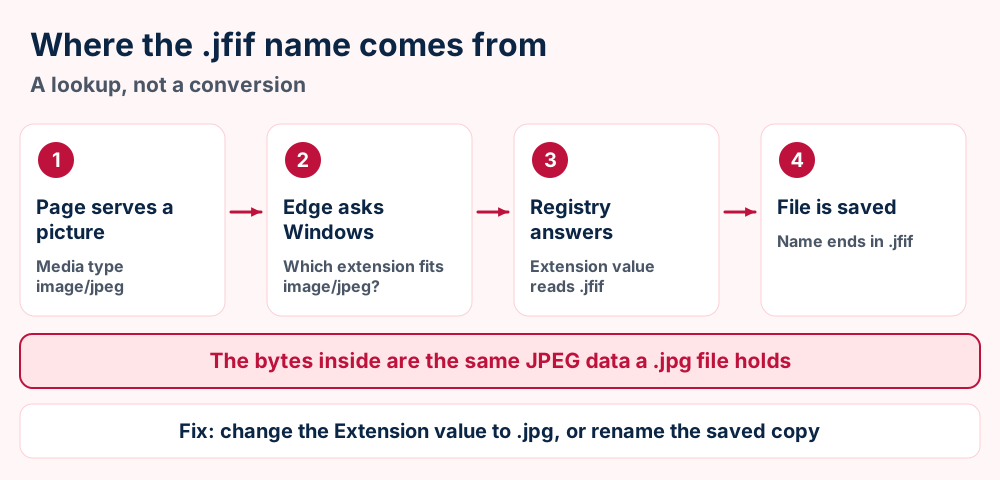
One poster in a March 2020 thread on the Microsoft Q&A forum dates the habit to Windows 10 version 1909 from December 2019. That is one user's memory and Microsoft does not confirm it. Windows 10 is the system those threads discuss.
Chrome users report the same .jfif name on Windows. Google publishes no note on it. The cause stays unconfirmed for Chrome.
The 2020 poster also says the value flips back after Windows updates. Microsoft gives no explanation. Check the value again if .jfif returns.
No. An Independent Advisor answered that exact question on the Microsoft forum in 2023.
"a JFIF file is a JPG, you only need to change the file extension"Independent Advisor, Microsoft Q&A, September 2023
| Source | Date | What it says |
|---|---|---|
| Microsoft Q&A thread | March 2020 | Windows 10 saves JPG as JFIF and a poster blames version 1909 |
| Support specialist answer | 2022 | Registry Extension value for image/jpeg reads .jfif |
| Independent Advisor reply | 2023 | JFIF is JPG and only the extension needs changing |
These steps follow the Microsoft support answer. Registry edits can break Windows when done wrong. Export the key first and keep the exported file.
HKEY_CLASSES_ROOT\MIME\Database\Content Type\image/jpeg.Not comfortable with the registry? Skip it and rename the copy instead. Section 5 explains why that is safe.
Nearly any program that opens .jpg opens .jfif. When yours refuses the file, one renamed copy settles it.
Start with a browser. Drag the file into an open tab and the picture appears, because the data inside is JPEG.
A reply on the 2020 Microsoft forum thread says its JFIF files opened in GIMP, Photos and Photoshop without problems. One commenter in 2024 saw no thumbnails and could not open the file by double-click. Results differ from one computer to the next.
| Program | Works on | Why select it |
|---|---|---|
| Any web browser | Windows, Mac, Linux | Nothing to install. Drag the file into a tab |
| Windows Photos | Windows | Named in the 2020 Microsoft thread as opening JFIF files |
| GIMP | Windows, Mac, Linux | Free editor. Opens the file and exports a clean JPG or PNG |
| Photoshop | Windows, Mac | Paid editor, also named in the same thread |
| Rename a copy to .jpg | Any system | The fallback. Works when a program checks the three letters |
Right-click the file and choose Open with. Select your photo viewer and tick the box that sets it as default for this extension. Windows then sends every matching file to that viewer.
On Mac or phone? Rename one copy to .jpg if your photo app skips the file. Our macOS guides cover viewer and association problems.
Renaming to JPG changes no byte of the picture. Opening and saving it as JPEG again compresses it twice and loses detail.
Renaming wins every time. The picture inside is already JPEG. A new extension on the same bytes costs you nothing.
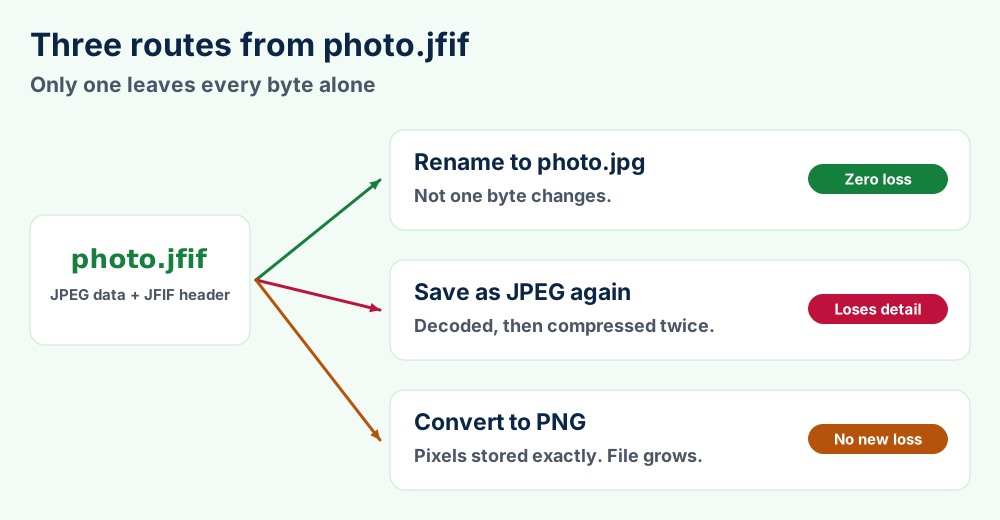
JPEG compression is lossy. Every save decodes the picture and compresses it again. Wikipedia notes that repeated saves cost quality, especially after cropping.
A rename skips that step. Exif data, pixel density and the thumbnail stay exactly as they were.
| Route | Picture quality | File size | Header and Exif data |
|---|---|---|---|
| Rename to .jpg | Identical | Same | Kept |
| Save as JPEG again | Lower after the second compression | Changes | Depends on the program |
| Convert to PNG | No new loss, old flaws stay | Larger in most cases | Depends on the program |
Saving again cannot undo loss. If you already saved over your picture, go back to the original download and rename that copy.
Command lines work too. Type ren photo.jfif photo.jpg in Command Prompt on Windows or mv photo.jfif photo.jpg in Terminal on Mac. Both commands rename in place and touch no byte inside.
Select PNG for pictures you edit again and again. PNG uses lossless compression. Later saves add no new damage. Files grow larger in most cases and flaws already in the JPEG stay.
Select JPG when you only need a file that every upload form accepts. That is the rename route.
Dozens of files? Select them in File Explorer and rename them together. Windows numbers names. Test on copies and check one result before you trust the batch.
Upload forms check the extension or the declared type. Many lists name only .jpg and .jpeg. A copy renamed to .jpg passes.
Upload forms read the name of your file before they read anything else. A list that allows only jpg and jpeg refuses the .jfif name even though the picture inside is fine.
Wikipedia notes that RFC 2046 requires image/jpeg to be encoded as JFIF. A site that accepts image/jpeg has no technical reason to refuse the upload. The refusal comes from the list of names, not from the picture.
| Symptom | Likely cause | Fix |
|---|---|---|
| Form says wrong file type | Extension missing from the allowed list | Rename a copy to .jpg |
| Form accepts then shows a broken picture | File is not JPEG data | Check for FF D8 at byte 0 |
| Phone app ignores the file | App does not know .jfif | Rename a copy to .jpg |
| Form says file too large | Size limit, not a name problem | Shrink the picture in an editor |
| Picture looks soft after upload | Site compressed it again | Upload a smaller original |
Test the first bytes of uploads instead of trusting names. FF D8 FF marks JPEG data under any label.
FF D8 FF. This catches renamed files of other types.A rename never changes file size. If the form also caps the size, shrink the picture in an editor and expect some lost detail.
Do not edit the bytes to fix a name. Hex edits cannot make refused files acceptable and can damage pictures. Rename copies and leave data alone.
JFIF opens with the SOI marker and a fixed APP0 header that names version and density. The thumbnail field is optional.
This header is tiny. The first 20 bytes hold the start marker and full APP0 segment. Every field has a fixed size.
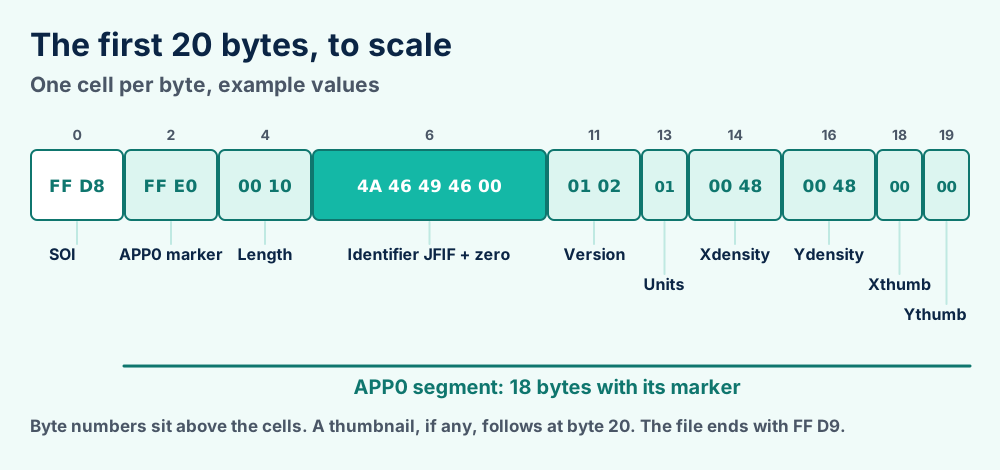
| Offset | Size | Field | Example | What it holds |
|---|---|---|---|---|
| 0 | 2 bytes | SOI | FF D8 | Start of image. Every JPEG begins here |
| 2 | 2 bytes | APP0 marker | FF E0 | Must follow SOI directly in a JFIF file |
| 4 | 2 bytes | Length | 00 10 | Segment size, 16 plus 3 for every thumbnail pixel |
| 6 | 5 bytes | Identifier | 4A 46 49 46 00 | The letters JFIF and a zero byte |
| 11 | 2 bytes | Version | 01 02 | Major then minor, so 1.02 |
| 13 | 1 byte | Units | 01 | 0 aspect ratio only, 1 per inch, 2 per centimeter |
| 14 | 2 bytes | Xdensity | 00 48 | Horizontal density, 72 here |
| 16 | 2 bytes | Ydensity | 00 48 | Vertical density, 72 here |
| 18 | 1 byte | Xthumbnail | 00 | Thumbnail width in pixels, 0 for none |
| 19 | 1 byte | Ythumbnail | 00 | Thumbnail height in pixels, 0 for none |
| 20 | 3 bytes per pixel | Thumbnail | none | Packed 24 bit RGB, only if both sizes are above 0 |
The length field counts itself but not the marker. With no thumbnail it reads 16. The full APP0 segment then takes 18 bytes with its marker.
| Value | Meaning | Density numbers read as |
|---|---|---|
00 | No units | Pixel shape only, like 1 to 1 |
01 | Dots per inch | Pixels in every inch |
02 | Dots per centimeter | Pixels in every centimeter |
Thumbnail pixels cost 3 bytes apiece. A 16 by 16 thumbnail holds 256 pixels and takes 768 bytes. The length field then reads 16 plus 768, which is 784 and reads 03 10 in hex.
Both size bytes sit at offsets 18 and 19. Readers that ignore thumbnails skip the data by reading the length field.
Take the bytes FF D8 FF E0 00 10 4A 46 49 46 00 01 02 01 00 48 00 48 00 00. They say JPEG starts here and APP0 follows. The segment holds 16 bytes and spells JFIF in version 1.02. Density is 72 by 72 dots per inch with no thumbnail.
Units byte 0 means density numbers give only pixel shape. Units byte 1 means dots per inch. Units byte 2 means dots per centimeter.
The specification sets three component pictures in YCbCr and single component pictures in Y alone. That is why JFIF has no alpha channel and cannot hold transparency.
After the header come standard JPEG segments. The frame header carries one or three components, one for grayscale and three for color. Color values follow CCIR 601 with 256 levels.
The file ends with the EOI marker, FF D9. Everything between the header and that marker is ordinary JPEG data.
Read bytes 2 and 3. FF E0 means a JFIF header and FF E1 means Exif. The picture opens the same either way.
Two bytes tell you the label. Open the file in any hex viewer and read the pair at offset 2.
| Label | Bytes 2 and 3 | Letters at byte 6 | Segment | Adds |
|---|---|---|---|---|
| JFIF | FF E0 | JFIF | APP0 | Version, density and a thumbnail |
| Exif | FF E1 | Exif | APP1 | Camera settings, date, GPS |
| Both | FF E0 first | JFIF, then Exif later | APP0 then APP1 | Both sets of labels |
| Plain JPEG | Another marker | No label | Neither | Picture data only |
The Library of Congress gives the same two signatures. It notes that programs built on Independent JPEG Group code write a JFIF segment before the Exif one.
Format-Hex -Path .\photo.jfif -Count 20 and press Enter. Microsoft documents the Count option from PowerShell 6.2.FF D8 FF E0 then 00 10 then 4A 46 49 46 00.xxd -l 20 photo.jfif in Terminal to see the same bytes.Keep whatever you have. All three are one picture format and the label does not change what you see. The choice only matters for what rides along.
Keep the Exif data. A JFIF header holds only density and a thumbnail.
Remove the Exif data first. Wikipedia says it can reveal where and when you shot the picture.
The Windows JPEG codec documentation lists an option that suppresses APP0 and sets its default to false. The Windows codec therefore writes the APP0 header by default.
JFIF stores only a version, a density and an optional thumbnail. Camera details and GPS come from the Exif segment that can share the file.
JFIF itself remembers little. Its header carries a version and a density plus an optional thumbnail. It records nothing about the camera or the place.
The thumbnail is a tiny 24 bit RGB copy of the picture. Both size fields take one byte. A JFIF thumbnail stays small. Wikipedia adds an optional JFXX segment that stores thumbnails in three other formats.
Version 1.02 and later allow an optional JFXX segment. Wikipedia says it stores a thumbnail as JPEG data or as palette or RGB pixels. Few people ever meet it.
Exif data can ride along. It sits in an APP1 segment. Wikipedia says it can hold the time of the shot and a device ID. Phones and cameras with GPS add the location.
Exif also keeps its own thumbnail. Wikipedia warns that editors sometimes fail to update it after an edit. A preview can still show content you cropped away.
| Item | JFIF header | Exif segment |
|---|---|---|
| Thumbnail | 24 bit RGB, optional | Yes, separate from the JFIF one |
| Camera model and settings | No | Yes |
| Date and time of the shot | No | Yes |
| GPS location | No | Yes, when the device records it |
Renaming keeps every byte. That keeps Exif data too. Remove location data with a metadata tool before sharing photos.
JFIF is an official standard. ITU-T T.871 (2011) and ISO/IEC 10918-5 (2013) publish the identical text, which grew from the 1992 C-Cube specification.
JFIF began as a minimal exchange format. Its specification aims to let JPEG bitstreams move between programs. Eric Hamilton at C-Cube Microsystems wrote it down.
Wikipedia dates agreement on the first version to late 1991 and calls version 1.01 a minor revision. Version 1.02 then stood as the latest for nearly 20 years.
C-Cube started in 1988 and LSI Logic acquired it in 2001, according to Wikipedia. The specification outlived its first publisher.
The Library of Congress also lists earlier versions. Version 1.00 and version 1.01 carry PRONOM records fmt/42 and fmt/43.
| Year | Event | Source |
|---|---|---|
| 1991 | Agreement reached on the first version | Wikipedia |
| 1992 | Version 1.02 dated September 1 | The specification |
| 1996 | RFC 2046 names JFIF as the format for JPEG over the internet | Wikipedia |
| 2009 | Ecma publishes the text as Technical Report 98 | Wikipedia |
| 2011 | ITU-T approves Recommendation T.871 | ITU |
| 2013 | ISO/IEC 10918-5 published | ISO |
The ITU page for T.871 lists it as in force. The ISO page for 10918-5 calls it the JFIF standard and shows a first edition from 2013.
The Library of Congress says T.871 is substantially based on JFIF 1.02 and that ISO/IEC 10918-5 publishes identical text. Wikipedia reports editorial changes and no substantial technical change.
The 1992 date has two forms. The specification says September 1. Wikipedia gives September 1 in its text and September 12 in its reference list. This page uses the specification.
The JFIF file format is version 1.02 of the C-Cube specification, republished as T.871 and ISO/IEC 10918-5. The media type is image/jpeg.
This section collects the records you can check yourself.
| Record | Value | Where |
|---|---|---|
| Specification | JFIF version 1.02, September 1, 1992 | W3C copy of the PDF |
| Library of Congress | fdd000018, last updated 2024 | Format description |
| PRONOM | fmt/42 v1.00, fmt/43 v1.01, fmt/44 v1.02 | The National Archives |
| Media type | image/jpeg | IANA, RFC 2046 |
| Signature | FF D8 FF E0 xx xx 4A 46 49 46 00 | Library of Congress |
| ITU-T | T.871, approved 2011 | ITU |
| ISO/IEC | 10918-5, edition 1, 2013 | ISO |
JFIF has no media type of its own. The type image/jpeg covers JFIF, plain JPEG and Exif alike.
| Term | Plain meaning |
|---|---|
| SOI | Start of image, the two bytes FF D8 |
| APP0 | Application segment zero, where the JFIF header lives |
| APP1 | Application segment one, where Exif data lives |
| EOI | End of image, the two bytes FF D9 |
| Density | Pixels per inch or per centimeter, or a pixel shape |
| YCbCr | Brightness plus two color difference values |
| Thumbnail | Tiny preview copy of the picture inside the header |
| JFXX | Optional extension segment for other thumbnail types |
Header layout, density units, thumbnail rules and color space come from the version 1.02 specification. The Library of Congress supplies signature bytes and extension names. Its JPEG family entry covers the SOI marker.
ITU and ISO pages supply standard numbers and years. The Library of Congress supplies the Exif placement rule. Wikipedia supplies history before 2011 and notes on Exif privacy.
Edge registry steps come from a Microsoft support specialist on the Q&A forum and not from Microsoft documentation. The Windows 10 1909 date comes from one forum poster. Our file format guide explains the general vocabulary and the format index lists every FileFix guide.
Microsoft publishes no note on the Windows 10 behavior. The start date stays unconfirmed. Windows 11 behavior is untested here and no source covers it. Google documents nothing about Chrome and .jfif names.
The xxd command is standard on Mac and Linux but sits outside Microsoft and ITU documentation. Treat it as common practice and not as a vendor step.
The what is hub covers more topics. Browser and Windows details can change. Check the Microsoft pages linked above for newer wording.
Rename a copy to .jpg. Section 5 shows the steps and the reason.
Rename it too. Section 6 explains what the form checks.
Did the picture come from a camera and not a browser? CR2 raw files and CRW files come from Canon, ARW files from Sony and NEF files from Nikon. RAF files come from Fujifilm.
Do you need an editable design with layers? PSD files keep layers apart. Adobe DNG files keep raw sensor data in an open layout.
Is the file a game texture or an old bitmap? TGA files, PCX files and DDS files all have their own traps.
Is the artwork a logo or a print job? AI files, CDR files and PS files hold vector artwork that scales without blur.
Did a CAD or cutter job save the file? STL files hold 3D shapes, PLT files hold cutter jobs and HPGL files hold plotter commands.
Is your computer at fault and not the file? Our Windows error guides start from the message you see. Still lost? Send us the file details and the first twenty bytes.