What Is a DXF File? Open It Free, Fix Scale Problems and Tell It From DWG
DXF files store CAD drawings as tagged data that other programs can read. Jump to your question below, or work through the page in order.

DXF files store CAD drawings as tagged data that other programs can read. Jump to your question below, or work through the page in order.
DXF files hold CAD drawings in a format Autodesk created for exchange. DXF stands for Drawing Exchange Format. Autodesk introduced it with AutoCAD in December 1982 and still publishes the full reference online.
What sets a DXF file apart from DWG is openness. DXF stores ASCII text or binary data that any CAD program can read. DWG is the native format that AutoCAD edits.
Free software opens a DXF file in seconds. Autodesk Viewer, LibreCAD and FreeCAD cost nothing. Most failures trace back to version, scale or units. Section 5 sorts them.
Your DXF file came from a client, a cutting shop or a parts library. You double click it and your computer offers nothing useful. The extension tells you almost nothing about what sits inside.
DXF stands for Drawing Exchange Format. Autodesk, the company behind AutoCAD, created it. Wikipedia's DXF article also lists Drawing Interchange Format as a name. Autodesk's own help says Drawing Interchange File.
The DXF format arrived with the first AutoCAD release in December 1982. The Library of Congress calls it proprietary but openly documented. Autodesk publishes the DXF Reference online at no cost.
Every DXF file stores its drawing as tagged data. Lines, arcs, circles, text, layers and blocks all sit inside with a numeric tag in front. Any CAD program can read those tags without owning AutoCAD.
Most DXF files carry flat 2D drawings. The reference also lists 3D entities including 3DSOLID, MESH and SURFACE. Parts outlines, sketches and cutter jobs all travel as DXF files.
DXF is the exchange copy of a drawing. Send DXF files to share the geometry with other CAD programs. Keep the DWG file when you still need to edit.
.dxfHEADER, CLASSES, TABLES, BLOCKS, ENTITIES, OBJECTS and THUMBNAILIMAGE0 then EOFimage/vnd.dxf, listed by IANACame here to cut a part? Section 9 covers laser and CNC jobs. Section 7 fixes DXF files that open at the wrong size.
No. DWG is the native AutoCAD drawing format and DXF is the exchange copy. Renaming one to the other changes only the name.
Autodesk's DWG article calls DWG the native drawing format for AutoCAD. It stores 2D geometry and 3D model data. The same article says DXF mainly moves drawing data between different CAD programs.
| Question | DXF file | DWG file |
|---|---|---|
| Main job | Exchange between CAD programs | Create and edit drawings in AutoCAD |
| Stored as | ASCII text or binary data | Proprietary binary, says Wikipedia |
| How you spot it | Readable text. No magic number | First six bytes start with AC plus four digits |
| Version label | $ACADVER in the HEADER section | The same style of code at the start of the file |
The version codes match. AutoCAD 2018 uses AC1032 for DWG files and for the DXF header. Wikipedia's DWG article lists the DWG side. Autodesk lists the DXF side.
AutoCAD opens your DXF file and saves it as DWG in two steps. After that you work with the drawing like any other. Autodesk documents the step in its import and export help.
Renaming part.dwg to part.dxf changes only the name. The bytes stay DWG. A DXF reader rejects the file. Section 5 shows the first line that gives it away.
The receiver uses other CAD software. Any program that reads the DXF format can open it.
The receiver works in AutoCAD. DWG is the format AutoCAD saves natively.
Some makerspaces name the DXF format when they take cutter jobs. Section 9 covers that job.
DXF files are lists of pairs. A group code sits on one line and its value on the next. Seven named sections hold the pairs and code 0 with EOF ends the file.
Open your DXF file in Notepad and you read pairs of lines. The first line holds a group code, which is an integer. The next line holds the value. Autodesk's group code page describes the layout.
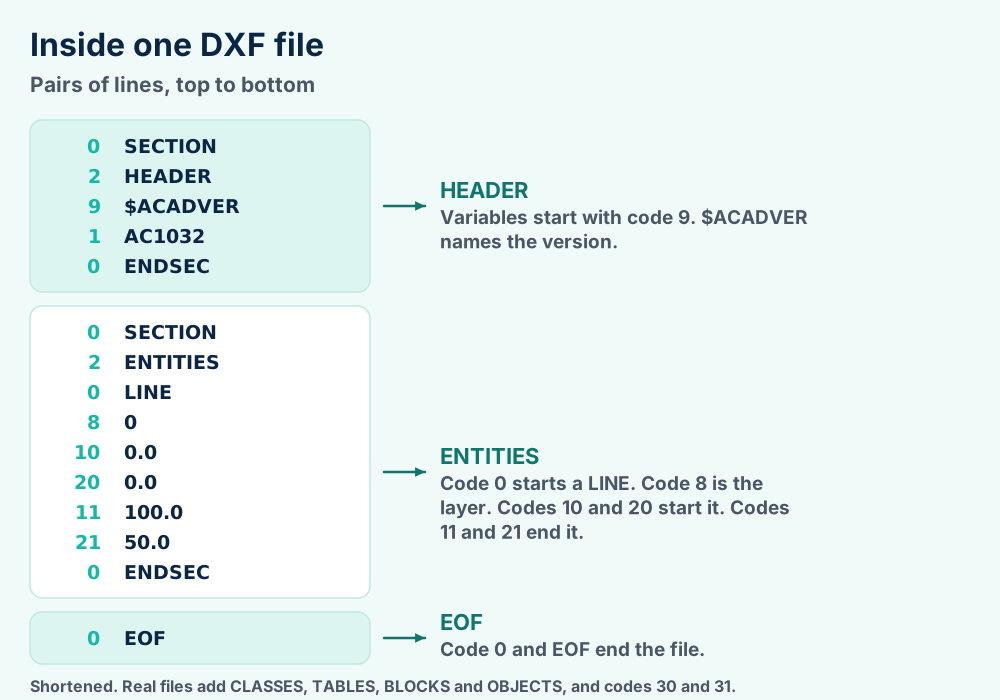
Code 0 starts every new item. It names a section, a table entry, an entity or the end of the file. A LINE entity lists a start point under codes 10, 20 and 30 and an end point under codes 11, 21 and 31, says the LINE reference.
| Section | What it holds |
|---|---|
HEADER | General drawing information as variable and value pairs. Every variable starts with code 9 and a name that begins with $ |
CLASSES | Application defined classes |
TABLES | Symbol tables including LAYER, LTYPE, STYLE, VIEW and VPORT |
BLOCKS | Block definitions that INSERT entities reuse |
ENTITIES | The drawing itself. Lines, arcs, circles, text, hatches and polylines |
OBJECTS | Data that has no shape, like dictionaries and layouts |
THUMBNAILIMAGE | A preview picture. The only optional section |
Every section opens with code 0 and the word SECTION. Code 2 then names it. Code 0 and the word ENDSEC close it, as Autodesk's file structure page shows.
The file ends with code 0 and the word EOF. The PRONOM signature for ASCII DXF uses the section markers together with that closing pair.
DXF files come in two encodings. Autodesk treats the plain words DXF file as the ASCII version. Binary DXF holds the same information in a different form.
| Trait | ASCII DXF | Binary DXF |
|---|---|---|
| Starts with | Pairs of text lines | A 22 byte sentinel that reads AutoCAD Binary DXF then CR, LF, SUB and NULL |
| Size | The baseline | About 25 percent smaller |
| Speed in AutoCAD | The baseline | About five times faster to read and write |
| Precision | Set by decimal places, up to 16 | Keeps the accuracy of the drawing database |
| Comments (code 999) | Allowed | Not used |
| Readable in Notepad | Yes | No. Only the sentinel reads as text |
| Introduced | With the first AutoCAD | AutoCAD Release 10. Earlier releases cannot read it |
Binary DXF keeps the .dxf extension. Autodesk says AutoCAD spots a binary DXF file by the sentinel when you open or insert it. Autodesk's binary DXF page has the byte layout.
0 then SECTION. A code 999 comment line can come first.$ACADVER. The code on the next line after group code 1 is the version.0 then EOF.Leave the text alone in a plain editor. Programs read the file in pairs. One deleted line shifts every pair after it. Change the drawing in a CAD program and save a new DXF file instead.
Autodesk Viewer, DWG TrueView, LibreCAD and FreeCAD all open DXF files at no cost. Start with the browser viewer when you only need to look.
Three jobs bring people to DXF files. You want to look at the drawing, measure it or edit it. Every job calls for a different program.
| Software | Cost | Why select it |
|---|---|---|
| Autodesk Viewer | Free in a browser | Autodesk's viewer page lists DXF and says the viewer works with over 80 file types |
| DWG TrueView | Free, Windows only | Autodesk lists DWG and DXF for it. Nothing to buy |
| LibreCAD | Free, open source | LibreCAD's FAQ lists DXF versions R12, R14, 2000, 2004 and 2007 |
| FreeCAD | Free, open source | FreeCAD's feature list names DXF and DWG among its formats |
| Inkscape | Free, open source | Inkscape 1.2 release notes say DXF import supports more features |
| Text editor | Built in | Shows the group codes and the version. Does not draw the shape |
Autodesk Viewer in a browser. Load the file and zoom.
LibreCAD or FreeCAD. Both import the lines as editable geometry.
Autodesk's viewers page explains the split. Autodesk Viewer and AutoCAD Web work in the browser. DWG TrueView and Design Review are Windows downloads.
LibreCAD describes itself as a free open source CAD application for Windows, Apple and Linux. Its FAQ adds a warning. LibreCAD does not support every Autodesk DXF feature.
AutoCAD itself opens both kinds of DXF file. Autodesk says OPEN and INSERT detect a binary DXF file from the sentinel. You never choose the type by hand.
Browser viewers need an upload. Keep client drawings with private dimensions in an offline program like LibreCAD.
If a double click shows an error instead of a prompt, our Windows error guides start from the message you see. Mac readers can start with our macOS guides.
Notepad gives you a harmless first look. Open the DXF file in it. If the first pairs read 0 then SECTION you hold a real DXF file and the rest of this page applies.
Open the DXF file in Notepad and look at its first and last lines. They show whether the file or the program is at fault.
Most failures trace back to the program rather than the DXF file. Test the quick causes before the rare ones.
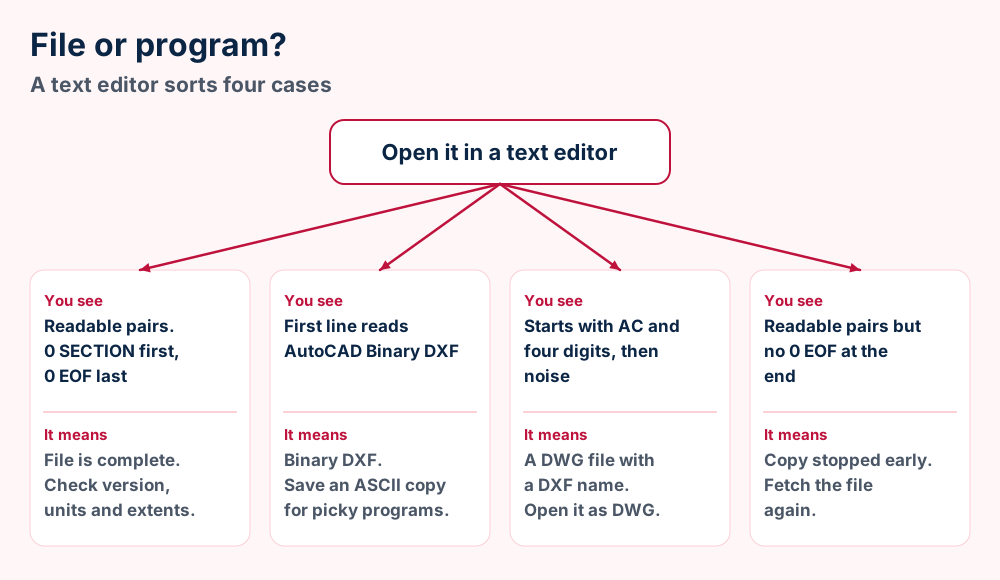
Downloads sometimes save a web page under the DXF file name. A first line that begins <!DOCTYPE html> gives it away. Download the link again after you sign in to the supplier site.
0 and SECTION.0 and EOF.$ACADVER. Section 6 decodes the value.A blank window does not mean an empty file. Entities can sit far from the origin or on a layer that is switched off. Zoom to extents before you decide anything.
| Cause | What the file holds | What to do |
|---|---|---|
| Layer is off | Autodesk says a negative color number (code 62) means the layer is off | Switch the layer on |
| Paper space only | Entities carry code 67 with value 1. Model space entities carry 0 or no code | Open the layout tab |
| Far from the origin | The header lists the drawing corners as $EXTMIN and $EXTMAX | Zoom to extents |
| Wrong scale | Coordinates are plain numbers with no unit | See section 7 |
Autodesk documents codes 62 and 67 on its common entity codes page. The header corners come from the header variable list.
Skip paid DXF repair offers. A file without its EOF pair lacks data. No repair tool restores missing lines. Download a new copy or ask the sender to export again.
The $ACADVER value in the HEADER section names the version. AC1032 is the newest code in Autodesk's table and matches the AutoCAD 2018 format.
Every DXF file carries a version code. Look for the header pair 9 then $ACADVER. The value after group code 1 is the code.
| $ACADVER code | AutoCAD release |
|---|---|
AC1006 | Release 10 |
AC1009 | Release 11 and Release 12 |
AC1012 | Release 13 |
AC1014 | Release 14 |
AC1015 | AutoCAD 2000 |
AC1018 | AutoCAD 2004 |
AC1021 | AutoCAD 2007 |
AC1024 | AutoCAD 2010 |
AC1027 | AutoCAD 2013 |
AC1032 | AutoCAD 2018 |
Autodesk lists these codes with the $ACADVER variable on its header variable page. The Library of Congress record counted 32 chronological DXF versions in PRONOM in 2024.
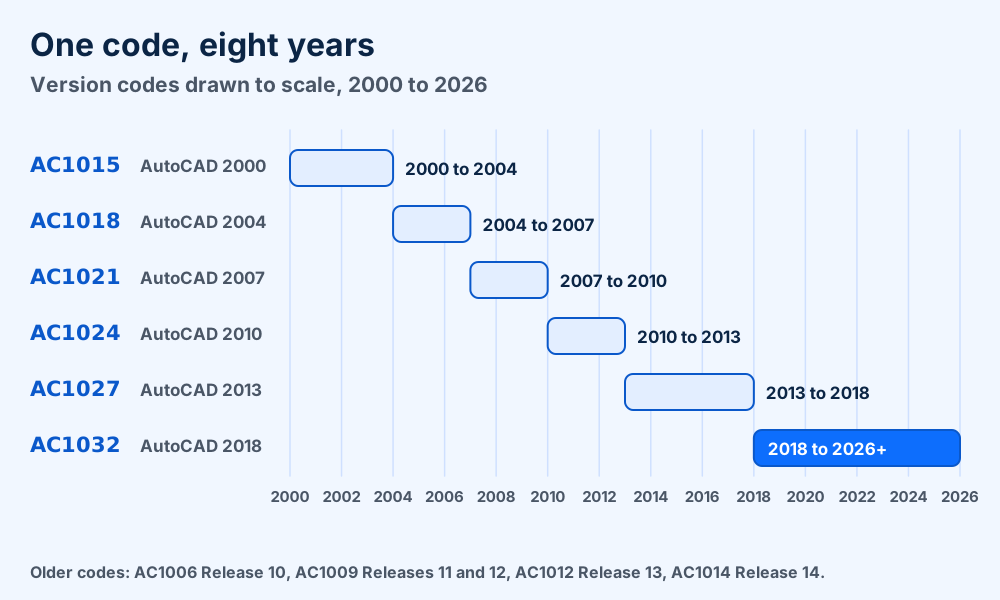
The newest code lasts longest. Autodesk says AutoCAD 2019 through 2026 still save drawings in the AutoCAD 2018 format. Expect AC1032 in DXF files from those releases. Autodesk's native format note has the wording.
Binary DXF began with Release 10. Wikipedia dates Release 10 to October 1988. Earlier releases wrote ASCII only.
Open the file in AutoCAD and save a copy in an earlier DXF format. Autodesk documents an AutoCAD R12/LT2 DXF option. Save under a new name, because older formats strip detail.
Autodesk lists these limits on its page on saving to earlier formats. Test the old copy before you send it.
DXF coordinates are plain numbers with no unit attached. A header variable names the intended unit. A size ratio of 25.4 or 1000 names the mix up.
Look at the sample in section 3. A LINE ends at 100.0 and 50.0. Those numbers do not say inches or millimeters. The unit lives in the header.
Autodesk's header reference lists $INSUNITS under group code 70. It describes the variable as the default drawing units for DesignCenter blocks. The same page lists $MEASUREMENT, where 0 means English and 1 means Metric.
| Value | Unit |
|---|---|
0 | Unitless |
1 | Inches |
2 | Feet |
4 | Millimeters |
5 | Centimeters |
6 | Meters |
21 | US Survey Feet |
The full table goes from 0 to 24 and includes microns, yards and light years. A value of 0 means the file names no unit. Check the import dialog for a unit setting and set the one you expect.
LibreCAD's setup guide says the default unit is millimeter and that you can change it in preferences.
| Ratio you see | What went wrong |
|---|---|
| 25.4 times off | Inches were read as millimeters, or the reverse |
| 1000 times off | Meters were read as millimeters, or the reverse |
| 10 times off | Centimeters were read as millimeters, or the reverse |
| 304.8 times off | Feet were read as millimeters, or the reverse |
Measure one edge you know and divide. The ratio points to the pair of units. Scale the drawing in your program or ask the sender to export it with the unit set.
The RIT laser cutting guide says to draw a box of known size and scale the design until the outer dimensions match.
Empty window with no error? Use Zoom to Fit first. A drawing in the wrong unit can sit far off screen or shrink to a dot.
Open the DXF file in a CAD program and save or export it in the format you need. AutoCAD handles DXF to DWG. LibreCAD, FreeCAD and Inkscape cover the free routes.
Every conversion starts in CAD software. You open the DXF file there and save or export it in the format you need.
| Conversion | How it works | What you get |
|---|---|---|
| DXF to DWG | AutoCAD opens the DXF file and saves it as DWG, says Autodesk | The working format for AutoCAD |
| DWG to DXF | AutoCAD saves DXF files. Options set ASCII or binary and decimal places | An exchange copy for other programs |
| DXF to PDF | LibreCAD's setup guide says output can be saved as PDF | A flat drawing you can share. See our PDF file page |
| DXF to SVG | Inkscape imports DXF and saves SVG | Vector paths for editing or cutters |
| DXF to STEP, IGES or STL | FreeCAD lists DXF, STEP, IGES and STL. Build a solid from the outline first | A 3D model. See STP files, IGS files and STL files |
| DXF to plotter files | Plotter software writes the instructions | See PLT files and HPGL files |
Exporting DXF files has choices. Autodesk's DXF options let you choose ASCII or binary and set the decimal places. You can also export only the selected objects. The Saveas options page lists them.
Lower precision gives smaller files. Binary gives smaller files again. Keep a high precision when the DXF file feeds a cutter that needs tight fits.
Saving a drawing as a picture fixes the lines into pixels. If you go that way, our PSD files, PCX files and TGA files pages explain the raster side.
| Next step | Format to export | Guide |
|---|---|---|
| Share a print | See PDF files | |
| Hand outlines to a sign maker | Vector art | See AI files, EPS files, CDR files and PostScript files |
| Review a design on video | Screen recording | See MP4 video, MKV video and AVI video |
| Send a flat job to a shop | DXF | Section 9 lists the checks |
Be careful with upload sites. DXF files can hold customer designs. Free web converters want the design uploaded to their servers. Keep confidential parts on your own computer.
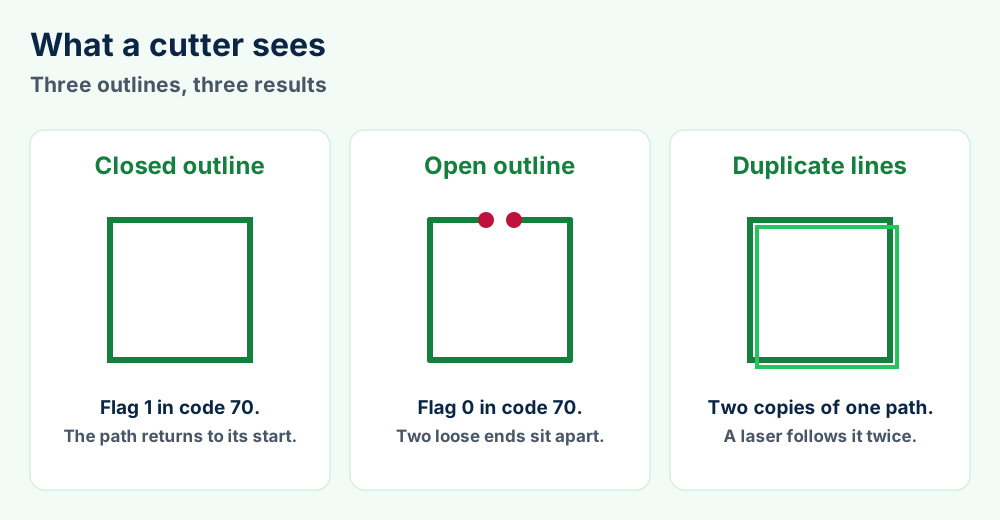
Draw flat geometry at true size with closed outlines and no stacked duplicates. One university makerspace names DXF as the file its laser and waterjet need.
The UIC makerspace names DXF as the vector format its laser and waterjet need. The same page warns that projected faces in an engineering drawing do not get cut. Export the face as DXF instead.
That advice matches how the DXF format stores a shape. A LWPOLYLINE keeps an X and a Y for every vertex. That suits flat outlines. Autodesk's LWPOLYLINE page lists the codes.
| Job | File the makerspace names |
|---|---|
| Laser cutter | DXF |
| Waterjet | DXF |
| Vinyl cutter | DXF or SVG works best |
CNC software varies. Ask your shop for its DXF notes before you send a job. The RIT guide says color sets the cut and engrave order in its laser software.
Pen plotters read a different kind of file. Our PLT guide and HPGL guide cover those plotter instructions.
Hatches and text need care. A cutter follows lines. Convert text to outlines and explode hatches in your CAD program. Or ask the shop what it accepts.
DXF holds 2D drawings. STEP holds exact 3D solids. IGES is the older exchange format. STL holds triangles and HPGL holds plotter paths.
Teams send a DXF file when the receiver needs a drawing. They send STEP when the receiver needs a 3D solid. They send STL when the receiver prints the part.
| Format | What it stores | Best for |
|---|---|---|
| DXF | Lines, arcs, text, layers and blocks, plus some 3D entities | Drawings and cutter jobs |
| DWG | The same drawing data in AutoCAD's binary format | Editing in AutoCAD |
| STEP | Exact 3D CAD models as clear text. See our STP file guide | Trading solids between CAD vendors |
| IGES | The older CAD exchange text format. See our IGS file guide | Old CAD systems |
| STL | Triangles only. See our STL file guide | 3D printing |
| HPGL | Plotter language. See our HPGL file guide | Pen plotters |
| PLT | Plot files that mostly hold HPGL. See our PLT file guide | Plotter jobs |
Your DXF file holds a drawing and not a mesh. STL triangles describe a surface rather than an outline. They make a poor cutter file.
DXF files are also not solids. STEP keeps exact surfaces and assembly data. The STP file page explains how that works.
Plotter files differ again. They hold pen moves rather than named entities. The PLT page and HPGL page tell you how to read them.
The job is a flat outline or a drawing. Cutters and most CAD programs read it.
The receiver needs the 3D solid. Exact surfaces and assemblies travel with it.
Not sure what a file extension means? Our file format primer explains the idea before you dig into one format.
The DXF format is Autodesk's tagged data exchange format. IANA lists it as image/vnd.dxf and records no magic number.
Autodesk owns the format and documents it in the DXF Reference. The Library of Congress records that the documentation is published under a Creative Commons license. Developers start there.
| Item | Value |
|---|---|
| Extension | .dxf |
| Stands for | Drawing Exchange Format. Autodesk help says Drawing Interchange File |
| Owner | Autodesk |
| First release | December 1982, with the first AutoCAD |
| Encodings | ASCII and binary |
| Binary sentinel | AutoCAD Binary DXF then CR, LF, SUB and NULL (22 bytes) |
| Sections | HEADER, CLASSES, TABLES, BLOCKS, ENTITIES, OBJECTS, THUMBNAILIMAGE |
| Pair layout | Group code on one line, value on the next |
| Header variables | Code 9, the name with a dollar sign, the value code, then the value |
| First pair | 0 then SECTION |
| Last pair | 0 then EOF |
| Version label | $ACADVER under group code 1 |
| Newest code in the table | AC1032, AutoCAD 2018 |
| Media type | image/vnd.dxf, listed in the IANA registry |
| PRONOM | fmt/63 for generic ASCII DXF |
| Magic number | None recorded. IANA says only the extension identifies it |
| Reference license | Creative Commons Attribution NonCommercial ShareAlike 3.0 |
Treat this table as the short version. The DXF Reference goes much deeper. Autodesk publishes it at its DXF format overview.
Many binary formats start with fixed bytes. The IANA record for image/vnd.dxf says DXF files can only be identified by their extensions. Programs lean on the extension and the opening section pair.
The PRONOM signature does better. It looks for code 0 and SECTION, a code 2 section name, ENDSEC and a closing code 0 and EOF near the end of the file.
Check both ends of the file. Section 5 separates file faults from program faults.
Measure the ratio. Section 7 names the unit from the factor.
Need triangles for a printer instead of a drawing? STL files describe the triangle format a slicer expects.
Did the sender mention a 3D solid? STP files and IGS files cover the CAD formats that carry one.
Does your plotter want a different file? The PLT file guide and the HPGL file guide cover plotter jobs.
Does the fault sit in the PC and not the drawing? Windows error guides list fixes by error message.
Still learning how extensions work? What a file format is explains the ideas. Our file format index and the what-is hub list every guide. The category list sorts them by topic.
Still holding a DXF file that none of this explains? Send us the first two lines and the file size and we will tell you what it is. You can also start from the FileFix home page.