What Is a BMP File? The Windows Bitmap, Why It Is So Big and How to Open It
BMP files hold raster images in the Windows bitmap format. Free software opens them in seconds. Jump to your question below, or work through it in order.

BMP files hold raster images in the Windows bitmap format. Free software opens them in seconds. Jump to your question below, or work through it in order.
BMP files are raster images in the Windows bitmap format. Every BMP file opens with the letters BM and stores pixels in rows, mostly with no compression. Microsoft documents the layout in its GDI pages.
BMP file size follows plain math. Width, height and bit depth decide it and every row pads to a 4 byte boundary. A 1920 by 1080 picture at 24 bits takes 6,220,854 bytes.
Free software opens BMP files in seconds. Paint, Preview and GIMP all read them. Convert to PNG when size matters because PNG keeps every pixel.
An old photo folder, a Windows icon pack or a retro game dump hands you a file that ends in .bmp. It opens on one computer and fails on the next.
Every BMP file holds one raster image in the Windows bitmap format. The name is short for bitmap. The first two bytes of the file spell BM to prove it.
Microsoft documents the layout in its GDI pages. BMP files start with a file header and then an information header. Color table and pixel data follow. See Microsoft's bitmap storage page for the order.
Most BMP files store pixels raw. The Library of Congress says most are uncompressed and that 16 and 32 bit files never use compression. That makes the format quick to read and heavy on disk.
Two names cover one family. DIB means device independent bitmap. RFC 7903 lists both .bmp and .dib as extensions for the image/bmp media type.
BMP files are Windows bitmap images that begin with the letters BM. Rows of pixels pad to 4 byte boundaries. Most BMP files carry no compression at all.
.bmp, also .dib42 4Dimage/bmp, registered in RFC 7903Came here for a game or print format? TGA files and TIFF files cover those jobs. Section 8 compares them with a BMP file.
BMP files store every pixel raw. Size equals header bytes plus padded row bytes times height. A 1920 by 1080 picture at 24 bits takes 6,220,854 bytes.
BMP files are big because they store every pixel raw. Nothing shrinks the data unless the file uses RLE. RLE exists only for 4 and 8 bit pictures.
The size math is short. Microsoft gives the row size as the width in bits, rounded up to the next multiple of 32 and then divided by 8. The BITMAPINFOHEADER page prints the formula.
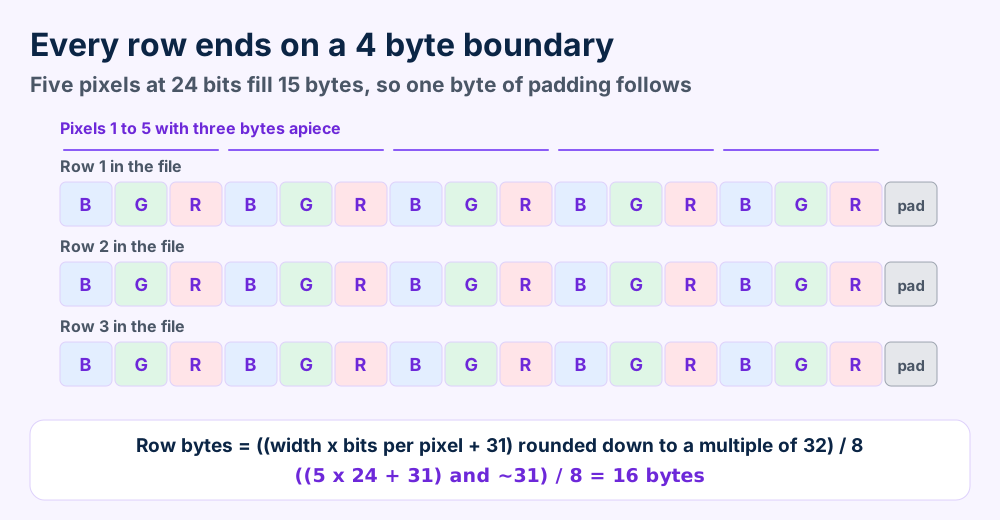
Row padding adds a few bytes. A 24 bit picture one pixel wide holds 3 bytes of color and 1 byte of padding in every row. A width of 4 needs none, says the Wikipedia BMP article.
| Picture | Row bytes | Pixel bytes | File bytes |
|---|---|---|---|
| 1920 by 1080 at 24 bits | 5,760 | 6,220,800 | 6,220,854 |
| 1920 by 1080 at 32 bits | 7,680 | 8,294,400 | 8,294,454 |
| 4000 by 3000 at 24 bits | 12,000 | 36,000,000 | 36,000,054 |
| 4096 by 4096 at 24 bits | 12,288 | 50,331,648 | 50,331,702 |
| 100 by 100 at 8 bits | 100 | 10,000 | 11,078 |
| 100 by 100 at 1 bit | 16 | 1,600 | 1,662 |
Look at the last row. A 1 bit picture of 100 pixels across needs 13 bytes of data in a row. Padding lifts it to 16.
Color depth drives the rest. A true color picture stores 3 bytes for every pixel. An indexed picture stores one small number per pixel and keeps the colors in a table.
The image size field can hold 0 for uncompressed pictures, says Microsoft. A reader then works out the size from the width, the height and the row formula.
The row formula also rescues damaged files. Multiply the stride by the height and add the header sizes. The total should match the file size from your folder view.
Windows opens BMP files with their built in codec. Preview opens it on a Mac. GIMP and ImageMagick cover editing and batch jobs for free.
Windows and macOS open a BMP file without extra software. Free editors add export choices and batch tools.
Microsoft lists a native BMP codec in the Windows Imaging Component and names .bmp and .dib as its extensions. See the WIC BMP overview. Programs built on that codec read the format by default.
| Software | Type | What to know |
|---|---|---|
| Paint | Built into Windows | Wikipedia lists BMP among the formats Paint saves. Others are JPEG, GIF, PNG and TIFF |
| WIC apps | Windows programs | Microsoft ships a native BMP decoder and encoder in WIC |
| Preview | Built into macOS | Opens BMP files and exports to BMP according to Wikipedia |
| GIMP | Free image editor | Export dialog offers an RLE option and 16, 24 and 32 bit RGB formats |
| ImageMagick | Command line tool | Reads and writes BMP. Writes version 4 by default and BMP3 or BMP2 for older versions |
Sources sit in the Wikipedia Paint article, the Wikipedia Preview article, the GIMP BMP export page and the ImageMagick format table.
ImageMagick also lists DIB as a BMP file without the file header. Use that tag only when you hold raw DIB data.
Mac owners double click the BMP file and Preview draws it. The macOS guides help when that fails.
Double click the BMP file. Windows and Preview both draw it at once.
Open it in GIMP or Paint. Use ImageMagick when a folder waits.
Windows users who see an error at a double click can start from the message in the Windows error guides.
Need layers? BMP files are flat. Layered work belongs in PSD files instead.
Suspect the program before the BMP file. Read the first two bytes and the header size, then try a second program.
BMP files that refuse to open have one of five faults. Four sit in the program or the label on the file and one sits in the data.
Pictures at 16 and 32 bits can use bit fields. Those files need a reader that parses the three masks after the header.
The size check catches most real damage. Section 2 gives the formula and section 5 shows where the numbers live.
Start with the cheap test. Open the BMP file in two programs before you suspect the data.
42 4D, the letters BM.28 00 00 00 means 40 and is the common form.Microsoft documents the signature and size fields in the BITMAPFILEHEADER page. The values 0x4d42 and the 14 byte layout come from there.
Files that fail all four checks lost data in transit or on disk. No tool can invent pixels that never arrived. Fetch the file again or ask the sender for a new export.
Still no luck? Send us the error text with the file size. Reports from readers shape our next guides.
BMP files hold a 14 byte file header, an info header, an optional color table and pixel rows. The header size field tells readers which variant they face.
Every BMP file is a stack of short blocks. Microsoft lists them in a fixed order.
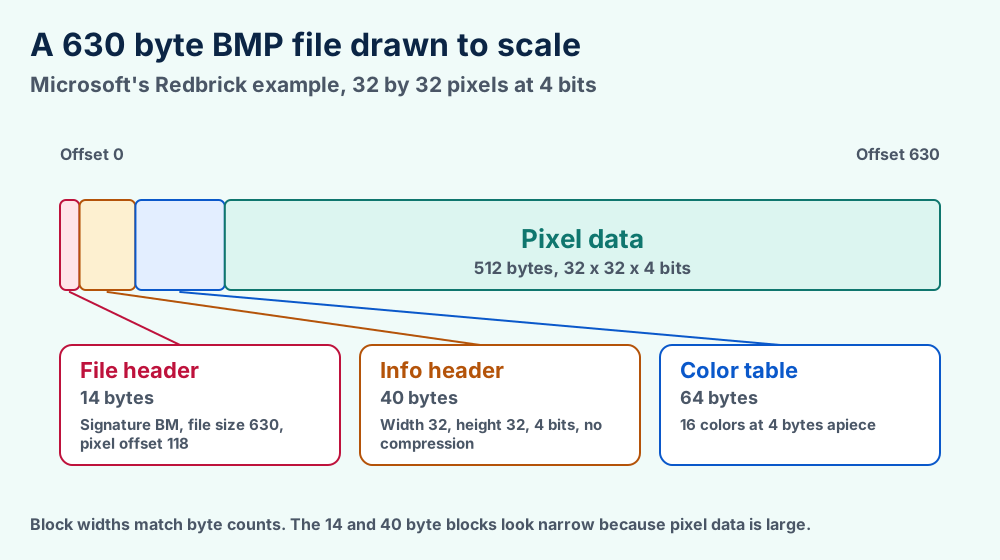
A 14 byte file header comes first. An information header follows and then a color table when the picture needs one. Pixel data fills the rest. Version 5 files can carry profile data after the pixels.
| Offset | Field | What it holds |
|---|---|---|
0 | Signature | The letters BM, 0x4D42 |
2 | File size | Size of the BMP file in bytes |
6 and 8 | Reserved | Two fields, both zero |
10 | Pixel offset | Distance from the first byte to the first pixel |
14 | Header size | 40 for BITMAPINFOHEADER |
18 and 22 | Width and height | Both in pixels. The sign of the height sets row order |
26 | Planes | Always 1 |
28 | Bits per pixel | 1, 4, 8, 16, 24 or 32 |
30 | Compression | 0 means none. Section 11 lists the others |
34 to 49 | Image size and resolution | Pixel bytes and pixels per meter, across and down |
46 and 50 | Colors used and important | Zero means the full table |
Microsoft's Redbrick example proves the offsets. Its file header records a size of 630 bytes and a pixel offset of 118. That equals 14 plus 40 plus a 64 byte table.
Pictures with bit fields add three masks right after the header. Masks mark which bits of a pixel hold red, green and blue.
Pixel offset matters because it skips masks, tables and padding that a reader does not know. A good viewer jumps to that spot instead of guessing.
Resolution fields store pixels per meter across and down. Windows GDI never reads them. Wikipedia gives 2835 pixels per meter as the match for 72 dots per inch.
| Depth | Colors | How pixels are stored |
|---|---|---|
| 1 bit | 2 | Index into the color table. Eight pixels share one byte |
| 4 bit | 16 | Index into the color table. Two pixels share one byte |
| 8 bit | 256 | Index into the color table. One pixel fills one byte |
| 16 bit | 32,768 or 65,536 | Direct color. Uncompressed files use RGB 555 and bit fields allow RGB 565 |
| 24 bit | 16,777,216 | Three bytes in blue, green, red order |
| 32 bit | 16,777,216 plus alpha | Four bytes. The high byte stays unused unless masks or a V5 header say otherwise |
Microsoft states the 16 bit rules on the BITMAPINFOHEADER page. The color counts follow from the bit counts.
Pictures at 8 bits or fewer carry a table of 4 byte entries called RGBQUAD. The fields go blue, green, red and then one reserved byte, according to the RGBQUAD page.
A zero in the colors used field means the table holds every color the depth allows. A 4 bit picture then carries 16 entries and an 8 bit picture carries 256.
Your BMP file is not damaged. A positive height stores rows bottom up and a negative height stores them top down. Pixel bytes start with blue.
Your picture appears flipped or the reds look blue. Nothing is damaged. BMP files store two details in ways that surprise newer programs.
The first is row order. Microsoft says a positive height marks a bottom up picture with its origin at the lower left. A negative height marks a top down picture with its origin at the upper left.
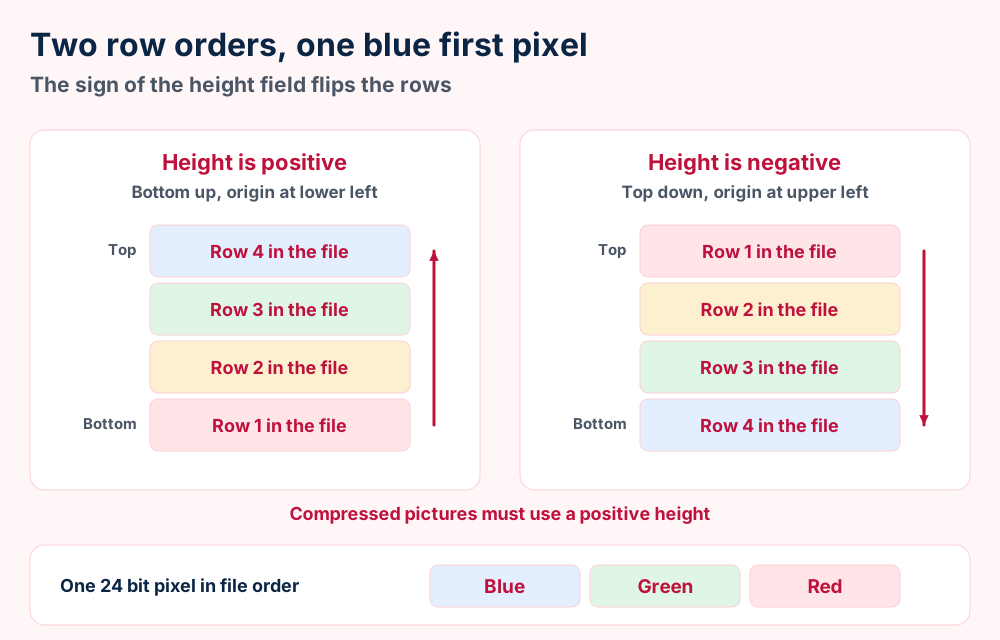
Compressed pictures must use a positive height, according to the BITMAPINFOHEADER page. Top down files are therefore always uncompressed.
The second detail is byte order. A 24 bit pixel stores blue first and red last. Microsoft says the RGBQUAD order matches 24 and 32 bit pixel data, which is the reverse of the usual RGB order.
A reader that assumes red first swaps the two colors. Skin looks blue and skies look orange.
Writers can choose either row order. Both are valid. Programs that use top down buffers write negative heights, which is why you meet both kinds.
Yes, in 32 bit BMP files with a version 4 or version 5 header and an alpha mask. Older headers leave the high byte unused. Many programs ignore alpha anyway.
A BMP file can hold transparency but most do not. The answer depends on the header version and on the program that reads the file.
The old 40 byte header has no alpha field. Microsoft says the high byte of every 32 bit pixel goes unused with no compression. See the BITMAPV5HEADER page.
Version 5 headers can point at an ICC profile. Microsoft says the profile is either linked by file name or embedded in the file after the pixels.
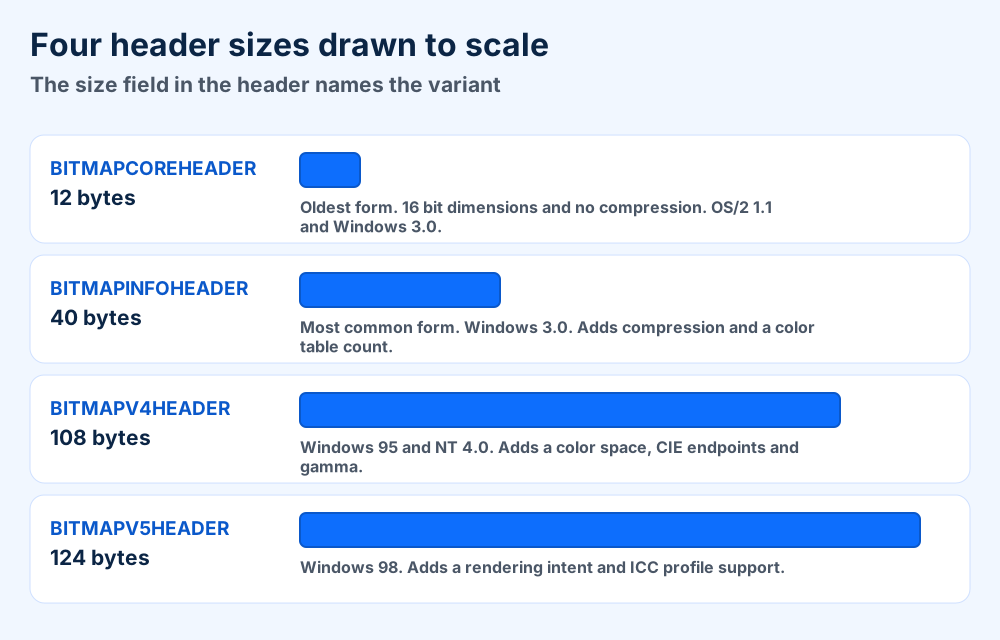
Newer headers add what the old one lacks. Version 4 declares masks for red, green, blue and alpha. Version 5 adds a rendering intent and profile fields.
| Case | Result |
|---|---|
| 32 bit, no compression, old header | High byte unused, per the BITMAPV5HEADER page |
| WIC reading 16 or 32 bit BMP files | Alpha ignored, because many old files hold invalid data there |
| WIC on Windows 8 and later | Reads 32 bit files with a V5 header and valid alpha |
| GIMP and Chrome | Honor a declared alpha mask, says Wikipedia |
| WIC writing alpha | Needs the EnableV5Header32bppBGRA option set to true |
The WIC overview covers the first three rows. Wikipedia covers GIMP and Chrome.
GIMP names the choice in its export dialog. The 32 bit choices read A8 R8 G8 B8 for alpha and X8 R8 G8 B8 for an unused byte.
Need clear backgrounds? Save the picture as PNG. The PNG standard defines an optional alpha channel for every color type.
Use PNG for storage and sharing. Use BMP files only when a program or device names them. JPEG suits photos and TIFF suits print work.
Choose the format by the job. BMP files win only when the receiving program names them.
| Format | Pixel loss | Best for |
|---|---|---|
| BMP file | None, even with RLE | Windows programs and tools that name BMP |
| PNG | None | Screenshots, graphics, archives and the web |
| JPEG | Yes, lossy | Photos where small size matters. See JFIF files |
| TIFF | Depends on the compression | Print and scanning. See TIFF files |
| TGA | None, with optional RLE | Game and video work. See TGA files |
PNG is the usual swap. The W3C PNG standard describes it as lossless and well compressed, with an optional alpha channel.
The Library of Congress rates the BMP file unsuited for general web use. Browsers still recognize uncompressed files. Viewers and editors read them widely.
A program or device names it. Windows tools and older software still ask for the format.
You store or share the picture. PNG keeps every pixel in a smaller file.
Many DOS paint programs wrote PCX files before BMP spread. Game artists pack textures into DDS files instead.
Camera raw files hold sensor data. BMP files hold finished pixels. Develop raw files first. The raw guides cover DNG files, ARW files, CR2 files, NEF files, RAF files and CRW files.
Logos and drawings scale without blur only as vectors. Keep them in AI files, EPS files, CDR files or PDF files and not in a BMP file.
Open the BMP file in Paint or Preview and save it as PNG. ImageMagick converts a full folder with one command. PNG keeps every pixel.
Three free tools convert a BMP file to PNG without losing a pixel. Start with the one already on your computer.
ImageMagick lists BMP as readable and writable. Open a terminal inside the folder and enter the command below.
magick mogrify -format png *.bmp
The command writes a PNG file next to every BMP file and leaves the originals alone. Test it on copies first.
Going the other direction means adding layers. Open the BMP file in an editor and save PSD files when you plan to add layers.
Keep the BMP file while a program needs it. Archive a PNG copy when the project ends because it stores the same pixels in less space.
Keep the BMP file while a tool in your workflow asks for it. Store a PNG copy once the work is done.
Size is the first reason. A thousand full screen captures at 1920 by 1080 and 24 bits take 6,220,854,000 bytes. That is about 6.2 GB for pictures you view once. Screen recordings belong in video files like MP4 files instead of thousands of frames.
Plain structure is the second reason. The Library of Congress notes that the BMP file has no embedded metadata and no patent concerns. Neither point helps when you need dates or captions.
A tool still lists it. Check the import dialog of the program before you delete the source.
The project is finished. Archive a PNG copy and confirm that it opens.
Questions about extensions in general go to the guide to file formats. The what is hub covers software and services.
The BMP file format is the Windows bitmap layout with 14 byte file headers and variable info headers. RFC 7903 registers image/bmp for it.
This section collects the checkable facts. Every value comes from Microsoft documentation or a named public record.
.bmp and .dibimage/bmp, RFC 7903, September 201642 4D, the letters BM| Value | Name | Meaning |
|---|---|---|
0 | BI_RGB | Uncompressed pixels |
1 | BI_RLE8 | RLE for 8 bit pictures |
2 | BI_RLE4 | RLE for 4 bit pictures |
3 | BI_BITFIELDS | Uncompressed with color masks for 16 and 32 bit |
4 | BI_JPEG | JPEG data for pass through |
5 | BI_PNG | PNG data for pass through |
6 | BI_ALPHABITFIELDS | Bit fields with alpha, named by Wikipedia |
Values 11 to 13 mark CMYK variants. MS-WMF lists them for Windows Metafiles. See the MS-WMF compression page.
| Bytes | Name | Notes |
|---|---|---|
12 | BITMAPCOREHEADER | Oldest form with 16 bit dimensions and no compression |
40 | BITMAPINFOHEADER | Windows 3.0 and still the most common form |
108 | BITMAPV4HEADER | Windows 95 and NT 4.0. Adds color space and gamma |
124 | BITMAPV5HEADER | Windows 98. Adds rendering intent and ICC profiles |
Wikipedia dates the 40 byte info header to Windows 3.0 in 1990. It adds that Windows NT brought bit fields for 16 and 32 bit pictures in 1993.
Version 4 arrived with Windows 95 and Windows NT 4.0. Version 5 followed with Windows 98, according to the Library of Congress and Wikipedia.
Sources disagree on whether Windows or OS/2 created the device independent bitmap. This page states no origin for that reason.
Icons and cursors reuse the structure. Wikipedia says their images begin with a BITMAPINFOHEADER.
BMP files are not always uncompressed. RLE8 and RLE4 exist. Both stay lossless.
BMP files do not always lack alpha. Version 4 and version 5 headers declare an alpha mask. Many programs ignore it.
BMP files do not store red first. Pixel bytes start with blue and then go green and red.
Microsoft supplies the structures, the row formula and the compression values. The Library of Congress record and RFC 7903 supply the media type and the signature.
Wikipedia supplies the extra header sizes and the history. The file formats primer defines the shared vocabulary. The format index lists every FileFix guide.
Check the height sign and byte order. Section 6 covers flips and swapped colors.
Test the signature and the size. Section 4 separates damaged files from weak programs.
Did a DOS era paint program save the picture? The PCX file guide covers that older bitmap.
Does your game engine want packed textures? The DDS file guide shows how graphics cards store them.
Need clear backgrounds and a game friendly format? The TGA file guide covers alpha and RLE.
Is the picture a print scan? The TIFF file guide covers pages and CMYK.
Does the fault sit in your computer and not in the picture? The Windows error guides begin with the message you see.
Unsure what an extension tells you? What a file format is starts from zero. Tell us about your file when nothing here matches.