What Is a TIFF File?The Tagged Image Format, and Why It Is So Large
TIFF files hold raster images in the Tagged Image File Format that Aldus began in 1986. Free software opens them in seconds. Jump to your question below, or work through it in order.
By Neeraj Singh ~21 min Updated Nov 2026 Checked against the TIFF 6.0 spec, Library of Congress and libtiff
TIFF files hold raster images in the Tagged Image File Format. Aldus began the format in 1986 and Adobe now controls it. Every TIFF file stores its images behind a header and a list of tags.
What sets a TIFF file apart is choice. One file can use no compression or lossless or lossy compression. It can hold many pages and 16 bit color and CMYK. That freedom explains the size.
Free software opens TIFF files in seconds. Windows Photos and Preview on a Mac read them and so does GIMP. Section 3 lists more.
1What Is a TIFF File?Tagged Image File Format, Explained in Plain Words
Scanners, print shops and photo libraries hand you files that end in .tif or .tiff. Most browsers refuse to show them and many of the files weigh far more than a JPEG of the same picture.
Every TIFF file holds raster images in the Tagged Image File Format. The Library of Congress format entry calls TIFF a wrapper for different bitstream encodings of bit mapped images.
Aldus first published a TIFF specification in 1986. Adobe now controls it after buying the PageMaker program from Aldus.
Two extensions cover one format. Both names open the same way in every program. The TIFF 6.0 standard recommends the short form according to the same Library of Congress entry.
TIFF files store raster images behind an eight byte header and a list of tags. The tags describe size, color and compression. Pixels sit in strips further down.
TIFF file format at a glance
TIFF file format at a glance
TIFF file extensions
.tif and .tiff
Full name
Tagged Image File Format
What a TIFF file is
Raster image container
First published
1986 by Aldus
Current revision
6.0, final on 3 June 1992
Specification owner
Adobe, through the Aldus PageMaker deal
Byte order
II little endian or MM big endian
Header size
8 bytes
Magic number
42, stored right after the byte order mark
Directory entry
12 bytes per tag
Compression
None, LZW, PackBits, Deflate, JPEG and CCITT
Pages
Many images in one TIFF file
Size limit
About 4 GB for classic TIFF files
Big file version
BigTIFF with 64 bit offsets
Media type
image/tiff
Mac file type
TIFF
Came here for camera files?DNG files and Canon CR2 files sit on a TIFF skeleton. Section 5 shows the structure they share.
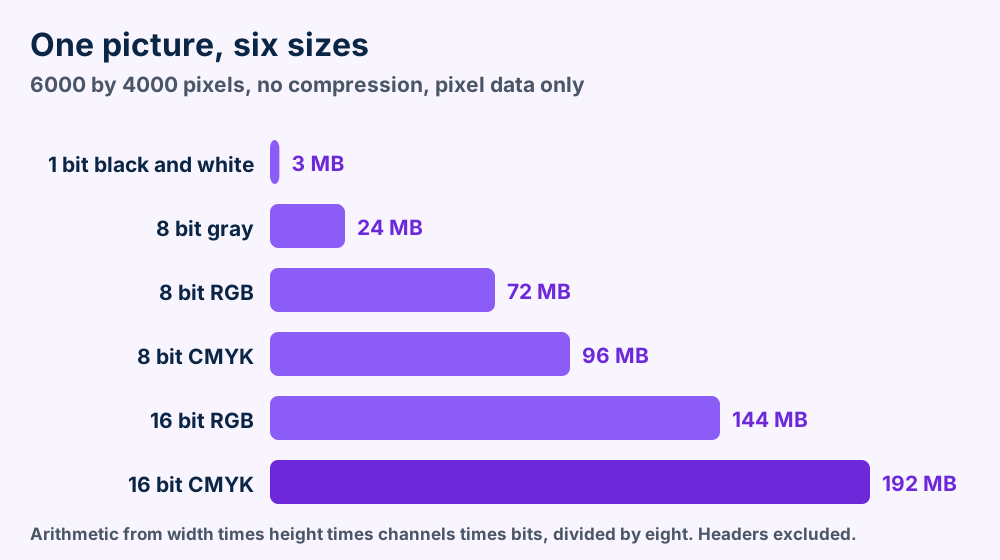
Your TIFF file is big because it keeps every pixel at full depth and can skip compression. A 24 megapixel RGB picture at 8 bits takes 72 MB before any header.
2Why Is a TIFF File So Big?Bit Depth, Channels and Compression Set the Weight
You save a scan and your TIFF file lands far larger than the JPEG you expected. Nothing is wrong with the scan.
Pixel data takes space in proportion to width times height times channels times bits per channel. Divide by eight to get bytes. A 6000 by 4000 picture holds 24,000,000 pixels.
One picture, six uncompressed sizes. Bit depth and channels set the bar length.
Compression is the second lever. Without it every pixel costs its full share. The GIMP manual says the None setting is fast and lossless but files can grow huge. See the GIMP TIFF export page.
What makes a TIFF file grow
Choices that raise the size of an uncompressed TIFF file, worked out from the formula above.
Choice
Effect on pixel data
Example for 24 million pixels
8 to 16 bits per channel
Doubles the bytes
72 MB becomes 144 MB
RGB to CMYK
Adds a fourth channel
72 MB becomes 96 MB
An alpha channel
Adds one more channel
72 MB becomes 96 MB
More pages in the TIFF file
Adds a full image per page
Ten pages cost ten times one page
GIMP also saves every layer as its own page when you tick Save layers. Ten layers can grow the file tenfold before compression.
How to shrink a TIFF file without losing pixels
1Open the TIFF file in GIMP. Check that the picture looks right before you change anything.
2Export it again with LZW or Deflate. GIMP lists both as lossless. Avoid the JPEG setting because GIMP labels it lossy.
3Compare the two files. Zoom in on fine detail in both. The pixels should match.
4Keep the first TIFF file until the new one opens where you need it. Wait to delete it until a second program reads the smaller file.
The sizes in section 2 are arithmetic. They count pixel data only. Headers, tags and compression change a real file.
Open your TIFF file in Windows Photos, Preview on a Mac or GIMP. Safari also opens it. Other browsers do not, according to MDN.
3How Do I Open a TIFF File for Free?Five Free Programs and the Browser Catch
Free software opens a TIFF file in seconds. Chrome and Firefox are the odd ones out when you open a TIFF file.
MDN says that other than Safari, browsers do not natively support TIFF in web content. See the MDN image type guide for the wording.
Free programs that open a TIFF file
Programs that open a TIFF file, with the page that documents them.
Software
Type
What to know
Windows Photos
Built into Windows
Wikipedia lists TIFF among the formats the app supports
Preview on a Mac
Built into macOS
Wikipedia lists TIFF as openable and Apple lists it as an export format
GIMP
Free image editor
Exports TIFF with LZW, Deflate, JPEG and more. Layers become pages
IrfanView
Image viewer
Lists TIF and TIFF as readable and savable with no plugin marked
ImageMagick
Command line tool
Lists TIFF as readable and writable, with controls for strips and tiles
Safari
Web browser
The one browser MDN names with native TIFF support
GIMP and ImageMagick are free programs. Windows Photos and Preview ship with the system.
How to open a TIFF file on your computer
1Double click the TIFF file. Windows Photos or Preview on a Mac opens most files.
2Try Open with if nothing happens. Right click the file on Windows or Control click it on a Mac. Select Photos, Preview or GIMP.
3Check the page count. Some viewers show only the first page of multi page files. Section 7 explains why.
4Use a converter for the browser. Export a JPEG or PNG copy when you need to put the picture on a web page.
Most TIFF files that fail are fine. The viewer lacks the page count or the compression or the 64 bit offsets. Open the file in a second program before you blame it.
4Why Won't My TIFF File Open?Four Causes and a Test for Every One
Your TIFF file is rarely broken when it fails in one program. The viewer is missing a feature that the file uses.
Four causes cover the common failures. Test them in order, because the fixes get harder as you go.
Only the first page showsBaseline TIFF readers only need to process the first subfile, says Wikipedia. GIMP warns that some viewers show only the first page.
The viewer lacks the compressionTIFF holds many schemes. The Library of Congress notes that other compression schemes exist and are undocumented. A viewer without that scheme cannot decode the pixels.
The TIFF file is a BigTIFFBigTIFF changes the version number to 43 in the header. Wikipedia says application support is limited.
The extension liesSomeone renamed a different file to .tif. A real TIFF file passes the byte test below.
How to test a TIFF file in four steps
1Open the TIFF file in a second program. GIMP and Preview on a Mac come from different teams. If one opens the file the first viewer is the problem.
2Read the first four bytes in a hex editor. A good file starts with 49 49 2A 00 or 4D 4D 00 2A. A BigTIFF file shows 43 where the 42 sits.
3Check the structure with tiffinfo. The libtiff tool prints every directory. Its -D option also reads and decompresses all the image data.
4Export a fresh copy. Save a new TIFF file with no compression. Add LZW if size matters.
CR2 and DNG files pass the byte test. Both sit on a TIFF skeleton. The header looks normal. Open them with a camera aware program. See CR2 and DNG.
Short files that fail every program lost bytes in transit. Download or copy the TIFF file again from the source.
Every TIFF file holds an eight byte header then a directory of 12 byte tag entries then the pixel data. The letters II or MM and the number 42 open the header.
5What Is Inside a TIFF File?A Header, a Directory of Tags and Strips of Pixels
Open the TIFF file in your hex editor and the first two letters read II or MM. Those letters start the structure that every reader follows in a TIFF file.
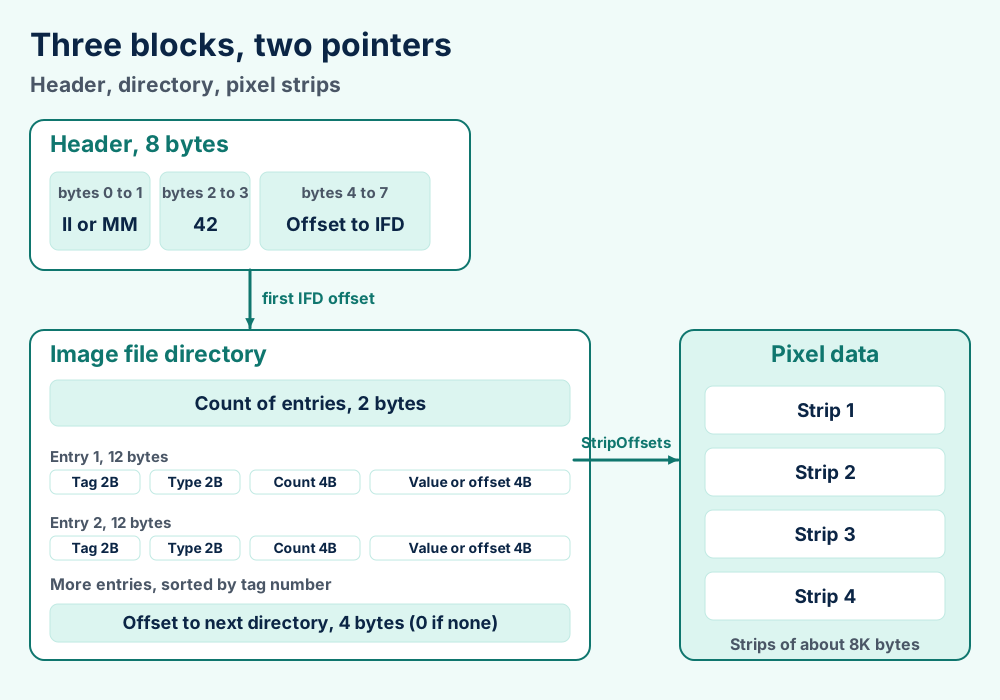
Three layers sit inside every TIFF file. The header points to the directory. The directory lists tags. Tags point to the pixel data.
Header, directory and pixel strips. Every TIFF file follows this chain.
The eight byte header
The TIFF 6.0 header, byte by byte.
Bytes
Holds
What it tells the reader
0 to 1
II or MM
Whether numbers are little endian or big endian
2 to 3
The number 42
That this file is a TIFF file
4 to 7
An offset
Where the first image file directory begins
The spec calls 42 an arbitrary but carefully chosen number. In hex it reads 2A. The TIFF 6.0 specification sets II at 4949 hex and MM at 4D4D hex.
Little endian files therefore open with 49 49 2A 00 and big endian files with 4D 4D 00 2A. The Library of Congress entry prints both patterns.
Readers must handle both byte orders. That rule is why one scanner can write II and another MM and both files still open.
Here is the smallest useful example. Little endian files with the first directory right behind the header start with 49 49 2A 00 08 00 00 00. The last four bytes read 8 in little endian order.
Open any TIFF file in your hex editor and check this pattern against the table above. If bytes 2 and 3 read 2A 00 or 00 2A your TIFF file is classic. If they read 2B 00 or 00 2B your TIFF file is a BigTIFF.
Directories, entries and tags
An image file directory starts with a two byte count of entries. Twelve byte entries follow. A four byte offset closes the directory. It points to the next directory or holds zero when none exists.
The four parts of a 12 byte directory entry.
Bytes
Field
Purpose
0 to 1
Tag
Names the field, for example image width
2 to 3
Type
Says whether the value is a byte, short, long or other type
4 to 7
Count
Says how many values of that type there are
8 to 11
Value or offset
Holds the value when it fits in 4 bytes or points to it otherwise
Entries must sit in ascending tag order. Readers must also ignore private fields they do not know. Both rules come from the spec and they let new tags arrive without breaking old software.
Tags you will meet first
Common TIFF 6.0 tags and their decimal numbers.
Tag
Number
What it holds
ImageWidth
256
Pixels across
ImageLength
257
Pixels down
BitsPerSample
258
Bits for every channel
Compression
259
Which scheme packed the data
PhotometricInterpretation
262
How to read the numbers as color
StripOffsets
273
Where the pixel strips start
NewSubfileType
254
What kind of image a directory describes
PageNumber
297
Page order in a multi page document
Pixel data sits in strips. The spec advises strips of about 8K bytes, even for uncompressed data.
Your TIFF file can use no compression or LZW or PackBits or Deflate or JPEG or CCITT fax. The Compression tag, number 259, names the scheme. Only JPEG loses detail.
6Which Compression Does a TIFF File Use?Six Schemes, One Tag and the Patent That Faded
Compression is one tag in the TIFF file and it holds the biggest swing in file size. The choice also decides which viewers can read the file.
Compression values in the TIFF 6.0 spec and the libtiff tables.
Scheme
Tag value
Loses detail?
Notes
None
1
No
Fast to write and files grow huge
CCITT fax
2, 3, 4
No
Black and white only. Group 3 and Group 4 need two colors
Sources disagree on the Deflate number. Wikipedia lists 8. The libtiff coverage page lists 32946 and labels it experimental. This page states no single value.
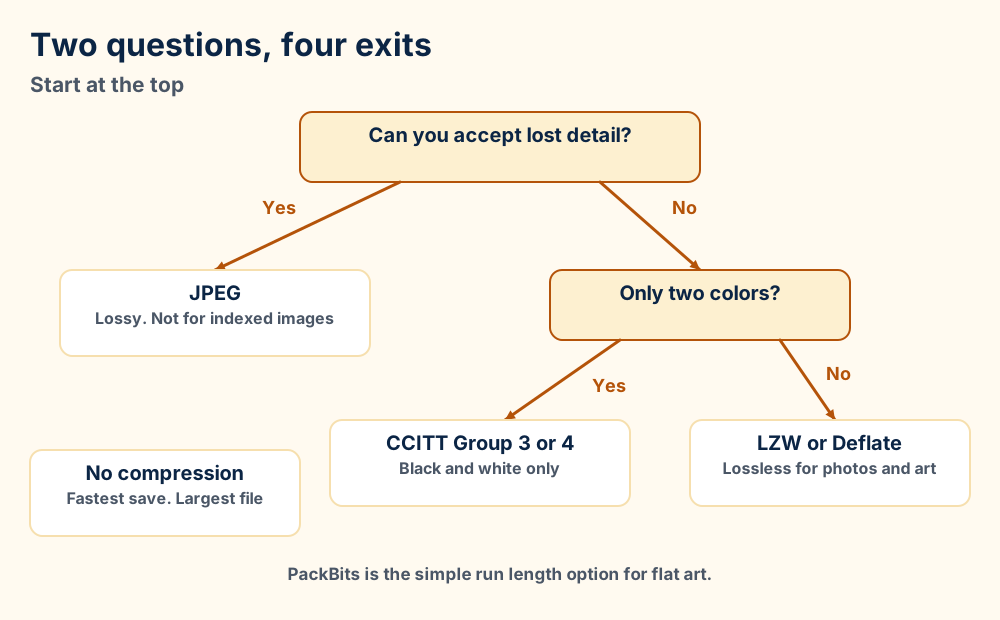
Four exits from one tag. Start at the top and answer two questions.
How LZW and PackBits work
LZW builds a table of repeated strings while it reads the data. The spec describes codes of 9 to 12 bits and strips of about 8K bytes. Wikipedia's LZW article confirms it is lossless.
PackBits is far simpler. Apple introduced it with MacPaint. A signed header byte tells the decoder to copy the next bytes as they are or to repeat one byte, per the PackBits article.
The LZW patent story
The spec carries a Unisys notice about licensing for LZW. The Library of Congress reports that the patent expired in 2003 in the U.S. and in 2004 in Europe and Japan.
Old advice to avoid LZW comes from those patent years.
Which setting to choose
Choose a lossless scheme for every scan and master TIFF file. LZW and Deflate fit photos and color art. Choose CCITT Group 4 for fax style black and white pages. The libtiff tiffcp tool offers all of these through its -c option.
Choose JPEG inside a TIFF file only when size matters more than detail. The tiffcp page lists the values. GIMP adds that JPEG is not available for indexed images.
Your TIFF file can hold many pages and 16 bit samples and CMYK. Classic files stop near 4 GB. BigTIFF raises that limit with 64 bit offsets.
7Can a TIFF File Hold Many Pages, 16 Bit Color and CMYK?Yes to All Three Plus BigTIFF for Files Past 4 GB
One TIFF file can carry more than most formats. Pages, deep color and CMYK all fit inside the header and directory of one TIFF file.
Many pages in one TIFF file
The spec says more than one directory can sit in the TIFF file and every directory defines a subfile. The PageNumber tag marks page order. Wikipedia names multi page fax as the main use.
GIMP saves layers as pages. Its Save layers option stores every layer as a separate page, starting from the bottom. The libtiff tools split and join pages. Use tiffsplit to break a file apart and tiffcp to combine files.
16 bit color and floating point
Baseline TIFF lists 8 bits per channel for full color. Wikipedia adds that the SampleFormat tag in TIFF 6.0 supports integers above 8 bits and floating point images.
Scientific cameras are the example Wikipedia gives. Their sensors capture up to 16 bits per photosite and a TIFF file keeps all of them.
CMYK in a TIFF file
CMYK stands for cyan, magenta, yellow and black, the four print inks. See Wikipedia's CMYK article. The libtiff coverage page lists Separated, value 5, with four samples per pixel for this.
GIMP exports CMYK when the image has a soft proofing profile assigned. Without that profile the option stays off.
BigTIFF and the 4 GB wall
Classic TIFF files use 32 bit offsets. The spec states that the largest possible file is 2 to the 32nd power bytes. That is about 4 GB.
The libtiff BigTIFF page describes the fix. The version number in header bytes 2 and 3 changes from 42 to 43. An offset size field of 8 follows and the first directory offset grows to 8 bytes.
Tag entries grow from 12 to 20 bytes. Wikipedia reports that libtiff reached a stable BigTIFF in December 2011. It also says application support is limited.
Related formats built on TIFF
The Library of Congress lists TIFF/IT, TIFF/EP, DNG and GeoTIFF as TIFF subtypes. Wikipedia calls GeoTIFF fully compliant with TIFF 6.0. See the GeoTIFF article.
GeoTIFF stores map coordinates inside normal TIFF files. Software that ignores the map data still opens the picture.
Wikipedia gives ISO numbers for two relatives. TIFF/EP is ISO 12234-2 and TIFF/IT is ISO 12639. Both extend TIFF 6.0.
Choose TIFF for scans, print handoff and masters. Choose JPEG for small photos you share and PNG for web graphics. Choose PSD while you edit layers in Photoshop.
8TIFF File or JPEG, PNG, PSD and BMP?Which One Fits Print, Web and Layers
Choose the format that your next step expects. TIFF began as a scanner and desktop publishing format. Websites ask for JPEG or PNG.
TIFF against JPEG and PNG
TIFF file, JPEG and PNG compared on points the sources document.
Point
TIFF file
JPEG
PNG
Compression
None or lossless or lossy, by choice
Lossy, with an adjustable level
Lossless, per the W3C standard
Bit depth
8 bits in baseline classes. More through SampleFormat
Quality and print come first. Scans, press files and archive masters keep every pixel.
Choose JPEG or PNG when
Sharing comes first. Both open in browsers and cost less storage than an uncompressed TIFF file.
TIFF against BMP and PSD
BMP is the Windows bitmap. Wikipedia says BMP is normally uncompressed and offers RLE only for 4 and 8 bit images. It has no CMYK and no multiple pages. See the BMP article.
PSD files belong to Photoshop and keep layers for editing. The TIFF file can hold layers as pages too. Choose a TIFF file for handoff when the receiver names it.
TIFF against other raster formats on FileFix
TGA files serve game and video pipelines. PCX files come from old DOS paint programs. DDS files hold textures that graphics cards read directly.
Raw formats from camera makers have their own guides. See NEF for Nikon, ARW for Sony, RAF for Fujifilm and CRW for early Canon bodies.
Open the TIFF file in GIMP and export JPEG or PNG. ImageMagick converts folders and the libtiff tools split pages. Keep the original until the copy opens.
9How Do I Convert a TIFF File to JPEG, PNG or PDF?GIMP for One File and Command Line Tools for Many
Convert a TIFF file to JPEG for sharing and to PNG for web graphics with clear backgrounds. Convert to PDF when you send pages to people.
1Open the TIFF file in GIMP. Confirm the picture and the page count look right.
2Export it as JPEG or PNG. Choose a new file name. JPEG is lossy and PNG is lossless.
3Compare the copy with the original. Zoom into edges and fine detail in both files.
4Keep the TIFF file until the copy works. Hold off on deleting anything until the copy opens where you need it.
Convert many TIFF files at once
ImageMagick reads and writes TIFF. One command can handle every file in a folder. Open a terminal inside the folder and enter this command.
magick mogrify -format png *.tif
PNG copies appear beside the TIFF originals and the originals stay as they are. Try the command on copies before the real folder.
Split, join and recompress with libtiff
The libtiff toolset handles TIFF to TIFF work. Use tiffsplit src.tif to split a multi page file. It names the pages xaaa.tif and xaab.tif by default.
Use tiffcp -c lzw in.tif out.tif to recompress with LZW. The libtiff site lists a tiff2pdf tool for PDF output. See PDF documents for what the result holds.
Settings worth checking in the GIMP export dialog
GIMP groups its TIFF choices into compression, layers, color and metadata. Save color profile keeps the profile with the picture. Save Exif data, Save IPTC data and Save XMP data keep the metadata that came with it.
Save color values from transparent pixels keeps color even in fully clear areas. Crop layers resizes layers to the image size because TIFF cannot store negative offsets. All of these come from the GIMP export page.
Four ways a conversion goes wrong
Pages disappearJPEG and PNG hold one picture. Multi page TIFF files need a split or a PDF target.
Detail drops from 16 to 8 bitsA 16 bit channel holds 65,536 levels and an 8 bit channel holds 256. The copy cannot bring the shades back.
CMYK colors shiftScreens show RGB. Convert with the right color profile so print colors survive.
JPEG loses detail on every saveGIMP labels the JPEG setting lossy. Convert once from the TIFF file and never from a copy.
Layers need a different target. Save Photoshop PSD files from an editor if you plan to keep editing.
Yes. Libraries trust TIFF for masters of scanned images. Keep the TIFF file as the master and share smaller copies.
10Is a TIFF File Good for Archiving?What Libraries Say and When to Keep a Copy
Your TIFF file earns its place in archives.
The Library of Congress rates TIFF fully documented and says particular subtypes are widely deployed as master formats for scanned images. Library and Archives Canada recommends it for still images.
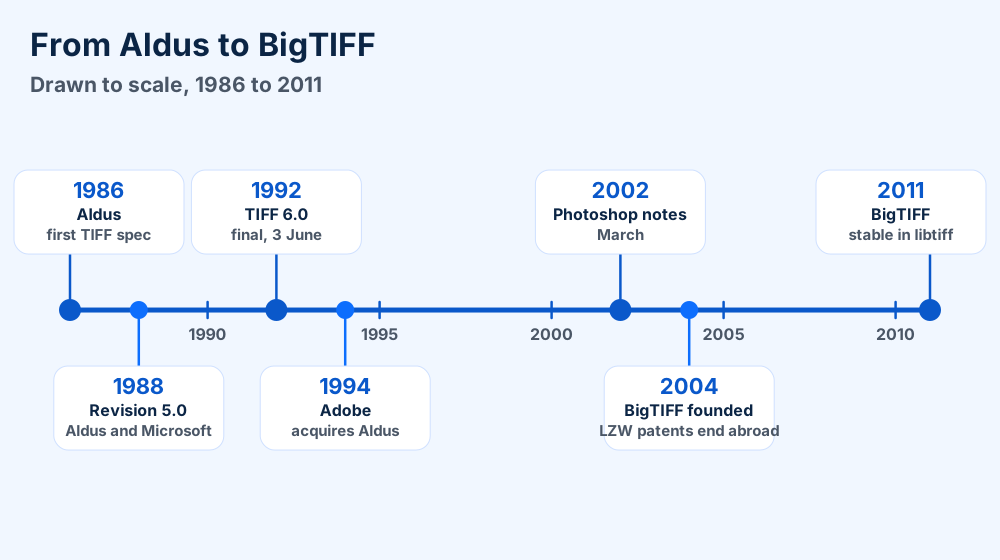
From Aldus in 1986 to stable BigTIFF in 2011, drawn to scale.
Preservation groups also track subtypes. The Library of Congress says the FLVC table gives particular TIFF subtypes high preservation confidence. Check which subtype your TIFF file uses.
What archives should check
The Library of Congress also flags two weak spots. The registry of tag extensions is not available from Adobe. The 6.0 revision dates from 1992 and the Library of Congress still calls it the most recent version.
Choose one lossless recipe and stay with it. Avoid lossy JPEG inside a master.
Keep the TIFF file when
It is the master. Scans, press files and film transfers should stay lossless.
Retire the TIFF file when
It only feeds a website. A JPEG or PNG copy costs less and opens everywhere.
How to check a TIFF file before you store it
1List the directories. Use tiffinfo file.tif to print the tags of every page.
2Read every strip. Add the -D option so tiffinfo reads and decompresses all the image data.
3Check the Compression tag. Look for a lossless value, because JPEG loses detail.
4Check the page count. The count should match the document you scanned.
Before you delete any TIFF file
1Open the copy. Confirm the size, the colors and the page count match.
2Find out which tools still call for the TIFF file. Print shops and scanner software can list it by name.
3Store one untouched master. Put it in a backup folder on a second drive.
The TIFF file format is the Aldus and Adobe Revision 6.0 layout from June 1992, with an 8 byte header and 12 byte directory entries. The media type is image/tiff.
11TIFF File Format and StructureSpecification, Records and Corrections
Numbers in this section trace back to the TIFF 6.0 specification or to a record named beside them.
TIFF file specification
TIFF file specification
Specification
TIFF Revision 6.0, final on 3 June 1992
Author
Aldus Corporation, by Steve Carlsen
Replaced
TIFF Revision 5.0
Later notes
PageMaker 6.0 notes, 14 September 1995. Photoshop notes, 22 March 2002
Extensions
.tif and .tiff
Mac file type
TIFF
IETF media type
image/tiff, RFC 2302
Little endian signature
49 49 2A 00
Big endian signature
4D 4D 00 2A
Directory entry
12 bytes. BigTIFF uses 20 bytes
Size limit
2 to the 32nd power bytes for classic files
Spec owner
Adobe
Field types
The 12 field types in the TIFF 6.0 specification.
Number
Type
Number
Type
1
BYTE
7
UNDEFINED
2
ASCII
8
SSHORT
3
SHORT
9
SLONG
4
LONG
10
SRATIONAL
5
RATIONAL
11
FLOAT
6
SBYTE
12
DOUBLE
How to tell a TIFF file from other files
Read the first four bytes. 49 49 2A 00 and 4D 4D 00 2A mark a classic TIFF file. 49 49 2B 00 and 4D 4D 00 2B mark a BigTIFF file, because 43 is 2B in hex.
Camera raw files like CR2 and DNG start with the same bytes. Check the extension and the size too before you call it a plain TIFF file or a camera file.
Baseline and extended TIFF
The spec lists four Baseline image types. They are bilevel, grayscale, palette color and full color. Features marked not recommended for general data interchange count as extensions.
Files that use extensions are called Extended TIFF 6.0 files. Wikipedia describes the 6.0 split between required and optional parts the same way.
What people get wrong about the TIFF file
TIFF is not always uncompressed. It carries six compression families and only one is the absence of compression.
TIFF is not one fixed format either. The Library of Congress lists subtypes for scanning, photography and mapping. Classic TIFF is capped at 4 GB and BigTIFF is not.
Sources also disagree on the month of Revision 5.0 and on the Deflate value. This page gives the year 1988 and no Deflate number.
Where these TIFF file facts come from
The specification supplies the header, directory and tag numbers. The Library of Congress supplies the history, signatures and preservation view. Wikipedia's Library of Congress article covers the institution.
Wikipedia covers the history and extension formats. The format index links every FileFix guide. Browse the what is hub for neighboring topics. Wikipedia's TIFF article is the general reference.
Frequently Asked Questions About TIFF Files
What does TIFF stand for?
TIFF stands for Tagged Image File Format. The name points to the tags that describe every image in the file. Aldus began the format in the 1980s for scanners and desktop publishing.
How do I open a TIFF file?
Double click the TIFF file in Windows Photos or Preview on your Mac. GIMP and IrfanView also open it. Safari shows TIFF files. Chrome and Firefox do not.
Is a TIF file the same as a TIFF file?
Yes. Both names hold the same format. Programs treat .tif and .tiff alike. Renaming one to the other changes nothing inside the file.
Why is my TIFF file so large?
Most TIFF files keep every pixel at full depth and many skip compression. A 6000 by 4000 picture at 8 bits in RGB takes 72 MB before headers. Export with LZW or Deflate to shrink it without losing pixels.
Is a TIFF file lossless?
It can be. None, LZW, PackBits, Deflate and CCITT keep every pixel. JPEG inside a TIFF file loses detail. Check the Compression tag with tiffinfo if you are not sure.
Can a TIFF file hold more than one page?
Yes. The specification allows several directories in one file and every directory defines a subfile. Fax software uses this for pages. Some viewers show only the first page.
What do II and MM mean at the start of a TIFF file?
They name the byte order. II means little endian and MM means big endian. The number 42 follows. Readers must handle both orders.
How big can a TIFF file be?
Classic TIFF files stop near 4 GB because offsets use 32 bits. BigTIFF uses 64 bit offsets and gets past that wall. Application support for BigTIFF is limited.
Does a TIFF file support 16 bit color and CMYK?
Yes to both. The SampleFormat tag allows integers above 8 bits and floating point. The Separated color model with four samples covers CMYK. GIMP exports CMYK once you assign a soft proofing profile.
How do I convert a TIFF file to JPEG?
Open the TIFF file in GIMP and export a JPEG. ImageMagick converts folders with one command. Keep the TIFF file because JPEG is lossy and holds one picture.
Why will Chrome not open my TIFF file?
MDN says that other than Safari browsers do not natively support TIFF. Convert a copy to JPEG or PNG for the web.
Is TIFF good for archiving?
Yes, with care. Library and Archives Canada recommends TIFF for still images and the Library of Congress rates it fully documented. Save masters with a lossless setting. Share copies in JPEG or PNG.
Still Stuck With a TIFF File?Six Routes Out, Depending on Your Problem
Pages or colors look wrong?
Check the structure.Section 5 shows how to read the header and the tags.
File will not open?
Test it in a second program.Section 4 sorts file faults from viewer faults.
Did your TIFF file come from your camera and not from your scanner? Read the DNG guide or the CR2 guide for raw files that sit on a TIFF skeleton.
Do you want layers and not pages? The PSD guide explains the Photoshop format and how it differs.
Does your printer want something other than raster files? The PDF guide covers press pages and the EPS guide covers vector art.
Does a game or video tool want another bitmap? See the TGA guide and the PCX guide for two older raster formats.
Does the trouble sit with your computer and not the picture? Browse the Windows fixes or the Mac fixes by the message on screen.