What Is an EML File? One Email in Plain Text, and How to Open It
EML files hold one email message as plain text. Thunderbird and Outlook open them. Jump to your question below, or work through it in order.

EML files hold one email message as plain text. Thunderbird and Outlook open them. Jump to your question below, or work through it in order.
EML files hold one email message saved as plain text, with headers and attachments inside. The extension is .eml. RFC 5322 and MIME define the layout.
What sets an EML file apart is how readable it stays. Notepad shows the sender and the words. Attachments sit in the same file as base64 text.
Free software opens an EML file in seconds. Thunderbird and Apple Mail both cost nothing to try. Section 3 lists more. Section 4 fixes files that misbehave.
Someone sends you a saved email and the file name ends in .eml. You double click it and the wrong app opens. Sometimes no app opens at all. Nothing is wrong with that EML file. It holds one email message as plain text.
The Library of Congress describes the EML format as an email message saved in the Internet Message Format. In most cases one EML file holds one message. The headers, the words and the attachments all sit in that single file.
Plain text is the point of an EML file. Open one in Notepad and you can read the sender, the date and the message. Attachments sit in the same file as encoded text.
An EML file is one email message saved as plain text. The extension is .eml and the media type is message/rfc822. Thunderbird, Outlook and Apple Mail open it.
.emlmessage/rfc822, per the Library of Congress.eml. Outlook's own message files end in .msg.You meet an EML file when you drag messages out of mail programs or save them from old clients. Outlook Express used the format as its standard, says the Library of Congress. Newer guides cover Windows Live Mail and Outlook Express, which both stored messages this way.
Holding one big file that packs many messages? That is an MBOX file. Section 7 compares the two formats.
Every EML file has three parts. Header lines come first and one empty line follows. The body comes last.
Open an EML file in Notepad and the layout shows at once. Header lines sit on top. Below them comes one empty line and then the message.
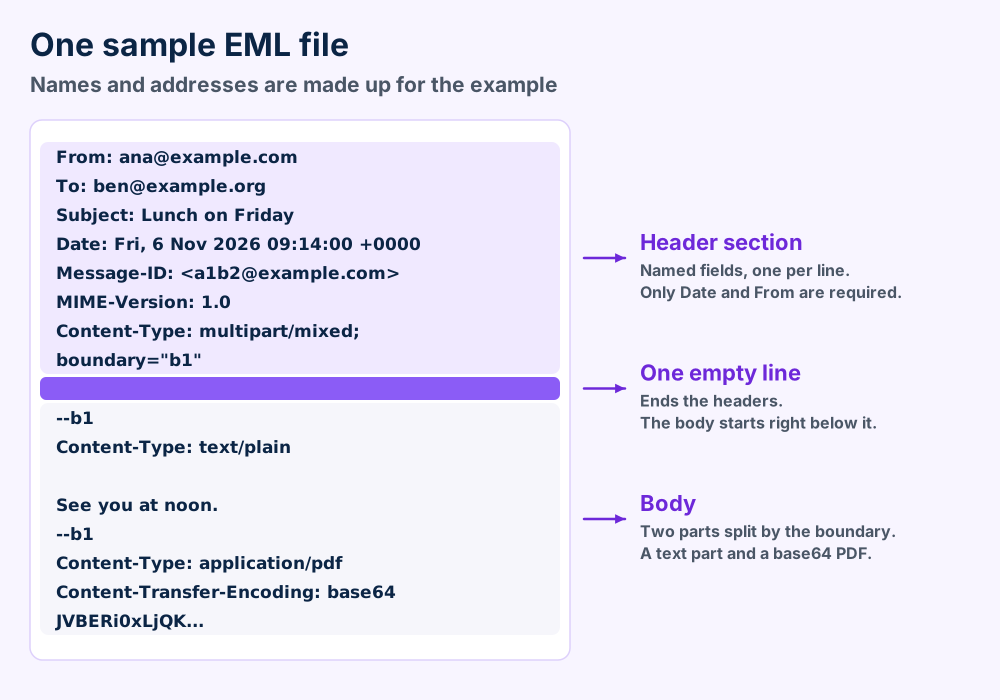
| Part | What it holds | Where the rule comes from |
|---|---|---|
| Header section | Named fields on separate lines, like From and Date | RFC 5322. Fields can appear in any order and some repeat |
| Empty line | Nothing. It marks the end of the headers | RFC 5322 section 2.1 says an empty line separates header and body |
| Body | The message text. With MIME it holds parts too | RFC 2045 and RFC 2046 define the parts |
Line rules come from the same standard. RFC 5322 says a line must stay under 998 characters and should stay under 78. Every line ends with CRLF, which means carriage return plus line feed.
The standard also says messages use characters with values 1 through 127, read as US-ASCII. Accents and other languages need MIME on top. Section 10 shows how headers carry them.
Plain text needs no MIME. Most real messages carry more. Messages with HTML versions and PDFs become small trees of parts.
A multipart/alternative part holds the same message in several versions. RFC 2046 says the best choice is the last part your reader supports. So plain text comes first and HTML comes last.
Multipart/mixed parts hold independent pieces, like text bodies and PDFs. A part typed message/rfc822 holds another message inside it. A forwarded email attached that way is an EML file inside an EML file.
MIME-Version sits at the top only. RFC 2045 says the field belongs to the top level of a message and not to every part inside it.
Thunderbird, Outlook and Apple Mail open an EML file. Notepad opens one too and shows the raw message.
An EML file has more readers than you think. The Library of Congress lists Outlook, Entourage, Thunderbird, Apple Mail and IncrediMail among the programs that open EML files. Its record also says EML files are plain text.
| Program | What to know | Where to read more |
|---|---|---|
| Thunderbird | Mozilla's tracker shows drag out to a .eml file fixed by Thunderbird 3.0 release candidate 1 | Read our Thunderbird guide |
| Outlook | Listed by the Library of Congress as a program that opens EML files | Read our Microsoft Outlook guide |
| Apple Mail | Listed by the Library of Congress. Apple's own EMLX is a close relative | Section 7 compares EML and EMLX |
| IncrediMail | Listed by the Library of Congress | Read our IncrediMail guide |
| Text editor | Notepad shows the raw message, headers and encoded attachments included | Steps follow the table |
Older Windows programs stored messages as EML files too. Our Windows Live Mail guide and Outlook Express guide show where those folders sit.
Smaller clients read the format as well. See SeaMonkey, Pegasus Mail, Trojita and Lotus Notes if your mail comes from one of them.
Windows had a gap for some time. The Library of Congress says the built in Mail app of Windows 8 lacked native EML support. Our Windows error guides help if the open command fails. Our macOS guides cover Mac trouble.
A text editor never starts the message. It shows the source only. That makes it a calm way to look at an EML file you do not trust.
Check the file in a text editor first. Header lines show whether your software or the file is at fault.
Five causes explain nearly every EML file that misbehaves. One sits in your software and four sit in the file. Start with the cheap checks.
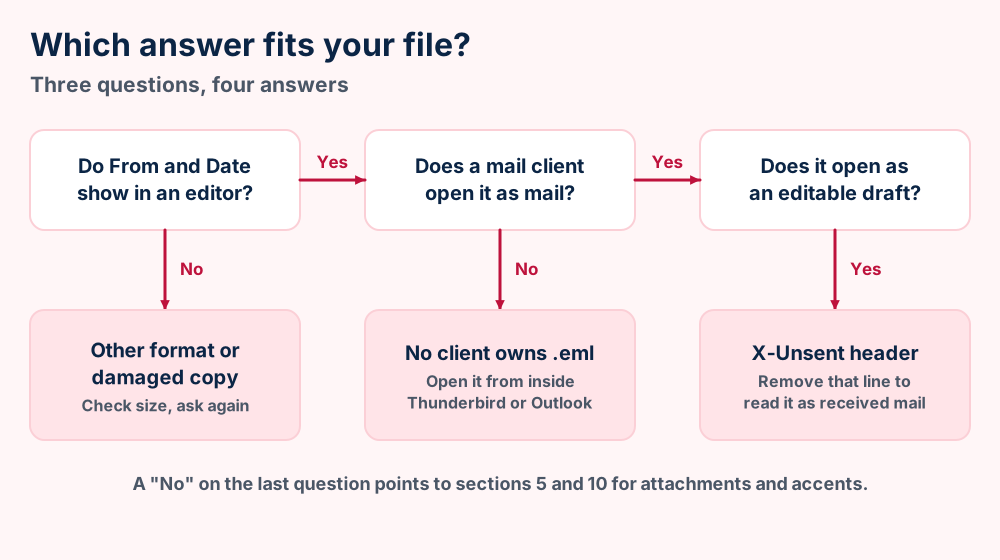
.eml. Outlook's MSG format is not MIME, so a text editor shows no header lines.X-Unsent: 1 marks the message as unsent. Mozilla's tracker says Outlook and Outlook Express open such files in compose windows.Mozilla's tracker explains the draft case well. The X-Unsent bug report says Thunderbird showed such files read only until version 91 added an editable compose window.
Damaged data needs a copy you trust. Restore your backup before you try to edit a broken EML file by hand. Our error submission page takes the cases this table misses.
Attachments sit inside the EML file as base64 text. The encoding makes them about 37 percent larger than the original.
Email travels as text. An EML file keeps that text as is. PDFs and photos cannot ride through as raw bytes. So your client encodes them as base64 and drops the result into the message.
Base64 maps every 3 bytes onto 4 printable characters. RFC 2045 also caps encoded lines at 76 characters. Those two rules explain the size jump in the figure.
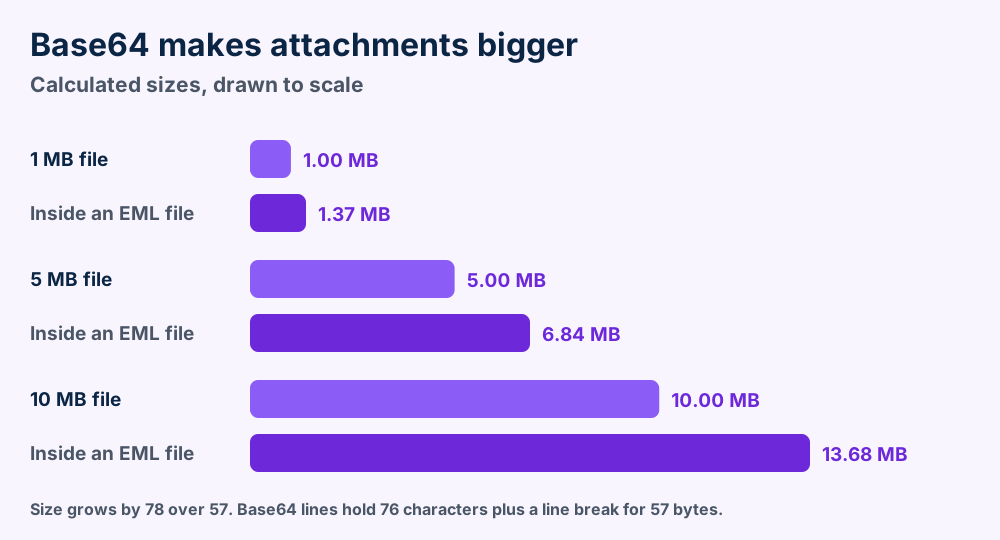
Wikipedia's attachment article puts the base64 overhead at about 37 percent. That matches the calculation. A 10 MB PDF makes an EML file near 13.7 MB.
The Content-Disposition field marks a part as inline or attachment. RFC 2183 says an inline part shows with the message and an attachment waits for you to act.
The filename parameter suggests a name. RFC 2183 tells clients to check it against local rules and to ignore any directory path. A client that trusts it blindly can overwrite your files.
Pictures inside an HTML body use cid links. RFC 2392 says a cid link points to the part with a matching Content-ID. The picture sits in the same EML file.
Some programs keep attachments outside the EML file instead. The Library of Congress record notes that option. Move such an EML file alone and the attachment stays behind.
Sometimes the attachment you want arrives as one file named Winmail.dat. Microsoft's TNEF support article says that is the usual name for a package in Transport Neutral Encapsulation Format.
The real files sit inside that package. Microsoft's fix starts with the sender. Choosing HTML or plain text for the message avoids TNEF so the files arrive as normal attachments.
Treat attachments like any download. The EML file stays text until your client decodes a part. Opening the decoded file is the step that carries risk.
Thunderbird saves a message as EML in two ways. Outlook saves MSG and not EML. Microsoft Graph returns raw MIME that you can store as EML.
Mail programs save messages in different ways. Thunderbird writes an EML file directly. Outlook does not. That difference causes most of the questions people send us.
Mozilla's tracker records that File then Save As writes the message with an EML extension. The drag and drop bug report also shows that dragging a message to the desktop makes a .eml file.
A Mozilla support thread adds one catch. The Save as type box can default to All Files. You then select Mail Files (*.eml) yourself.
.eml ending.Microsoft's developer list of Outlook SaveAs types names .msg, .rtf, .txt, .html, .mht, .oft, .doc, .vcs, .vcf and .ics. The list has no .eml entry.
Microsoft's Graph guide says Outlook does not save messages in MIME format. It shows two ways to get a message body in MIME.
"save them in files with the .EML extension"From the Microsoft Graph MIME guide
Developers can add $value to a get message request and receive the MIME content. Microsoft says you can save that content in a .eml file. Section 8 shows how to read one back with Python.
Gmail's Show original page displays the full message source. Google's help article describes it as the way to view and copy the complete header.
Copy before you edit. Keep one untouched EML file in a backup folder. Work on a second copy.
EML holds one message as plain text. MSG is Outlook's own format. MBOX packs a folder into one file and EMLX is Apple Mail's close cousin.
Four names cause the mix ups. EML, MSG, MBOX and EMLX all store email but they split the job in different ways.
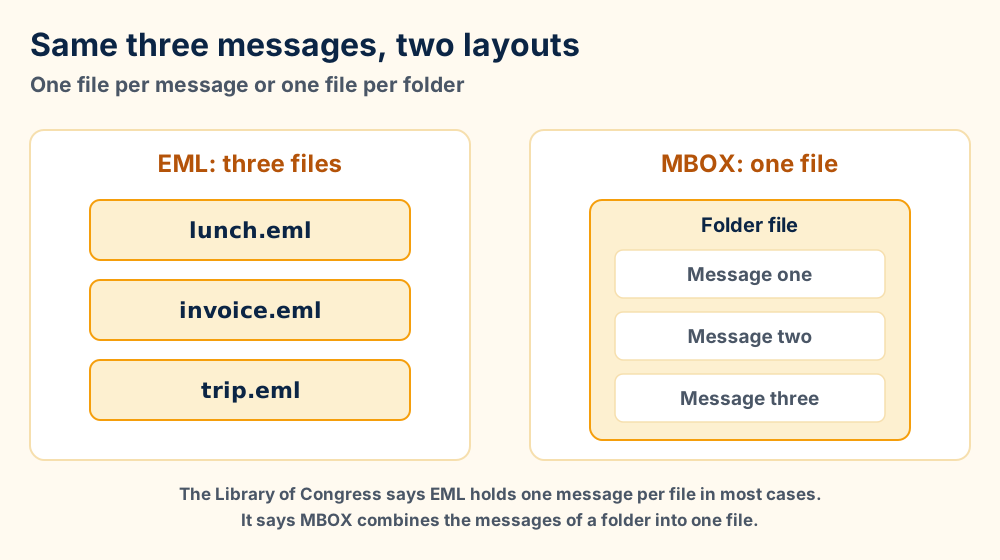
| Format | What one file holds | What the sources say |
|---|---|---|
| EML | One message as plain text | The Library of Congress says EML stores one message per file in most cases |
| MSG | One Outlook item | Microsoft lists it as Outlook message format. Microsoft's Graph guide says Outlook does not save in MIME |
| MBOX | Many messages in one file | The Library of Congress says MBOX combines the messages of a folder into one file |
| EMLX | One message in Apple Mail's variant | The Library of Congress calls it a modified version, closely related to EML |
The Library of Congress record cites a report that calls MBOX and EML de facto standards. The same record says no specification defines EML as a storage format. The message inside still follows RFC 5322.
Outlook keeps full mailboxes in data files. Our PST files and OST files guides cover those. They hold many messages and folders. That puts them on the MBOX side of the fork.
Other stores belong to other programs. See OLK files, EDB files and MAB files when your mail sits in one of them. Our MBOX file guide explains the folder format in full.
Choose an EML file when you want single messages you can read anywhere. Choose MBOX or PST when you want full folders in one place.
Python's email package parses an EML file in a few lines. Its documentation includes a script that unpacks every part into a folder.
Scripts save hours when you hold hundreds of EML files. Python ships with an email package. Its documentation covers parsing a message from a file.
The Python email parser page says to always set the policy keyword. It names policy.default as the future default. The Python email examples page includes a script that unpacks a MIME message into a folder of files.
| Task | Call | Where it appears |
|---|---|---|
| Parse the file | BytesParser(policy=policy.default).parse(fp) | Email parser page |
| Walk every part | msg.walk() | Unpack example |
| Get the attachment name | part.get_filename() | Unpack example |
| Decode the attachment | part.get_payload(decode=True) | Unpack example |
| List attachments | iter_attachments() | HTML message example |
open(path, 'rb') so Python reads the bytes exactly as stored.policy=policy.default.That warning matches RFC 2183. The filename comes from the sender. Strip any path and refuse names that already exist.
Read your headers the same way. The parser page says the dictionary interface adds headers. The same interface reads them back. Looping over folders then builds lists of senders and dates.
Work on copies. A script that writes into your only EML folder can ruin it. Point the output at an empty folder.
Yes, keep EML originals when single messages matter. Plain text with no license and no patents makes them safe to store. You can convert copies later.
The Library of Congress rates the EML file well on the traits that matter for long storage. It lists no licensing, no patents and no external dependencies. It also calls EML files plain text.
The same record names a weakness. EML is only partly documented through RFC 5322. No standard defines EML as a file storage format. Your mail client decides the details.
| Your situation | What to do |
|---|---|
| You want single messages as a record | Keep the EML originals in folders named by date |
| You switch to Thunderbird or Outlook | Import a copy of the folder and keep the originals until counts match |
| You want one searchable archive | Convert copies to MBOX or PST and keep the EML files |
| Someone has no mail client | Print a copy of the message to PDF |
| A message looks damaged | Restore your backup and compare it with the broken copy |
A PDF copy serves people without a mail client. See our PDF files guide for what that format keeps. Keep the EML file too because the PDF drops the headers.
The format has deep roots. The Library of Congress traces the message layout to RFC 822 from 1982. RFC 5322 replaced it in 2008 through RFC 2822. Old EML files from the 2000s still read fine today. New files should age the same way.
Only Date and From are required in an EML file. MIME fields add the content type, the encoding and the attachment label.
Headers in an EML file tell clients who sent the message and how to read it. Only two fields are required. RFC 5322 says the only required fields are the origination date and the originator address.
| Field | What it holds | Where it is defined |
|---|---|---|
| Date | When the message was sent. Required | RFC 5322 section 3.6.1 |
| From | The author's address. Required | RFC 5322 section 3.6.2 |
| Message-ID | A globally unique label for the message. Every message should carry one | RFC 5322 section 3.6.4 |
| Subject, To and Cc | The topic and the recipients. Optional | RFC 5322 section 3.6 |
| Reply-To | Where replies should go. Optional | RFC 5322 and the Library of Congress IMF record |
| Field | What it holds | Where it is defined |
|---|---|---|
| MIME-Version | The value 1.0, at the top level of the message | RFC 2045 section 4 |
| Content-Type | The media type. The default is plain US-ASCII text | RFC 2045 sections 5 and 5.2 |
| Content-Transfer-Encoding | 7bit, 8bit, binary, quoted-printable or base64. 7bit applies when the field is missing | RFC 2045 section 6.1 |
| Content-Disposition | Inline or attachment, plus a suggested file name | RFC 2183 |
| Content-ID | The label that a cid link in HTML points to | RFC 2392 |
Headers must stay ASCII under RFC 5322. Other languages need a wrapper. RFC 2047 defines an encoded word as =?charset?encoding?text?=. The letter B means base64 and the letter Q means a quoted printable variant.
The word =?UTF-8?B?Y2Fmw6k=?= decodes to the word café. An encoded word cannot pass 75 characters. Long subjects split into several.
RFC 6532 from February 2012 lets headers carry UTF-8 directly. Older clients still expect encoded words.
Long header values wrap. RFC 5322 allows a line break before any white space. Unfolding removes the break again. A client then reads one long value.
An EML file follows RFC 5322 and MIME. The Library of Congress lists message/rfc822 as its media type and notes that no standard defines EML as a file.
Rows below come from the RFCs and the Library of Congress. Facts we could not check stay off the page.
.emlmessage/rfc822, per the Library of CongressThe Library of Congress keeps two records worth reading. One covers the EML format and one covers the Internet Message Format. The second lists the RFC dates used above.
This page prints no private header names from Outlook or Thunderbird, because no primary source lists them in full. It also gives no market share for any mail client.
Wikipedia's email article and MIME article tell the wider history. The Base64 article covers the encoding on its own. Our file format guide explains extensions and media types.
Check the headers. Section 4 sorts app faults from file faults.
Is your mail one big file instead of many messages? The MBOX file guide explains folder packs. The PST file guide and OST file guide cover the Outlook versions.
Does your mail come from a Mac or a server? See the OLK file guide and the EDB file guide for those stores. The MAB file guide covers address books.
Is the attachment a calendar invite or a contact card? ICS files carry invites and VCF files carry contacts.
Do you need to share a message as a document? The PDF file guide shows a print route that drops the headers.
Is your computer at fault and not the EML file? Our Windows error guides and our macOS guides start with the exact message you see.
Still holding an EML file that none of this explains? Send us the error and the file size and we will help. The FileFix format index and the what is hub cover other file types.