What Is a VCF File? The vCard Contact File, and How to Open and Import It
VCF files hold contact cards in the vCard format. Free programs open them in seconds. Jump to your question below or work through it in order.

VCF files hold contact cards in the vCard format. Free programs open them in seconds. Jump to your question below or work through it in order.
VCF files hold contacts in the vCard format. Names, numbers, emails and addresses sit in plain text between BEGIN:VCARD and END:VCARD lines. One file can carry one contact or thousands.
What sets a VCF file apart is its version. The second line says 2.1, 3.0 or 4.0 and that number decides the character set and which programs accept the card.
Free programs open VCF files in seconds. Mac Contacts and Google Contacts import them directly while Outlook takes one card at a time. Section 3 walks through all three.
Phones, mail programs and old contact exports hand you a file that ends in .vcf. You double click it and a contacts app opens or nothing happens at all.
Every VCF file holds contact details in the vCard format. Names, phone numbers, email addresses and postal addresses sit in plain text that any text editor can read.
One file can hold a single contact or thousands. RFC 6350 says one body can carry many vCards and every card gets its own BEGIN and END line.
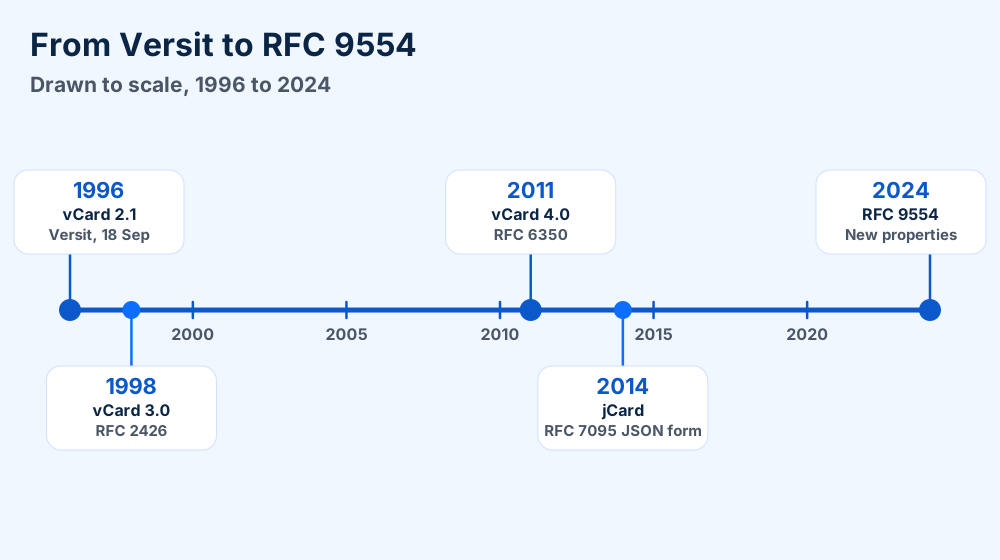
vCard began as the electronic business card of the Versit Consortium. Version 2.1 of the specification carries the date 18 September 1996.
Two names cover one thing. The vCard is the card and the VCF file is the file that carries it. IANA lists both .vcf and .vcard as extensions of the text/vcard media type.
VCF files are plain text contact cards in the vCard format. RFC 6350 defines version 4.0 and the text/vcard media type. One file can hold one contact or many.
.vcf, also .vcardtext/vcard, registered with IANABEGIN:VCARDEND:VCARDpublic.vcardCame here for DNA data? The .vcf extension also names the Variant Call Format used in genetics. This page covers vCard contacts. Open the file in a text editor and contact files start with BEGIN:VCARD while current genetics files start with ##fileformat.
Contacts apps open VCF files and offer to add the cards. Text editors open them as plain text and add nothing, which makes them the safe first look.
Most contacts programs open VCF files with a double click. Text editors open them too and show the raw cards without adding anything.
Choose the program by what you want to do. Reading needs a text editor and adding needs a contacts app.
| Program | What it does with the file | Where it is documented |
|---|---|---|
| Contacts on a Mac | Double click the file or drag it onto the Contacts icon in the Dock. Then click Add | Apple Support, import contacts |
| Outlook | Imports one vCard at a time. Right click the vCard in a message and choose Add to Outlook Contacts | Microsoft Support, import vCards |
| Windows Contacts folder | Choose Import and then vCard (VCF file) in the Contacts folder of File Explorer | Microsoft Support, iCloud vCard import |
| Google Contacts | Click Import and then Select file. Choose the vCard file and click Import | Google Workspace Learning Center |
| Any text editor | Shows every line of every card. Nothing gets imported | Section 4 shows how to read one |
Mac users have the shortest path because Contacts takes the file directly. See the macOS guides if the app refuses it.
Windows users can send VCF files to Outlook or to the Contacts folder. The Windows error guides start from the message on your screen.
Open the VCF file in a text editor. You see the names and numbers at once and change nothing.
Import the file into your contacts app. Section 3 walks through three of them.
BEGIN:VCARD. Anything else means the file is not a vCard.BEGIN:VCARD. The number of matches is the number of contacts in the file.Look before you import. Reading the file first tells you the contact count and the vCard version. Both decide which import route works.
Mac Contacts and Google Contacts import VCF files directly. Outlook imports one vCard at a time. Many cards need the Windows Contacts folder and a CSV file.
Three destinations cover most imports. Mac Contacts and Google Contacts take the file directly. Outlook takes one card at a time unless you use the Windows Contacts folder route.
These steps follow Apple's import guide. Archive files with the .abbu extension behave differently. Apple warns that importing one replaces your current contact information.
Google documents these steps in its Workspace learning center.
Outlook imports one vCard at a time, according to Microsoft Support. For one card open it from a message and choose Save & Close.
Many cards need a detour. Microsoft's iCloud guide imports the VCF file into the Contacts folder in File Explorer. It then saves the contacts as CSV for Outlook.
C:\Users\(your name)\Contacts.Microsoft's iCloud guide lists these steps. It also warns about iCloud exports that hold only one contact. Count the cards before you start.
Open it and choose Save & Close. Outlook adds the card directly.
Use the Contacts folder and a CSV file. Or split the file into single cards as shown in section 8.
Outlook is not the only program with an address book. The Microsoft Outlook guide covers the current family and the Windows Live Mail guide covers the older one.
Thunderbird keeps contacts of its own. Read the Thunderbird guide for its profile and MAB files for old address books.
Check the version line and the card count first. Outlook takes one vCard at a time. Short exports can look like broken files.
Six problems stop VCF files from importing. Four sit in the file and two sit in the program.
Check the cheap causes first. Text editors settle most of them in minutes.
VERSION:2.1, VERSION:3.0 or VERSION:4.0. RFC 6350 requires that line right after BEGIN in version 4.0.Apple documented a version clash in an older guide for macOS 10.11. That page says Contacts exported vCard 3.0 and some apps did not accept it. Apple told readers to set version 2.1 in the vCard preferences and export again.
iCloud has its own complaints. The iCloud invalid contact data fix and the file is not formatted for Contacts fix cover them. Gmail size limits have their own file too large fix.
Still no luck? The vCard contact file errors hub lists every fix. Send us the exact message if yours is missing.
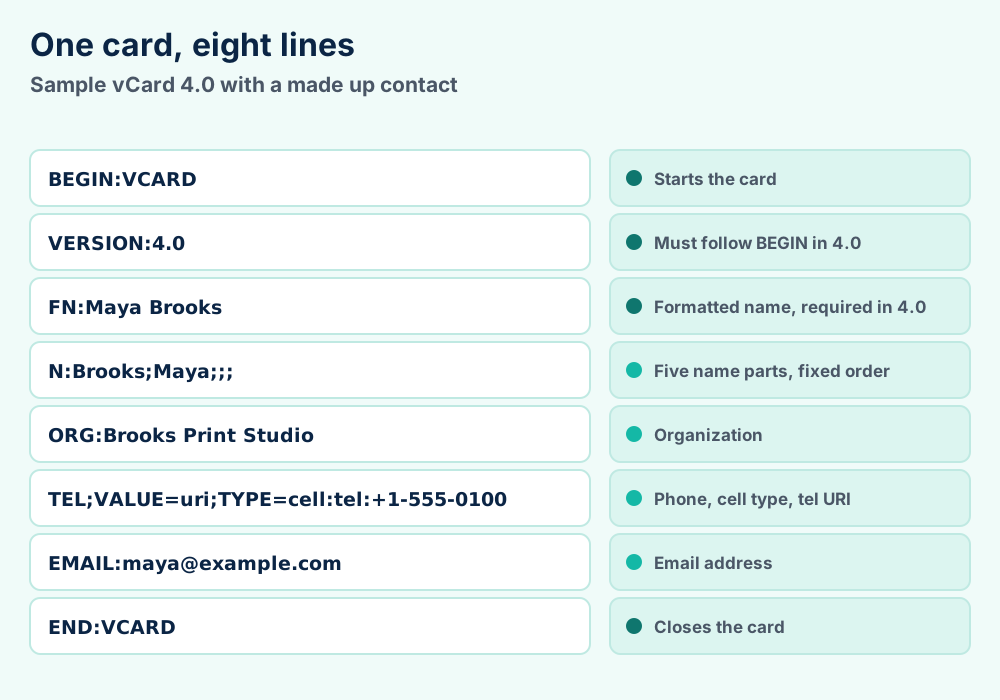
A VCF file is a stack of property lines between BEGIN:VCARD and END:VCARD. Version 4.0 requires VERSION right after BEGIN and an FN line in every card.
Every vCard is a stack of short lines between BEGIN and END. Lines name a property and then give its value.
Version 4.0 sets strict rules for three lines. VERSION must come right after BEGIN. FN must be present. Every line ends with a carriage return and line feed.
| Property | Holds | Rule from RFC 6350 |
|---|---|---|
FN | Formatted name | Must be present in the card |
N | Structured name | Five parts in a fixed order |
ORG | Organization | Company or group name |
TITLE | Job title | Position within the organization |
TEL | Phone number | Types include text, voice, fax, cell, video, pager and textphone |
EMAIL | Email address | Takes a type like work |
ADR | Postal address | Seven parts in a fixed order |
PHOTO | Picture | One URI, which can be a data URI |
UID | Unique identifier | Cards with equal UIDs must be matched in synchronization |
KIND | Type of card | individual, group, org or location |
That table lists properties from the RFC 6350 text. The same RFC defines more, including NICKNAME, BDAY, URL, NOTE and REV.
The N line splits a name into family names, given names, additional names, honorific prefixes and honorific suffixes. Semicolons separate the parts and empty parts stay empty.
The ADR line has seven parts. They cover post office box, extended address, street, locality, region, postal code and country. RFC 6350 asks writers to leave the first two empty.
Telephone lines changed over time. Version 4.0 gives the TEL value type as free text by default for version 3 compatibility and says it should be reset to a URI. The expected scheme is tel.
Long lines get folded. RFC 6350 says content lines should not pass 75 octets. To fold, a writer inserts a line break followed by one space or tab and a reader removes both.
Special characters need a backslash. Commas inside values must be escaped and so must backslashes. Line breaks inside values are written as \n.
Photos follow the same rules. PHOTO lines can carry the picture itself as base64 text inside a data URI. Base64 writes 3 bytes of picture as 4 characters. Photos therefore add a third more text.
Read the second line of the file. It says 2.1, 3.0 or 4.0. That number decides the encoding, the photo style and which programs accept the card.
Three versions exist and the second line of the file tells you which one you hold. Open the VCF file in your text editor and read it.
Every version arrived with its own rules for encoding, photos and phone types. Programs that read one version well can stumble on another.
| Point | vCard 2.1 | vCard 3.0 | vCard 4.0 |
|---|---|---|---|
| Published | 18 September 1996 by Versit | September 1998 as RFC 2426 | August 2011 as RFC 6350 |
| VERSION value | 2.1 | 3.0 | 4.0 |
| Position of VERSION | Anywhere in the card | Anywhere in the card | Right after BEGIN |
| Character set | ASCII by default and CHARSET can change it | CHARSET parameter, removed in 4.0 | UTF-8 only |
| Photos and logos | ENCODING=BASE64 | ENCODING=b | Data URI with MEDIATYPE |
| Name fields | Five parts in N | Five parts in N | Five parts in N |
The 2.1 column comes from the Versit specification text. RFC 2426 supplies the 3.0 column and RFC 6350 supplies the 4.0 column. Wikipedia's vCard article lines up the encoding differences.
RFC 6350 merged the older RFC 2425 and RFC 2426 into one standalone document. It also obsoleted RFC 4770. UTF-8 became the only character set.
Version 4.0 added KIND, GENDER, LANG, ANNIVERSARY, XML and CLIENTPIDMAP. It removed NAME, MAILER, LABEL, CLASS and the inline AGENT card. The TEL type list shrank to the seven values shown in section 5.
Version 3.0 listed more phone types, including home, msg, work, pref, voice, fax, cell, video, pager, bbs, modem, car, isdn and pcs. Programs that expect those labels can read a 4.0 file differently.
The standard did not stop in 2011. RFC 9554 from 2024 adds CREATED, GRAMGENDER, LANGUAGE, PRONOUNS and SOCIALPROFILE to version 4.0. It updates RFC 6350 and aligns vCard with JSContact.
Version 4.0 files still say VERSION:4.0 after that update. Check for the new property names if you need to know whether a file uses them.
Garbled names mean the program read your VCF file with the wrong character rules. Save a copy as UTF-8 and import that copy.
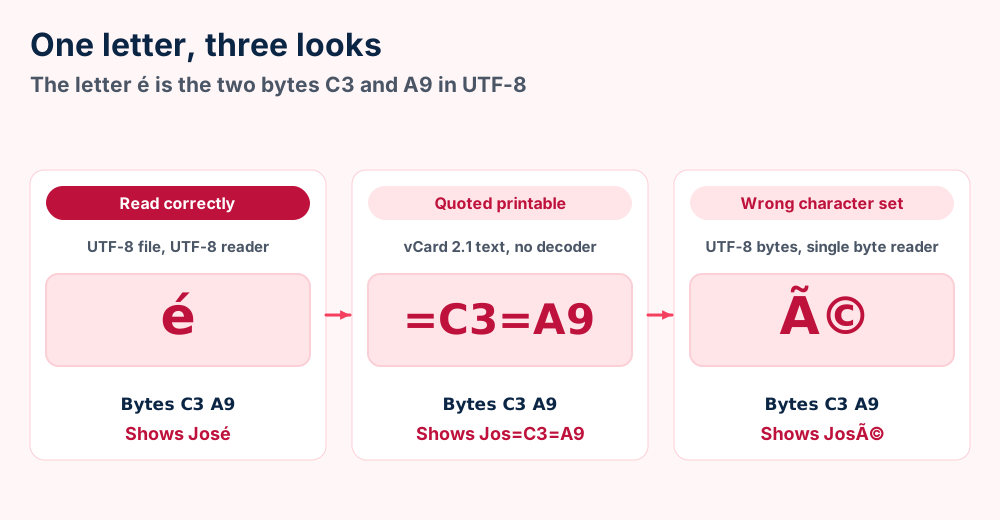
You import the cards and every accented name looks wrong. The text José arrives as José or as Jos=C3=A9. The contact data is fine and the program read it with the wrong rules.
Two older habits cause it. Version 2.1 allowed quoted printable text and other character sets. Version 4.0 allows UTF-8 only.
| What you see | What happened | What to do |
|---|---|---|
=C3=A9 in a name | Quoted printable text that nothing decoded | Import into a program that reads vCard 2.1 or save a clean copy |
é in a name | UTF-8 bytes read as a single byte set | Open the file as UTF-8 and save it that way |
The 2.1 specification says the default character set is ASCII and that a CHARSET parameter can name another set. It also allows quoted printable text. Soft line breaks there end in an equals sign.
Version 4.0 removed the CHARSET parameter. RFC 6350 says UTF-8 is the only allowed set and nothing can override it.
The garbled characters in a vCard fix goes deeper on invalid UTF-8. Text with mixed history sometimes needs an export from the source program again.
Do not edit in a word processor. It adds formatting and can change line breaks. Use a plain text editor for every VCF edit.
Join VCF files as plain text to merge them and cut at the BEGIN and END lines to split them. Every card must keep both lines.
Merging VCF files is copying and splitting them is cutting. The format is plain text. You need no special program.
The rule behind it sits in RFC 6350. Its grammar defines a vCard body as one or more vCards. Joined cards stay valid.
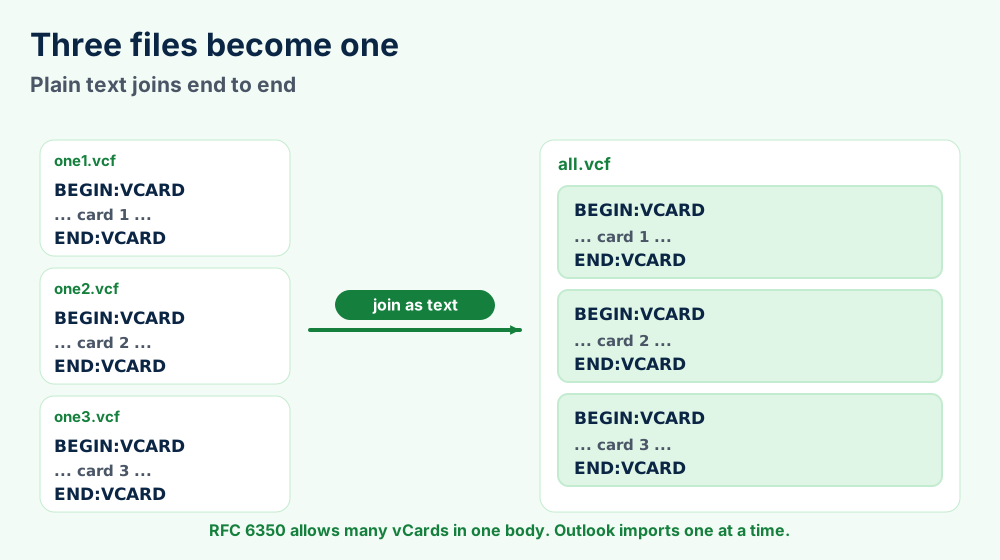
copy /b *.vcf ..\all.vcf. On Macs type cat *.vcf > ../all.vcf.END:VCARD sits alone on its line above the next BEGIN:VCARD.The output lands one folder up so the command cannot read its own result. A file that lacks a final line break glues its END line to the next BEGIN line. Fix that in the editor.
Watch the UID line. RFC 6350 says cards with equal UIDs must be matched during synchronization. Two copies of one contact can collapse into one card.
BEGIN:VCARD line.Few people split thousands of cards by hand. The Contacts folder route in section 3 saves that work.
Choose a VCF file when photos and every field must travel. Choose CSV when you edit rows in spreadsheets or an old program only exports CSV.
VCF and CSV are the two formats you meet when contacts move. Choose by what must survive the trip.
| Point | VCF file | CSV file |
|---|---|---|
| Shape | Cards with named properties | Rows and columns |
| Photos | PHOTO property can hold the picture | The format defines no fields at all |
| Mac Contacts | Opens with a double click | Needs checks for line breaks and field counts first |
| Google Contacts | Accepted on import | Accepted on import. Export steps name Google CSV |
| Outlook | One vCard at a time | Imports through the Import and Export Wizard |
| Edit in a spreadsheet | No | Yes |
Apple's import page asks you to check CSV files for line breaks inside a contact and for equal field counts. Google's export page names Google CSV as the export choice. Microsoft sends CSV files to the Import and Export Wizard.
Old programs export contacts as CSV. Windows Live Mail and IncrediMail both do. CSV files then need a second step before VCF files exist.
Photos and every field must travel. Mac Contacts and Google Contacts take it directly.
You edit rows in spreadsheets. Check the headings before you import.
VCF carries people and ICS carries dates. The ICS file guide covers calendar events. Version 4.0 vCards can point to a calendar through FBURL and CALURI but they hold no events.
VCF files hold contacts and never messages. Mail lives in files like EML, MBOX and PST files.
Microsoft says a PST file holds contacts beside messages. VCF exports give you portable copies of only the contacts, which any contacts app can read.
Wikipedia lists three relatives. hCard puts vCard data in web pages. MeCard is a shorter form that NTT DoCoMo made for QR codes. jCard is a JSON form from RFC 7095.
QR codes that scan as plain text have their own QR code fix.
VCF files are readable by anyone who opens them. Keep one private copy as your backup and delete the extras.
Treat VCF files like printed address books. Anyone who opens one reads every name, number and address in plain text.
Size is the first thing you notice. Embedded photos add base64 text to the file. Contacts with big pictures can outweigh thousands without.
Sharing is the second. Email attachments and cloud links copy the file to places you do not control. Send only the cards people need.
It is your only portable copy. Store it somewhere private and note the date.
The contacts are safe in your account. Extra copies only add places for the data to leak.
Google tells you to download your contacts as a CSV or vCard file before you move them to another account. Apple offers a separate archive with the .abbu extension for a full copy of Contacts.
The archive and the VCF file differ in one way that matters. Apple says importing an archive replaces your current contact information while a vCard import adds cards.
Work contacts can also live on a server. The Exchange Server guide explains where its contacts sit and the Lotus Notes guide does the same for Notes.
Zarafa users get a Microsoft documented route through Outlook and PST files. See the Zarafa guide for that route.
The VCF file format is the vCard standard. RFC 6350 defines version 4.0 and IANA registers text/vcard with .vcf and .vcard as extensions.
This section collects the checkable facts. Every number comes from standards or vendor pages named in the text.
text/vcard.vcf and .vcardpublic.vcardBEGIN, VERSION, FN and END| Change | Items |
|---|---|
| Added properties | KIND, GENDER, LANG, ANNIVERSARY, XML and CLIENTPIDMAP |
| Added parameters | ALTID, PID and MEDIATYPE, with PREF as its own parameter |
| Removed properties | NAME, MAILER, LABEL and CLASS |
| Removed parameters | CONTEXT and CHARSET |
| Removed address types | intl, dom, postal and parcel |
| Merged documents | RFC 2425 and RFC 2426 into one |
VCF files do not always hold contacts. The Variant Call Format uses the same extension for DNA variants. Its specification says a 4.3 file starts with ##fileformat=VCFv4.3.
VCF files are not databases. They store a snapshot of fields and nothing links the cards to your account after export.
Version 4.0 did not erase older versions. Apple's older guide shows Contacts exporting 3.0. Check the second line before you assume newest rules.
The standards supply the grammar, the dates and the media type. RFC 6350, the IANA registration and the 2.1 text are all public. The Variant Call Format specification and its Wikipedia page cover the genetics use.
Apple, Google and Microsoft supply the import steps. Definitions of common terms sit in the file format guide. The format index links every FileFix format guide. The what is hub adds the email programs.
Check the version and the card count. Section 4 separates damaged cards from fussy programs.
Save a UTF-8 copy. Section 7 explains the character set mix up.
Did iCloud refuse the file with an invalid data message? The iCloud vCard error page lists the causes.
Does Gmail say the file is too large? Read the vCard size limit page for the way around it.
Do you need calendar events as well as people? The ICS file guide covers events and why they duplicate.
Are the contacts stuck inside old mail data? Look at PST files for Outlook and MBOX files for Thunderbird.
Does the computer show an error before you reach the contacts? Try the Windows error guides or the macOS guides and search the message text.
Never worked with file extensions before? The file format primer explains the vocabulary. Tell us about your VCF problem when nothing here matches.