What Is a WAV File? PCM Audio, the RIFF Container and What Opens It
WAV files store sound as uncompressed samples that Windows Media Player and VLC play. Jump to your question below, or work through it in order.

WAV files store sound as uncompressed samples that Windows Media Player and VLC play. Jump to your question below, or work through it in order.
WAV files hold digital sound in a RIFF container. Most carry uncompressed PCM audio. The extension is .wav.
What sets WAV apart is size. CD quality stereo weighs about 10.6 MB per minute. Plain WAV also stops below 4 GiB unless the file uses RF64.
Windows opens WAV files with no extra software. Section 4 lists free players. Sections 5 and 7 fix files that refuse to play.
Your voice recorder saved an hour of interview audio and the folder now shows one file of 635 MB. That is a WAV file at CD settings. It keeps every sample the recorder captured and compresses none of them.
WAV is short for Waveform Audio File Format. The Library of Congress dates the specification to August 1991 and credits IBM and Microsoft. Microsoft's list of Windows Media Player file types calls the .wav extension audio for Windows.
Two layers make up a WAV file. A RIFF container holds labeled chunks. Inside those chunks sits the sound, stored as PCM samples in most WAV files. Sections 2 and 3 pull the layers apart.
Studios and archives lean on the format because nothing is thrown away. Section 8 weighs it against the smaller formats.
A WAV file is an audio file in the Waveform Audio File Format. The extension is .wav. Most WAV files hold uncompressed PCM samples inside a RIFF container.
.wavbext chunk.wav. The extension alone proves little because anyone can rename a file.Weighing a WAV file against smaller formats? MP3 files, M4A files and WMA files give up detail to save space. Section 8 sets them side by side.
A WAV file stores sound as a list of measurements. The sample rate counts them per second. The bit depth sets how fine the measurements are and the channel count sets how many lists play together.
Digital sound is a list of numbers. Pulse code modulation measures the signal at even time steps and rounds every measurement to the nearest step on a ladder. A WAV file stores that list as it is.
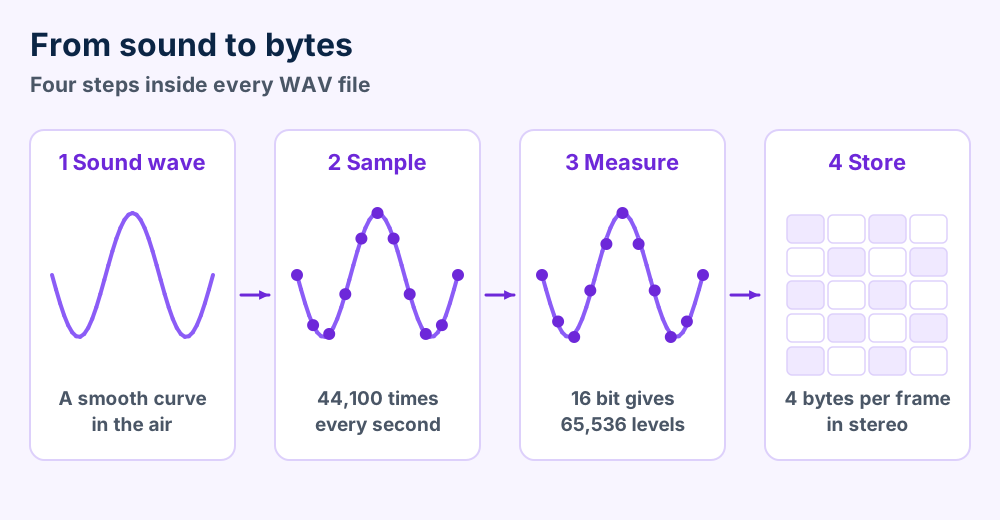
Microsoft's WAVEFORMATEX page lists 8.0, 11.025, 22.05 and 44.1 kHz as common sample rates for PCM. CD audio uses 44.1 kHz. Wikipedia's WAV article adds 48 kHz for BBC Radio.
Sixteen bits give 65,536 levels. Twenty four bits give 16,777,216. Wikipedia's audio bit depth article puts the dynamic range of 16 bit audio near 96 dB and 24 bit audio at a theoretical 144 dB.
Microsoft sets plain PCM at 8 or 16 bits. Anything beyond 16 bits calls for the extensible structure that section 10 explains.
| Setting | Where you meet it | Source |
|---|---|---|
| 44.1 kHz, 16 bit, stereo | CD audio | Wikipedia's WAV article |
| 48 kHz, 16 bit | Radio, as in the BBC Radio entry | Wikipedia's WAV article lists BBC Radio |
| 8 kHz and 11.025 kHz | Low rate recordings | Microsoft's WAVEFORMATEX page |
| 24 bit, any rate | Higher resolution recording | Needs the extensible structure per Microsoft |
| More than 2 channels | Surround and other multichannel audio | Needs the extensible structure per Microsoft |
Mono uses one channel and stereo uses two. Microsoft sets nChannels to 1 for mono and 2 for stereo. Higher counts need the channel mask in section 10.
Every setting changes the file size. Section 6 converts the three numbers into megabytes.
Higher numbers do not rescue a weak source. A phone call saved at 96 kHz still sounds like a phone call. It only weighs more.
Not quite. RIFF is the container and a WAV file is one kind of file built on it. A label near the top of the file says WAVE.
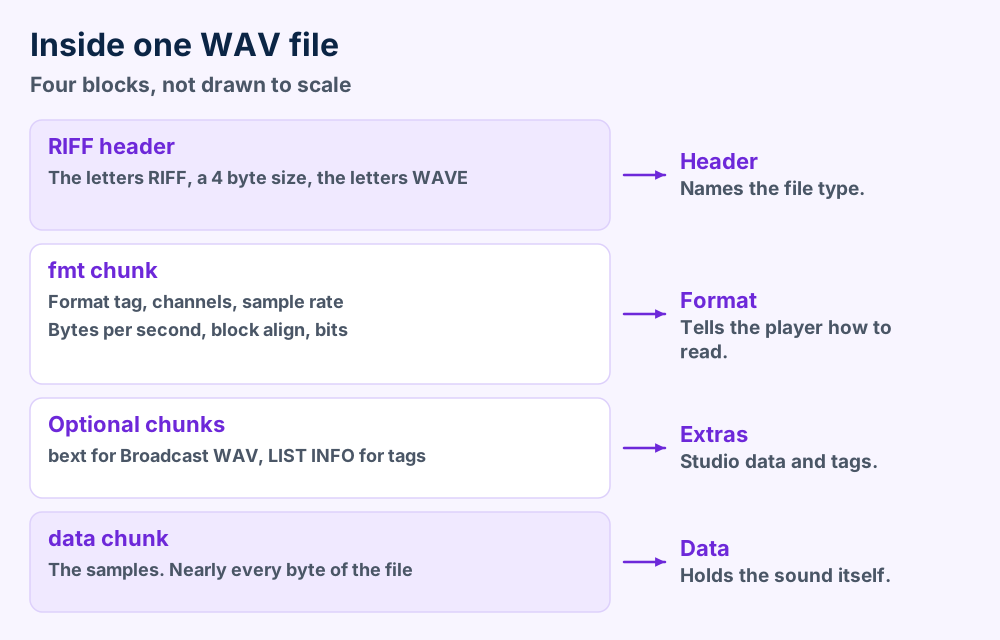
A WAV file rides on RIFF. Microsoft's RIFF page says a RIFF file is made of chunks. The first chunk is labeled RIFF and holds every other chunk.
The label that follows the size says what kind of file you have. For audio Microsoft names WAVE and XWMA. Wikipedia's RIFF article says AVI files and WAV files both use RIFF as their basis.
| Part | Size | What it holds |
|---|---|---|
| RIFF | 4 characters | The label that opens the file |
| File size | 4 bytes | Size of the file type plus every chunk that follows |
| Chunk ID | 4 characters | A label like fmt or data |
| Chunk size | 4 bytes | Size of the chunk data, without the ID and without padding |
| Padding | 0 or 1 byte | Chunks pad out to a word boundary |
The fmt chunk describes the audio. The data chunk holds it. A plain PCM file needs only those two chunks and the RIFF wrapper.
Your ears never meet these chunks. Software reads them in order and plays what the data chunk holds. Wikipedia says the bytes sit in little endian order.
RIFF explains why one family of Microsoft files looks alike. AVI files use the same chunk design for video. WMA audio files follow a different Microsoft container called ASF.
Rename a WAV file to MP3 and nothing converts. The RIFF chunks stay inside. Our file format guide explains why an extension never changes the contents.
Chunk order is flexible. Microsoft says the chunks inside a RIFF chunk can come in any order. The IDs tell readers what they hold.
Double click the WAV file. Windows Media Player 12 plays it and so does VLC on Windows, Mac, Linux, Android and iOS.
Windows has handled WAV files for decades. Microsoft's list of audio formats supported out of the box names WAV files beside MP3 and AAC. Your file likely plays with a double click.
| Software | Platforms | What the vendor says |
|---|---|---|
| Windows Media Player 12 | Windows | Microsoft lists .wav as supported |
| Media Foundation | Windows 7 and later | Microsoft lists the WAVE container from Windows 7 |
| VLC | Windows, Mac, Ubuntu, Android and iOS | VideoLAN lists WAV files among its input formats |
| Android | Android phones | Android's table shows WAVE decoding on all versions |
Double click it. Windows Media Player 12 starts the sound and VLC does the same on any system.
Convert a copy. Section 9 shows the FFmpeg commands.
Android's supported formats page describes WAVE as 8 and 16 bit linear PCM. Studio files at 24 bits fall outside that description. Test them in VLC for Android.
Mac owners can use VLC too. Our macOS guides cover Mac problems that have nothing to do with sound.
Long recording? A WAV file past 4 GiB can use RF64. Section 7 lists the players and tools that read it.
Test the WAV file in VLC first. A clean play in VLC clears the file and blames your first player. A failure there points to a short save or damaged data.
Most silent WAV files fail for one of four reasons. Only one of them damages the sound. Start with the cheap test in VLC and work down the list.
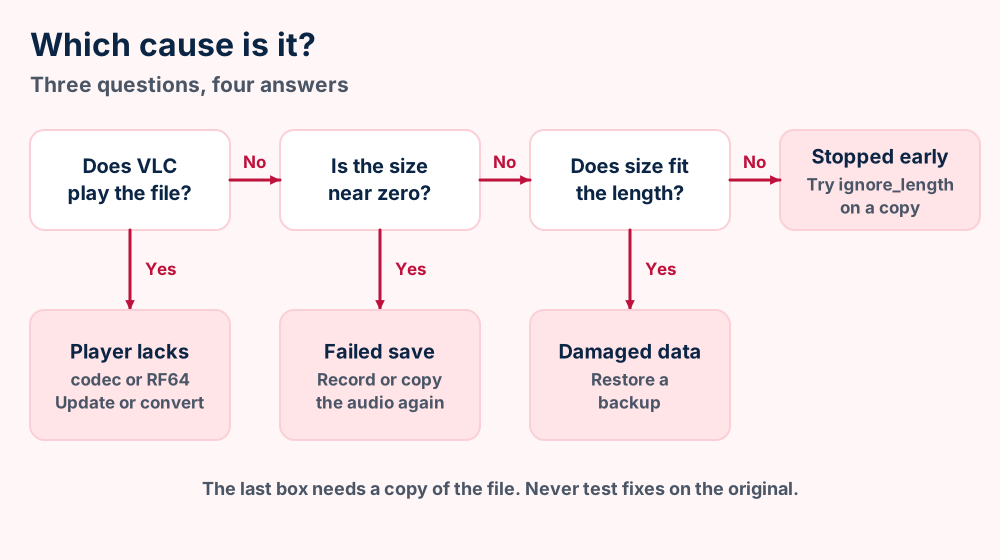
.wav name. The size gives that away.Microsoft's Media Foundation list shows the split in codecs. It names the WAVE container from Windows 7 and an ADPCM decoder from Windows Vista. VideoLAN lists LPCM and ADPCM among the audio codecs VLC reads.
The FFmpeg format documentation describes the ignore_length option as ignoring the size of the data chunk and reading to the end of the file. It is off by default. Work on a copy so the original stays untouched.
| What you see | Cause | First move |
|---|---|---|
| Player reports an unsupported format | Codec or RF64 header | Open the file in VLC |
| File weighs a few kilobytes | Failed save or wrong file | Fetch or record it again |
| Plays a few seconds then stops | Size fields disagree with the data | Try ignore_length on a copy |
| VLC fails too | Damaged data | Restore your backup |
ffmpeg -ignore_length 1 -i broken.wav fixed.wav and play the new file.Skip paid repair offers for cut audio. Sound that never reached the file cannot return. Record the take again or restore a backup.
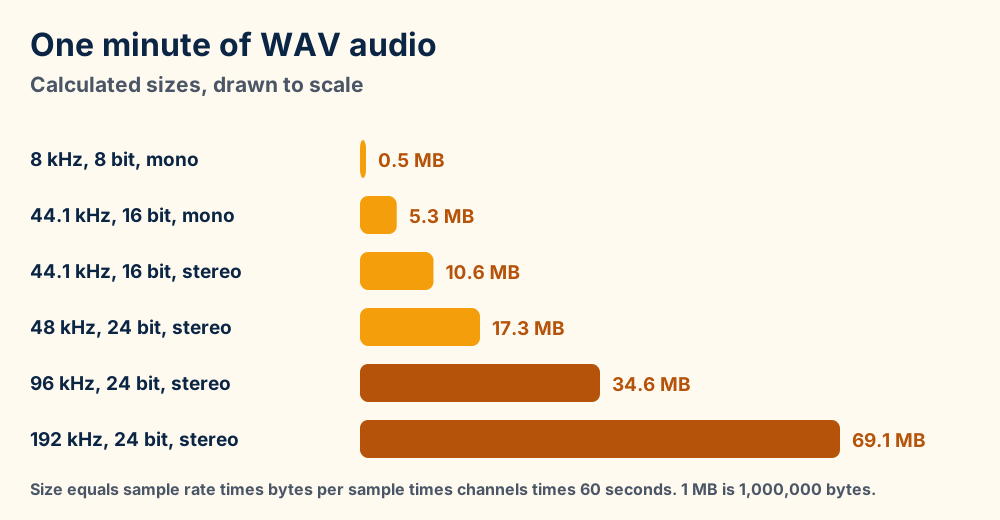
No compression means large files. CD quality stereo adds 176,400 bytes every second, about 10.6 MB every minute.
Nothing in a WAV file is compressed. Size is arithmetic. Multiply the sample rate by the bytes per sample and by the channels. The result is the bytes your recording adds every second.
Microsoft gives the frame size for PCM as channels times bits per sample divided by 8. At 44.1 kHz stereo and 16 bits that is 4 bytes per frame and 176,400 bytes per second.
| Setting | Bytes per second | One minute | One hour |
|---|---|---|---|
| 8 kHz, 8 bit, mono | 8,000 | 0.5 MB | 28.8 MB |
| 44.1 kHz, 16 bit, mono | 88,200 | 5.3 MB | 317.5 MB |
| 44.1 kHz, 16 bit, stereo | 176,400 | 10.6 MB | 635.0 MB |
| 48 kHz, 24 bit, stereo | 288,000 | 17.3 MB | 1,036.8 MB |
| 96 kHz, 24 bit, stereo | 576,000 | 34.6 MB | 2,073.6 MB |
A three minute song at CD settings weighs about 31.8 MB. The same song as MP3 at 128 kbps weighs about 2.9 MB. A WAV file costs roughly eleven times the space.
Headers add almost nothing. Wikipedia's example header for a plain PCM file is 44 bytes. Even a 3 second clip is almost all samples.
Drop to mono for speech. Drop the sample rate for voice notes. Keep the original WAV file when you plan to edit it later.
Convert to FLAC when you want a smaller file with no loss. Section 9 shows the command.
Bits per second and bytes per second are different units. CD audio streams 1,411,200 bits per second. That equals 176,400 bytes per second.
A WAV file stops below 4 GiB because RIFF sizes use 4 bytes. RF64 lifts the ceiling with 64 bit sizes and keeps the .wav extension.
Long recordings hit a wall. Microsoft's RIFF page defines the file size as a 4 byte value. Four bytes count up to 4,294,967,295 and no further.
Wikipedia puts the WAV file limit at under 4 GiB and equates that to about 6.8 hours of 16 bit stereo at 44.1 kHz. The math in section 6 agrees. Higher settings reach the wall sooner.
| Setting | Time to 4 GiB |
|---|---|
| 44.1 kHz, 16 bit, stereo | 6 hours 45 minutes |
| 48 kHz, 24 bit, stereo | 4 hours 8 minutes |
| 96 kHz, 24 bit, stereo | 2 hours 4 minutes |
| 192 kHz, 24 bit, stereo | 1 hour 2 minutes |
The EBU designed RF64 in Tech 3306 for multichannel sound across the programme chain. The Library of Congress says the first four bytes change from RIFF to RF64. The size field at offset 4 becomes 0xFFFFFFFF.
A ds64 chunk then carries the real 64 bit sizes. The Library of Congress gives the new ceiling as about 16 exabytes. Wikipedia's RF64 article says a JUNK chunk reserves the space for ds64.
RF64 files normally keep the .wav extension. A player that knows only plain RIFF sees the new label and can refuse the file. Section 5 lists that cause.
| Tool | RF64 support |
|---|---|
| FFmpeg | The WAV muxer has an rf64 option. The default is never. The auto mode switches over at 4 GB |
| flac | Accepts RF64 input and detects it by extension or header |
| EBU and ITU | EBU Tech 3306 recommends BW64 from ITU-R BS.2088 for the 64 bit format |
The ITU's BS.2088 page lists version BS.2088-2 from November 2025 as in force. EBU's June 2018 edition of Tech 3306 says the ITU version adds the chna chunk for the Audio Definition Model.
A recorder without RF64 has to end the file near the wall. Join the parts later in an editor.
Need one command? Enter ffmpeg -i long.wav -rf64 auto out.wav when you write a file that can pass 4 GB. The default mode never switches.
A WAV file beats MP3, M4A and WMA on fidelity and loses on size. Keep WAV files for recording and archives. Use the smaller formats to share.
A WAV file keeps every sample. MP3 and AAC throw detail away to save space. That one fact decides most choices between them.
| Format | Kind | Where it plays |
|---|---|---|
| WAV file | Uncompressed PCM in most files | Windows and Android list it. VLC reads it on every major system |
| MP3 | Lossy, per Wikipedia | Everywhere. Our MP3 file page covers bit rates |
| M4A | Container for audio codecs. The M4A guide names them | Windows lists M4A. See the M4A file guide |
| WMA | Lossy and lossless codecs | Windows lists it. Android's table leaves it out |
| FLAC | Lossless, per Wikipedia | Windows and Android list it |
The Library of Congress prefers Broadcast WAV with LPCM as its archival master for mono and stereo analog reformatting. The Library lists the format as open with no licensing or patent restrictions.
Editors work with WAV files because every lossy export stacks another loss. Start from the WAV original and every export is a first generation copy. Chain MP3 to MP3 and the damage adds up.
Sharing flips the call. Wikipedia describes MP3 as a format that shrinks sound by discarding detail listeners are unlikely to notice. Android and Windows both list MP3.
You record, edit or archive. Every sample stays.
You share, stream or fill a phone. The file shrinks to about a tenth.
Photographers face the same choice with images. TIFF files, BMP files and JFIF files sit on different sides of it. Camera raw files like DNG files and CR2 files reward the same keep the original habit.
Weighing the video side? MP4 files and MKV files wrap video with audio tracks. FLV files, SWF files and MTS files cover web and camcorder video.
Encode the WAV file with FFmpeg. FLAC loses nothing. MP3 and AAC lose detail once. Keep the original WAV file.
Converting a WAV file means encoding the samples into a new format. FFmpeg does it for free. Its documentation lists the LAME encoder for MP3 and a built in AAC encoder.
ffmpeg -i song.wav -codec:a libmp3lame -b:a 192k song.mp3The FFmpeg codec documentation says -b sets the bit rate for CBR or ABR in libmp3lame. A higher number means a bigger MP3 file.
For M4A enter ffmpeg -i song.wav -c:a aac -b:a 192k song.m4a. FFmpeg's documentation calls its native AAC encoder the default. It falls back to 128 kbps if you set no rate.
For FLAC enter ffmpeg -i song.wav song.flac. The FLAC command line tool also takes WAV files and RF64 files directly. Its --keep-foreign-metadata option saves non audio chunks in the FLAC file.
| From | To | What happens |
|---|---|---|
| WAV file | FLAC | Nothing is lost. The file shrinks and decodes back to the same samples |
| WAV file | MP3 | One lossy pass. Keep the WAV original |
| WAV file | M4A with AAC | One lossy pass. Keep the WAV original |
| MP3 | WAV file | The file grows and quality stays put. Nothing returns |
Apple's Music guide lists WAV files among the formats you can convert songs to. Use it if you live in the Music app. Check your titles afterward because a WAV file stores tags in INFO chunks that other formats can handle differently.
Online converters ask for your upload. Convert on your own computer when the recording matters. Your voice files stay with you.
Broadcast WAV files add a bext chunk of studio metadata. The extensible format adds channel masks and bit depths beyond 16.
Two extensions grew out of the WAV file format. Broadcast WAV files add studio metadata. The extensible format adds channels and bit depths the original structure could not describe.
EBU Tech 3285 defines the Broadcast WAV file. Version 2.0 dates from 2011. The document says the format was first issued in 1997. Wikipedia calls it a metadata enhanced version of the WAV file format for film, radio and television.
| Field | Size | Holds |
|---|---|---|
| Description | 256 bytes | Free text about the sound |
| Originator | 32 bytes | Name of the producer |
| OriginationDate | 10 bytes | Date as yyyy-mm-dd |
| OriginationTime | 8 bytes | Time as hh:mm:ss |
| TimeReference | 8 bytes | Sample count since midnight |
| UMID | 64 bytes | SMPTE 330M material identifier |
| CodingHistory | Variable | ASCII lines that log every processing step |
The Library of Congress record says every Broadcast WAV file must carry a bext chunk. Version 2 added loudness fields according to Tech 3285. Older software can ignore them.
Microsoft says the WAVEFORMATEXTENSIBLE structure covers formats with more than two channels or higher resolution than WAVEFORMATEX allows. The Library of Congress says Microsoft introduced it with Windows 2000.
| Field | What it does |
|---|---|
| wValidBitsPerSample | Counts the bits of real precision inside the container |
| dwChannelMask | Assigns channels to speaker positions |
| SubFormat | A GUID that names the audio format, for example KSDATAFORMAT_SUBTYPE_PCM |
| cbSize | Must be at least 22 for an extensible header |
The container size must be a multiple of 8 bits. A 20 bit signal sits in a 24 bit container with a valid bit count of 20. Microsoft's driver documentation says WAVEFORMATEX describes 8 and 16 bit samples and the extensible form is necessary beyond 16 bits.
Hit a 24 bit or 5.1 file that stays silent? The player can lack extensible support. Test it in VLC and convert a copy to FLAC.
A WAV file is a RIFF container of type WAVE. Format tags name the codec inside and RF64 or BW64 handle files past 4 GiB.
These are the plain facts. Every row names its source. Facts we could not check stay off this page.
.wav52 49 46 46 then 4 size bytes then 57 41 56 45, spelling RIFF and WAVE, per the Library of Congressds640x0001 (WAVE_FORMAT_PCM), per RFC 23610x0002, per RFC 23610x0003, per RFC 23610x0055 (WAVE_FORMAT_MPEGLAYER3), per RFC 2361audio/wav, audio/x-wav, audio/wave and audio/vnd.wave. The Library of Congress says audio/wav is not IANA registeredThe RFC 2361 codec registry dates from June 1998 and carries an informational status. It lists the format tags above. The Microsoft pages we read leave the numbers out.
The Library of Congress WAVE record adds identifiers and sustainability notes. Our file format index and what is guides list sibling topics.
The number for WAVE_FORMAT_EXTENSIBLE appears on none of the Microsoft pages we read. This reference omits it. It also gives no listening test results and no ranking of codecs by sound.
Mail files can carry WAV file attachments. EML files and MBOX files store messages with their attachments. PST files and OST files do the same inside Outlook.
Try VLC. Section 5 separates player faults from file faults.
Convert a copy. Section 9 has the commands.
Did the audio start life inside a video? MP4 file format and AVI file format hold audio tracks you can pull out.
Want a file every phone plays? The M4A format and the MP3 format fit the job.
Does Windows show an error code? Windows error pages match fixes to the exact message.
Did the file arrive by mail? EML message files and MBOX mailboxes hold attachments you can save out.
Unsure what an extension even means? File format basics explains extensions and containers.
Have a WAV file that none of this explains? Share the size and any error text through our error form.