What Is Unibox Email Client? Mac Mail by Sender, Status and Where Mail Lives
Unibox email client groups mail by sender on Mac, iPhone and iPad. Learn who makes it, which accounts it reads, where it stores mail and how to move that mail.

Unibox email client groups mail by sender on Mac, iPhone and iPad. Learn who makes it, which accounts it reads, where it stores mail and how to move that mail.
Unibox email client is a Mac, iPhone and iPad mail app from eightloops GmbH that groups mail by sender. You open a person and see every message and attachment you exchanged with that person.
Unibox mail client connects over IMAP and keeps messages on your device. Your provider keeps the master copy. The developer lists no POP support and no Windows version.
Add the same IMAP account to Thunderbird, Apple Mail or Outlook to move out. Apple Mail exports MBOX files and Outlook exports PST files.
Unibox email client is a mail app that lists people instead of messages. You open a person and read everything you swapped with that person in one pane.
The developer is eightloops GmbH. Its website offers a Mac version through the Mac App Store and an iPhone and iPad version through the App Store. FileFix found no Windows version of the Unibox mail client.
Many readers land here from an old review or an old Mac App Store link. This page uses the developer pages and 2013 press coverage. It marks every point those sources leave open.
Unibox email client groups mail by sender. It connects over IMAP and keeps messages on your device. The Mac listing shows version 1.21.0 and no discontinuation notice.
Comparing mail clients? Mozilla Thunderbird and Apple Mail have their own pages in the email application guides.
This page covers the Unibox email client from eightloops GmbH for Mac, iPhone and iPad. Unibox in Instantly and the Unibox set top box are different products.
Three products carry the Unibox name. The mail app from eightloops is the one the old FileFix page described.
| Product | What it is | Source |
|---|---|---|
| Unibox email client | Mail app for Mac, iPhone and iPad that groups mail by sender | App Store listings and developer site |
| Unibox in Instantly | Inbox for lead replies inside a sales outreach platform | Instantly help center |
| Unibox set top box | Digital TV receiver that can record streams | Wikipedia |
The old FileFix page said Unibox mail client works on Mac and groups messages by sender. It named Mountain Lion and Mavericks. The MacRumors launch report gives the same two systems for the eightloops app.
The Unibox website lists Mac, iPhone and iPad only. FileFix found no Windows or Android build of the Unibox mail client from eightloops.
Windows users can read about Windows Mail or Mozilla Thunderbird instead. Both have a page here.
No. The Instantly help article calls it a centralized inbox for managing lead replies. That feature lives inside Instantly. It is not a desktop mail app.
A third product shares the name. The Wikipedia entry for Unibox covers a digital set top box.
Unibox email client lists people and not messages. Open a person and you see the mail you sent and received with that person, whatever the subject or date.
The Unibox FAQ says Unibox email client groups your emails by sender. Opening a contact shows the messages you exchanged with that person.
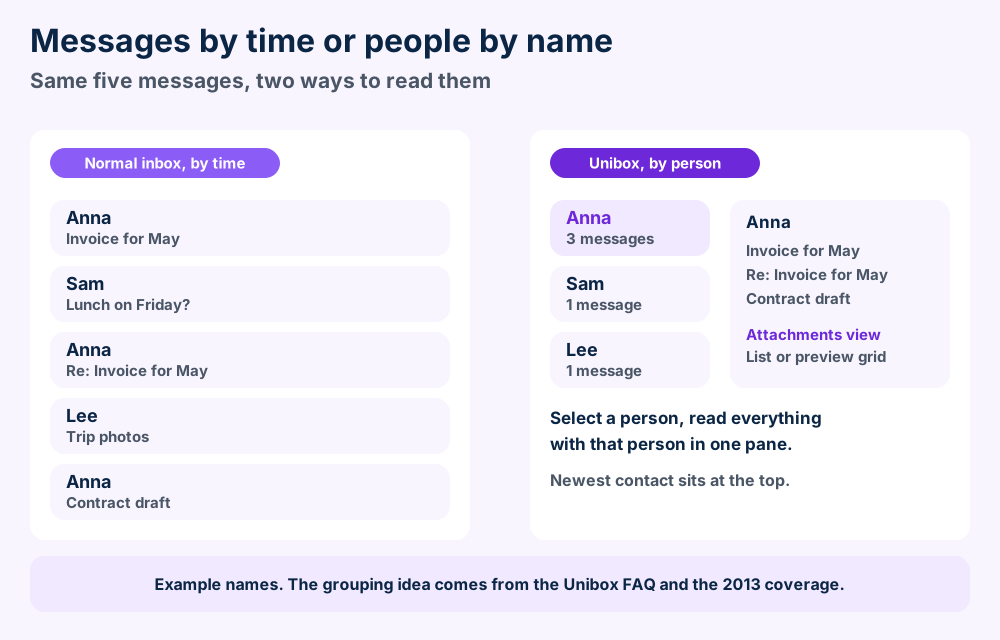
Received and sent mail sit together under the contact. The Unibox website lists a grid or list of that contact's attachments. It also lists a threads view that shows related messages from all participants.
The FAQ says you can link several addresses to one person through the Contacts app. It adds that matching display names alone cannot identify someone reliably.
You can delete or move every message from a contact together. The FAQ says this works within the folders you currently have selected.
The iMore report from 2013 says you can drill into existing folders from the top navigation. It also says the app lacks a traditional inbox view. Sorting mail into folders by dragging is harder than in a classic client.
Today the Unibox email client lists a unified view of all accounts. You can also select one account at a time.
Unibox email client lets you read earlier messages while you write a reply in the same window. The Macworld review of version 1.0 says the compose window drops down from the top of the screen. It adds that To, Cc and Bcc fields appear only when you ask.
The FAQ says search covers names, email addresses, subject lines, message text and attachment filenames. It does not search inside attached files. The Unibox account setup FAQ adds that search covers only messages already downloaded and indexed.
Unibox mail client is still listed on the Mac App Store and the developer site shows no discontinuation notice. The Mac listing shows version 1.21.0 as the latest.
Press coverage dates the start to 2013. The Macworld beta report from 19 July 2013 describes a private beta from Eightloops. The MacRumors beta report of 16 September 2013 covers the public beta.
The Mac App Store listing dates version 1.0 to 18 October 2013. The MacRumors launch report on 24 October 2013 says the Mac App Store launch cost $9.99.
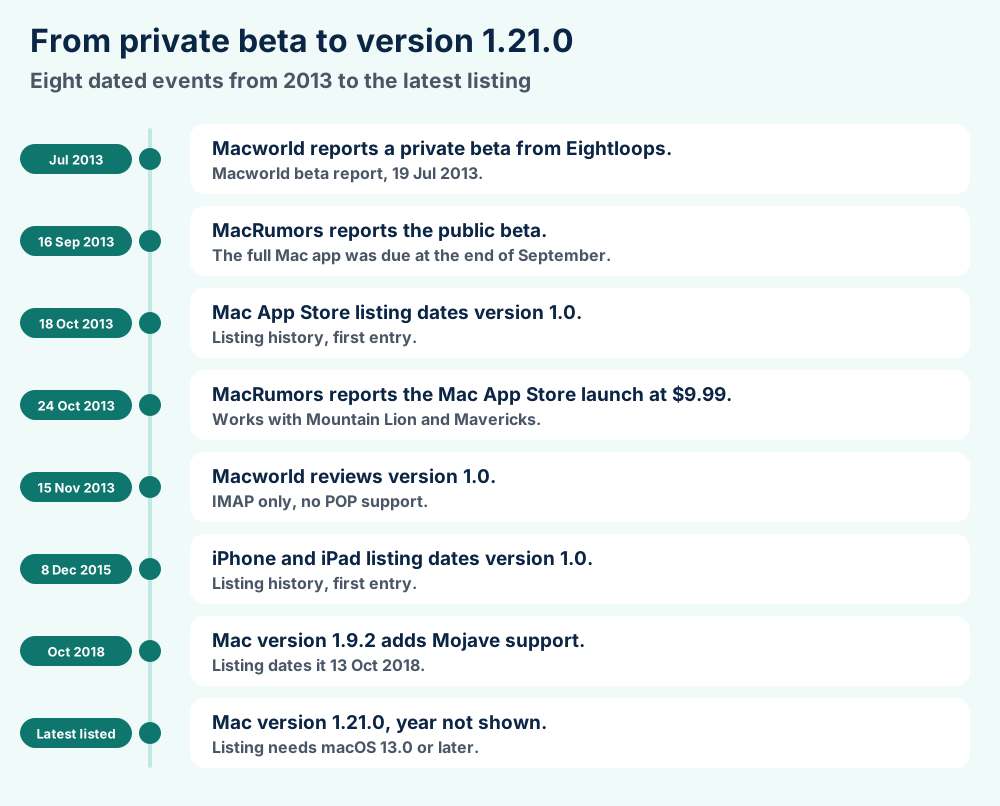
The iPhone and iPad listing shows version 1.0 dated 8 December 2015 as its earliest entry. That is the first date FileFix found for the Unibox email client on mobile.
| Version | Date | Listed change |
|---|---|---|
| 1.1 | 10 Apr 2014 | Large font setting and a view for email source |
| 1.2 | 10 Sep 2014 | Starring, message filters and auto saved drafts |
| 1.2.1 | 30 Sep 2014 | OAuth for Gmail and Outlook.com |
| 1.7.2 | 22 Apr 2017 | Sierra compatibility |
| 1.9.2 | 13 Oct 2018 | Mojave compatibility |
Dates come from the Mac App Store listing. FileFix did not test a single Unibox mail client version.
Version 1.21.0 improves search with prefix matching and exact matches in quotes. It also lets you empty Spam and Trash and shows sender photos in notifications. Version 1.20.4 updated the Gmail and iCloud setup guidance.
The page shows these dates as 27 and 18 September with no year. FileFix states no year for them.
The FAQ says Unibox email client is actively developed and points to release notes. The developer site shows a 2026 copyright line. FileFix found no discontinuation notice on the site or in the App Store listings.
Unibox email client needs macOS 13.0 or later on a Mac and iOS 15.6 on an iPhone. It is free with one account and Pro adds more.
System requirements changed a lot since 2013. Read a live listing before you buy or download the Unibox email client.
| Device | Requirement | Download size |
|---|---|---|
| Mac | macOS 13.0 or later | 12.3 MB |
| iPhone and iPod touch | iOS 15.6 or later | 31.4 MB |
| iPad | iPadOS 15.6 or later | Same listing |
| Apple Vision | visionOS 1.0 or later | Same listing |
The old FileFix page listed OS X 10.10 and an Intel 64 bit processor. The current Mac listing asks for macOS 13.0. FileFix drops the old line.
The FAQ says Unibox mail client is free with one email account. Pro adds multiple accounts and custom default signatures. It is sold as an annual subscription and the app shows the current price before you buy.
Listings and the FAQ word the price differently. FileFix states no Pro price. In 2013 the app cost $9.99 per the iMore report.
An active subscription covers Mac, iPhone and iPad when the devices share one iCloud account. The FAQ says earlier lifetime purchases stay with their original platform.
The Mac listing shows English and 15 other languages. The website offers about 30 languages. Check the listing for your language before you download.
The developer lists no Windows or Android version. Windows users need another client in place of the Unibox mail client. Mozilla Thunderbird and Microsoft Outlook both have FileFix pages.
Unibox email client connects to IMAP accounts including iCloud, Gmail, Outlook.com, Microsoft 365 and Yahoo. Gmail and iCloud need an app password.
Unibox mail client receives mail over IMAP and sends over SMTP. The Unibox account setup FAQ lists iCloud, Gmail, Outlook.com, Microsoft 365 and Yahoo. It also lists private servers that are set up the right way.
IMAP keeps your mailbox on a server so several programs can use it. The IMAP specification describes that design.
| Provider | How you sign in | Watch for |
|---|---|---|
| Gmail | Google app password | 2 Step Verification must be on |
| iCloud Mail | App password from Apple | Two factor authentication must be on |
| Outlook.com and Microsoft 365 | Microsoft sign in | IMAP and SMTP must be allowed |
| Exchange | IMAP and SMTP only | Needs IMAP enabled on the server |
Steps follow the FAQ, which gives no click path. Changing your Google password means creating a new app password.
Create an app password in the Sign-In and Security section of your Apple account. Two factor authentication must be on. A password reset means you create a new one.
The FAQ names IMAP and SMTP only and never mentions POP. The Macworld review of version 1.0 said in 2013 that there is no POP support. FileFix claims none.
Exchange works only through IMAP and SMTP. The FAQ says Exchange ActiveSync, calendars and contacts are not included. See Exchange Server for the server side.
The FAQ lists no setup for GMX Mail or Yandex Mail. A private server route exists. FileFix found no source that confirms either provider.
The free tier of the Unibox mail client includes one account. Pro adds multiple accounts per the FAQ.
Unibox email client stores messages and attachments on your device and keeps login details in the Apple Keychain. The developer does not publish the folder path.
Your provider holds the master copy. Unibox mail client keeps a working copy on your device.
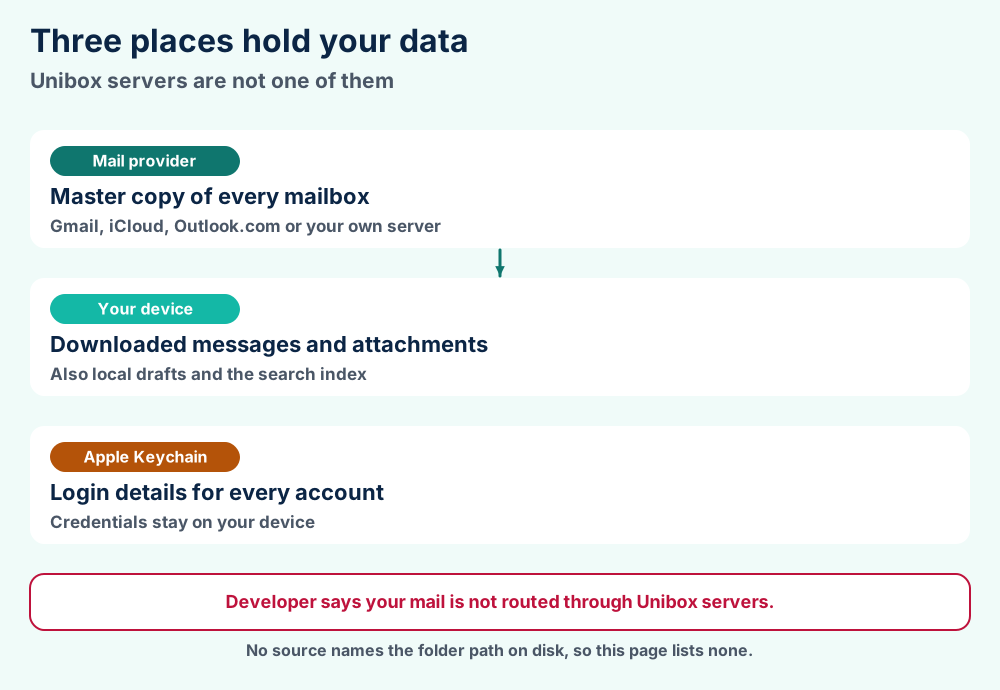
The FAQ says messages and attachments are stored on your device. Drafts stay on the device where you wrote them. Unibox mail client also indexes downloaded mail for search. The 1.21.0 notes mention Spotlight indexing.
The FAQ says the Apple Keychain protects your login details. A developer reply on the Mac listing says saved credentials in the Keychain persist after you reinstall. Update them after a password change.
The developer gives a flat no. Unibox email client connects directly to your provider and your emails are not routed through Unibox servers. That is a developer claim and FileFix did not test it.
The iPhone listing carries a developer written privacy label. It lists contact info, identifiers, usage data and diagnostics. Apple notes that it does not verify the label.
Removing an account deletes its local data in Unibox. It does not delete the emails stored by your provider. You can add the account again.
FileFix found no source that names the Unibox email client folder. Ask support@uniboxapp.com, which is the address the FAQ gives for questions it does not cover.
No source says so. Unibox email client documents no mail file that other programs can open. MBOX files and PST files are the formats you meet when you move mail out.
Check sign in first and the sync period second. Most Unibox mail client trouble comes from app passwords, provider blocks and a short sync window.
Most Unibox email client trouble starts at sign in or sync. Check these six causes in order.
The Macworld review of version 1.0 lists long messages cut off behind a More button, a blank screen at launch and some graphical glitches. It also calls the help pages thin. The Macworld beta report found that multi recipient threads showed only the selected contact's messages.
The Mac listing shows four reviews dated 2017 to 2023. They praise the layout and the grouping by sender. They criticize background sync delays, reliability and slow support replies.
Check that your provider's webmail works in a browser. Refresh the account and read the error text. Then email support@uniboxapp.com with your device, system version, Unibox version, provider and exact error.
The FAQ says never to send passwords or app passwords. Send us the file details if you hold a mail file that Unibox email client cannot explain.
Thunderbird, Apple Mail and Outlook all do the mail job and all work with files you can open elsewhere. Unibox email client trades that for a view built around people.
Unibox email client suits people who think in contacts. It suits a folder fan less. The iMore report names the missing traditional inbox as the main drawback.
| Question | Unibox | Thunderbird | Apple Mail | Outlook |
|---|---|---|---|---|
| Local mail file | Not published | mbox by default | .mbox on export | PST on export |
| Source | Unibox FAQ | Mozilla | Apple | Microsoft |
Mozilla Thunderbird reads IMAP mail and stores every folder as one mbox file by default, per the Mozilla Maildir article. MBOX files show what that file holds.
Apple Mail comes with macOS and exports mailboxes in mbox format.
Microsoft Outlook exports a PST file, as the Microsoft guide to PST export shows. Read PST files and OST files for how those files differ. Mac Outlook data sits in OLK files.
Windows Mail belongs on a Windows PC. It helps if you also own one. FileFix has a page for it.
Read about Trojitá, Sylpheed and SeaMonkey. Pegasus Mail and Opera Mail also have pages. Their pages cover storage and status in the same style.
Protonmail and Zimbra Mail are services and servers and not desktop clients. Check the page before you try to add one to Unibox.
Add your IMAP account to Apple Mail for MBOX or to Outlook for PST. Export from there because Unibox email client documents no export feature.
Unibox email client lists no export feature in its FAQ. Export from another client that reads the same IMAP account.
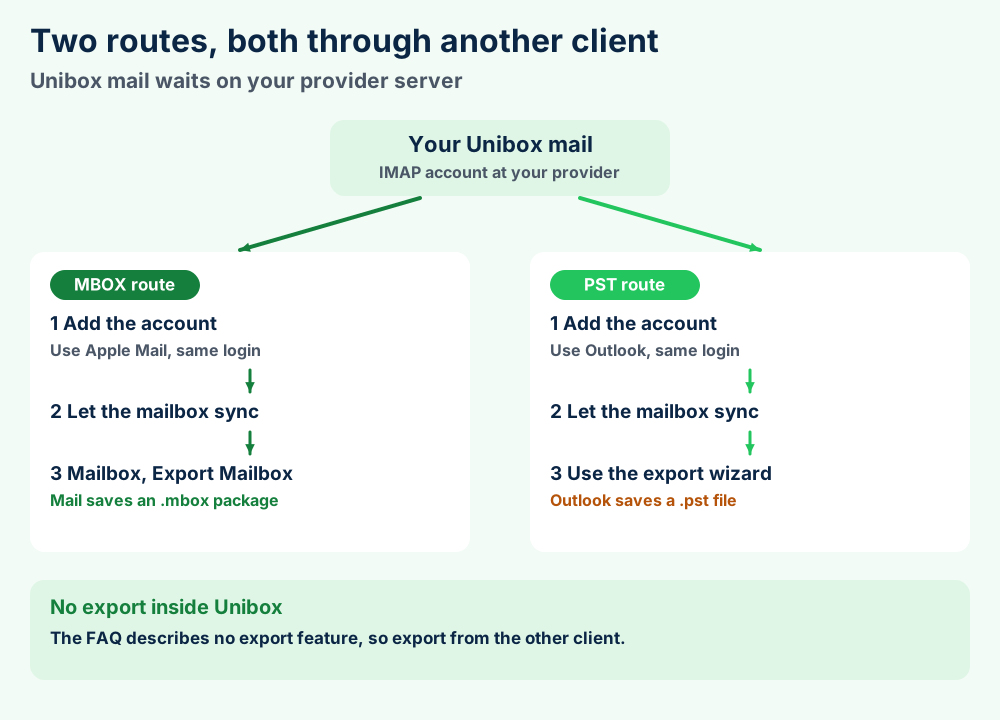
Steps follow the Apple Mail guide. Mail saves every mailbox as an .mbox package and does not overwrite an earlier export. Read MBOX files for what the file holds.
Add the same IMAP account to Outlook and let it finish syncing. Microsoft suggests waiting for all mail to sync before you export. In new Outlook, Microsoft says to open Settings, then Files, then Export.
The Microsoft guide to PST export also says new Outlook cannot save calendar and contact items to PST. Importing a PST needs classic Outlook. Read PST files before you plan the move.
No. Removing an account clears only the local data in Unibox. Your provider keeps the messages.
Mozilla Thunderbird stores folders as mbox files by default. The format is familiar there. FileFix has not tested your exact file. Start with a small export.
Read what a file format is for the basics. Browse the file format guides for other formats.
Unibox email client documents no mail file format. MBOX and PST are the formats you meet when you move mail out through another client.
No vendor spec for Unibox mail client files exists in the sources checked. This section lists what the developer states about the Unibox email client and what it leaves out.
| Format | What it is | Where you meet it |
|---|---|---|
| MBOX | Plain text family that stores many messages in one file, per Wikipedia entry on mbox | Thunderbird default and Apple Mail export |
| PST | Outlook data file for mail, contacts and calendar | Outlook export |
No source publishes the folder path, the database layout, the sync period choices or a Pro price. Treat any website that states them as unverified.
what a file format is explains why a working copy differs from a mail file. The file format guides cover every format written up so far.
Export from another client. Section 10 shows both routes.
Create a new app password. Section 6 lists the provider rules.
Want your mail in a file you can open? MBOX files explain what Thunderbird and Apple Mail write. PST files cover the Outlook side.
Looking for a client with local files? Mozilla Thunderbird is one route. Microsoft Outlook and Apple Mail are the other two.
Using a Windows PC as well? Windows Mail has its own guide. Use the Windows error guides when an error code shows up.
Holding a GMX or Yandex account? GMX Mail and Yandex Mail both have a page. Check them before you add either to a new client.
Working on a Mac? macOS guides collect macOS fixes. OLK files explain the Outlook for Mac data files.
Looking for something else? Try the FileFix category index or go back to the FileFix home page. Send us the file details when your Unibox email client question needs a person.