What Is an MBOX Viewer? Open MBOX Files, Read Them and Fix Them
MBOX viewers open one file that holds many emails. Learn which programs import MBOX files, how to read one as text and why size and encoding cause trouble.

MBOX viewers open one file that holds many emails. Learn which programs import MBOX files, how to read one as text and why size and encoding cause trouble.
MBOX viewers are programs that open an MBOX file and list the emails inside it. Thunderbird with an add-on and Apple Mail are the two vendor documented import routes.
Every message in the file starts with a line that begins with From and a space. RFC 4155 describes that line. An MBOX viewer splits the file at those lines and needs no mail server.
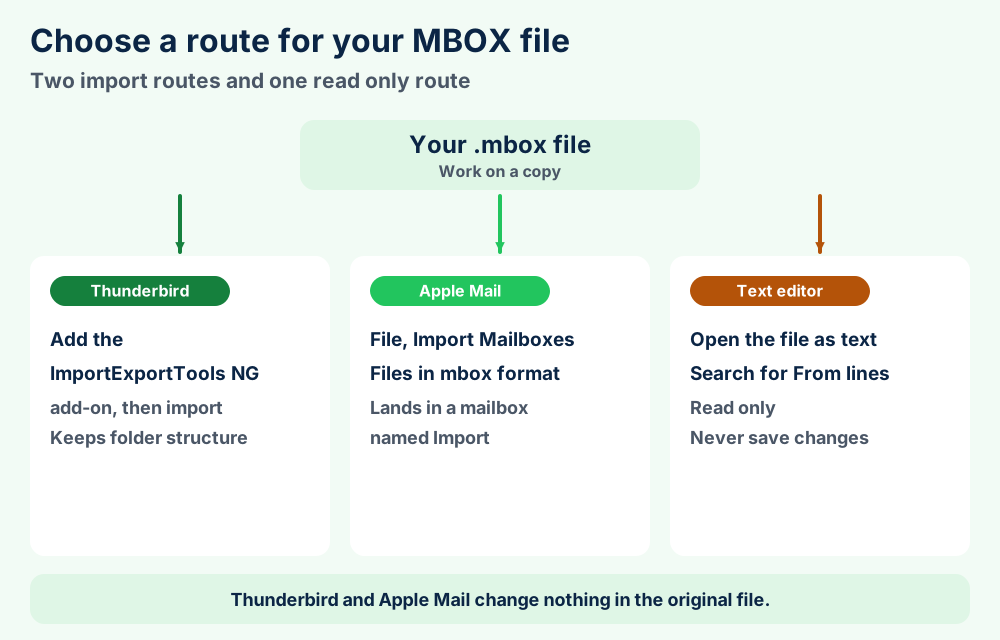
Choose a route in section 2. You import the file into a mail app or read it as plain text on a copy. Never save it from a word processor.
MBOX viewer is the name people give to any program that opens an MBOX file and shows the emails inside it. No single product owns the name. Mail apps and plain text editors all work as an MBOX viewer in some way.
You hold an MBOX file and want to read it. The file came from Gmail or from an old mail program. This MBOX viewer guide shows the routes that vendor pages support and the traps that damage the file.
An MBOX file is plain text with many messages stacked one after another. Because it needs no database, an MBOX viewer only has to find where every message starts. MBOX file format covers the format itself in more depth.
Facts here come from RFC 4155 and from Apple and Mozilla and Google help pages checked in Nov 2026. Where those sources stay silent you see that stated and not guessed.
MBOX viewers read one text file that holds many emails. Thunderbird with an add-on and Apple Mail import the file. A text editor shows it raw. Work on a copy and never save it from a word processor.
Holding a different mail file? PST files, EML files and OLK files have their own guide.
Thunderbird stores MBOX natively and imports stand alone files through an add-on. Apple Mail imports MBOX from its File menu. A text editor reads the file as raw text.
Few programs list MBOX in their own documentation. This section names only the ones with the vendor page that confirms it.
| Program | How it handles MBOX | Source |
|---|---|---|
| Mozilla Thunderbird | Stores local folders as MBOX, one file per folder, by default | Mozilla Maildir article |
| Thunderbird with ImportExportTools NG | Imports Mbox files with their structure and exports folders as MBOX | Add-on page on GitHub |
| Apple Mail | Imports Files in mbox format and exports mailboxes as .mbox packages | Apple Mail guide |
| Plain text editor | Shows the raw text and leaves import to a mail app | FileFix advice |
Thunderbird is the closest match for a native viewer. The Mozilla article on Maildir calls MBOX the default format with one file per folder. Mozilla Thunderbird explains the program itself.
The Mozilla import article says the Import tool works with Thunderbird profiles and other applications and certain files. It names no MBOX option. You need an add-on for the stand alone MBOX file.
SeaMonkey belongs to the same Mozilla family as Thunderbird. The Wikipedia entry on mbox says that family uses an mboxrd variation. FileFix could not confirm an import page for other programs this session.
Programs without a checked vendor page stay off the table. Postbox and MailMate and Sylpheed have their own guides in the email application guides.
Every message starts with a line that reads From, a space, a sender address and a date. A viewer cuts the file at those lines and shows the headers and body below every one.
An MBOX viewer needs one skill. It must tell where one message ends and the next begins. RFC 4155 makes that a line with a fixed shape.
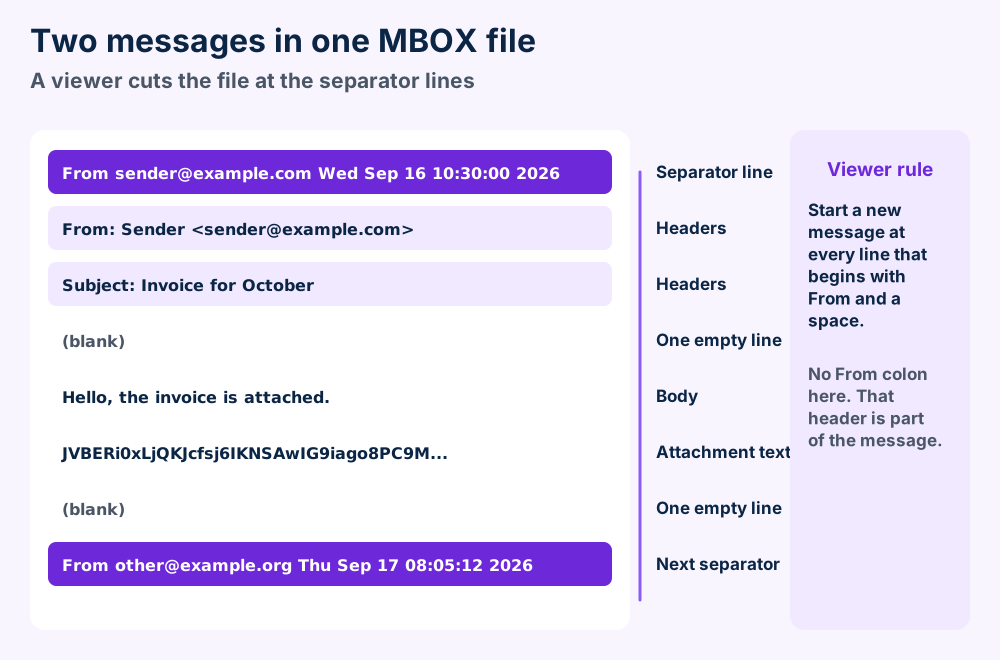
The RFC 4155 lists the parts in order. You see the word From and one space and the sender address in addr-spec form. Then comes one space and a UTC time stamp in the old Unix ctime style with no time zone.
That line has no colon after From. The From header inside the message has one. An MBOX viewer that confuses the two cuts your mail in the wrong places.
RFC 4155 says every message ends with an empty line. Every message after the first is therefore introduced by two line ends followed by the separator line.
The same appendix says the file uses a single line feed to end every line. It must not use a carriage return and line feed pair as transferred.
A body line can start with From and a space by chance. The RFC says many programs add the greater than sign in front. Others escape only some lines and a few escape nothing.
The RFC prescribes no escape syntax. It tells readers to parse full separator lines. That is why an MBOX viewer checks the full line shape and not only the first word.
Attachments sit inside the file as encoded text. RFC 4155 asks for seven bit characters and says eight bit data must be encoded first. Section 8 shows what that does to file size.
Install the ImportExportTools NG add-on and import the MBOX file from a copy. Thunderbird then shows the messages as a normal mail folder.
Thunderbird already keeps its own folders as MBOX files. A file from outside needs an import step. The add-on ImportExportTools NG covers it.
Its ImportExportTools NG page on GitHub says the add-on imports Mbox files with their structure. It also exports folders as MBOX files and can include subfolders.
The Mozilla article on installing add-ons covers the add-on step. The add-on listing did not open for FileFix this session. Read the GitHub page for the current menu names.
Thunderbird keeps them in your profile folder. On Windows the default is C:\Users\<your login>\AppData\Roaming\Thunderbird\Profiles\. On macOS it is ~/Library/Thunderbird/Profiles/ and on Linux it is ~/.thunderbird/.
Open Help and then Troubleshooting Information and select the button beside Profile Folder to jump there. The Mozilla article on the profile folder lists these steps.
Thunderbird can store one file per email instead. Mozilla says Maildir uses the EML data format. EML files explain that format.
MBOX stays the default format for Thunderbird folders, per the same article.
Choose File, Import Mailboxes and Files in mbox format. Apple Mail places the messages in the new mailbox named Import.
Apple Mail imports MBOX from the File menu. Apple calls the choice Files in mbox format. The Apple Mail guide to import and export lists the steps.
Drag the folders and messages to other mailboxes when you finish. Then delete the Import mailbox. Apple Mail has its own guide to the program.
Select one or more mailboxes and choose Mailbox and then Export Mailbox. Choose the folder and select Choose.
Mail saves every mailbox as an .mbox package. It never overwrites an earlier export. It creates a new file named like My Mailbox 3.mbox.
Apple names no Thunderbird option on that page. It lists Apple Mail and mbox format as the two sources. Thunderbird folders are MBOX files by default so the mbox choice is the route to test. See macOS guides for more Mac topics.
Takeout returns Gmail in archive parts that carry labels in an X-Gmail-Labels header. Download every part within about 7 days and open the .mbox file in a viewer.
Google lets you download your Gmail data through Takeout. The Gmail Help page on exporting your data says the download holds message content and headers and attachments. It also holds your labels and the Trash and Spam messages.
Google help pages checked this session do not name the file type for personal Takeout downloads. Look for the file that ends in .mbox in your archive and open that one.
The Google Account Help page on downloading your data says every message keeps its labels in an X-Gmail-Labels header. An MBOX viewer shows that header with the other headers.
The archive size you choose decides how many parts you get. Google recommends the 50 GB limit to reduce splitting. Open every part before you decide the mail is complete.
The Google Vault page on export contents says Gmail exports from Vault come as PST or mbox files. It adds that files above 1 GB for PST or 10 GB for mbox go into zip files.
The Wikipedia entry on Google Takeout dates the Gmail addition to Takeout to 5 Dec 2013. MBOX files cover what Takeout and other tools write.
A plain text editor opens an MBOX file and shows the raw text. Search for lines that start with From. Close without saving and keep a copy of the original.
A text editor shows you an MBOX file without any import. You see raw headers and encoded attachments and every message in order. That is good for a quick look and bad for editing.
Never open an MBOX file in a word processor. Those programs add formatting and can change line endings. RFC 4155 relies on the line shape to find message edges.
You see long rows of letters and digits where attachments sit. That is the encoded file. RFC 2045 describes the Base64 method behind it.
FileFix found no vendor limit to quote for a plain text editor. A multi gigabyte MBOX file can slow a basic editor to a stop. Use a mail app for big files.
For one message you can search the file for a subject or a sender and copy that block. EML files show what a single message looks like when a mail program saves it.
Attachments sit in the file as Base64 text that is about 33 percent larger than the original. RFC 4155 sets no size limit and asks for seven bit text.
MBOX files grow faster than the mail you see in your inbox. Two reasons stand behind it. Attachments become text and every message adds its full headers.
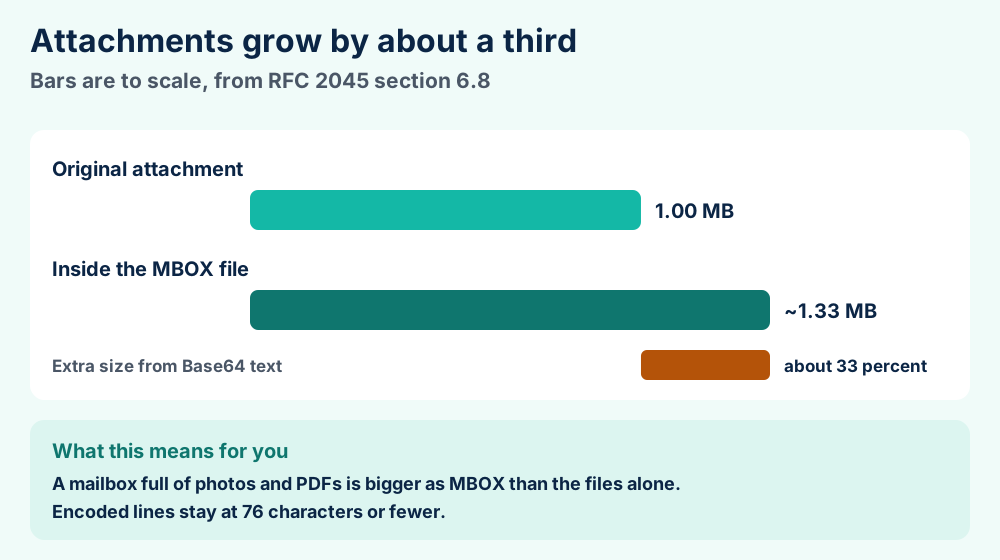
The RFC 2045 says Base64 converts three bytes into four characters. It calls the result about 33 percent larger than the original. Lines stay at 76 characters or fewer.
RFC 4155 gives no size limit. Limits come from the program and the file system. FileFix could not verify a limit for Thunderbird or Apple Mail this session.
RFC 4155 asks for seven bit characters. A program must convert eight bit data with a standard encoding and tag it with the right headers. Your MBOX viewer reads those tags to show the text correctly.
Google splits Takeout downloads into parts by the size you choose. Vault puts large Gmail exports into zip files. Both choices keep every file smaller.
Locking also matters on a live mailbox. The Wikipedia entry on mbox says readers should lock the file so they never see half written content. Copy a closed file and not one a program is writing.
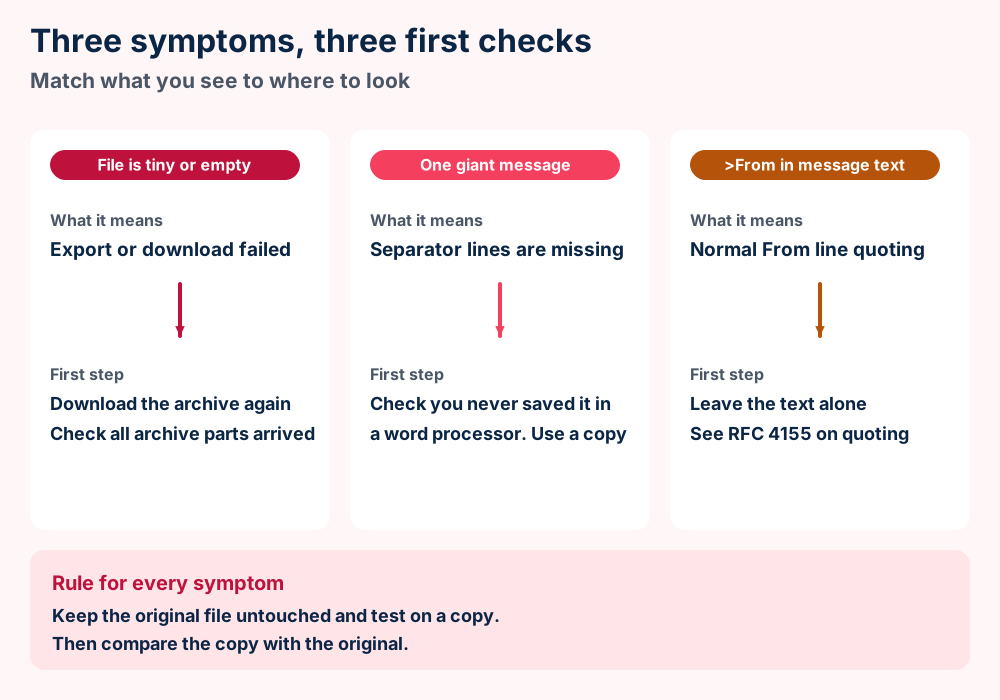
A tiny file means the export failed. One giant message points to damaged separators. Lines that start with >From are normal quoting and need no repair.
Most MBOX problems trace back to three causes. The file is incomplete or the separators are damaged or the quoting looks odd but is normal.
The Wikipedia entry on mbox names four variants. They are mboxo and mboxrd and mboxcl and mboxcl2. They differ in how they quote From lines and whether they rely on Content-Length.
Mboxo adds the greater than sign but cannot always reverse it. Mboxrd can reverse it. Wikipedia says the Mozilla family uses an mboxrd variation.
RFC 4155 says a .mbox extension is not required nor expected. Never judge the file by its name. Open it as text and look for a line that starts with From and a space.
Still no luck? Send us the file details with the size of the file and the program that made it.
MBOX holds a mailbox as plain text. EML holds a single message. PST needs Outlook. Choose by what you plan to do next.
Choose the file type by what you need to do next. MBOX keeps many messages together. EML keeps one. PST belongs to Outlook.
| File | Holds | Stored as | Opens in |
|---|---|---|---|
| MBOX | Many messages in one file | Plain text | Thunderbird with an add-on and Apple Mail import |
| EML | One message | Plain text | Many mail programs |
| PST | Outlook mail and other items | Binary data file | Microsoft Outlook |
| OST | Cached copy of a mailbox | Binary data file | Microsoft Outlook |
MBOX and EML are text files you can read without your mail program. PST files and OST files need Outlook. Microsoft Outlook explains where Outlook keeps them.
Keep an MBOX file for any mailbox archive you want to read years from now. Plain text survives program changes. Keep a second copy somewhere else.
Use EML when you need one message to share or attach. Use PST when the next stop is Outlook. OLK files belong to Outlook on a Mac.
Address books and calendars use their own files. MAB files and ICS files cover two of them.
RFC 4155 defines the separator line and the line endings and the media type. It sets no size limit. Four older variants differ on quoting and Content-Length.
RFC 4155 is an Informational document about the MBOX file from Sept 2005. It registers the application/mbox media type with IANA.
| Variant | From line handling | Content-Length |
|---|---|---|
| mboxo | Adds > but cannot reverse a line that already had it | No |
| mboxrd | Adds > and can reverse it | No |
| mboxcl | Quotes like mboxrd | Yes |
| mboxcl2 | Leaves From lines unquoted | Yes |
Wikipedia dates the variant names to 1996. It says RFC 4155 standardized the media type and that the MBOX file storage format has no other formal definition.
Read what a file format is to see why a program and a format differ. The file format guides cover other files that mail programs write. EDB files cover an Exchange mailbox store.
Check the separators and variants. Section 9 lists the first checks.
Import it or read it as text. Section 2 compares the routes.
Want to learn the format itself? Read MBOX file format for the structure and EML files for single messages.
Planning to use your mail program? Thunderbird keeps mail in MBOX files and Apple Mail imports them. SeaMonkey sits in the Mozilla family.
Holding mail from Microsoft programs? Microsoft Outlook and Windows Mail have guides. Their files are described in PST files and OLK files.
Working with an old program? Windows Live Mail and Outlook Express and Pegasus Mail have pages here. IncrediMail and Opera Mail also have one.
Weighing other mailboxes? GMX Mail and Protonmail have pages in the email application guides. Exchange Server covers a business mail server.
Need another topic? Open the FileFix category index or the Windows error guides. Send us the file details when your MBOX file behaves in a way this page leaves unanswered.