What Is Microsoft Entourage? Status, Identity Folders and How to Move Your Mail
Microsoft Entourage is the old Mac email client from Office 2001 to 2008. Learn if the program is discontinued, where it keeps your mail and how to move that mail.

Microsoft Entourage is the old Mac email client from Office 2001 to 2008. Learn if the program is discontinued, where it keeps your mail and how to move that mail.
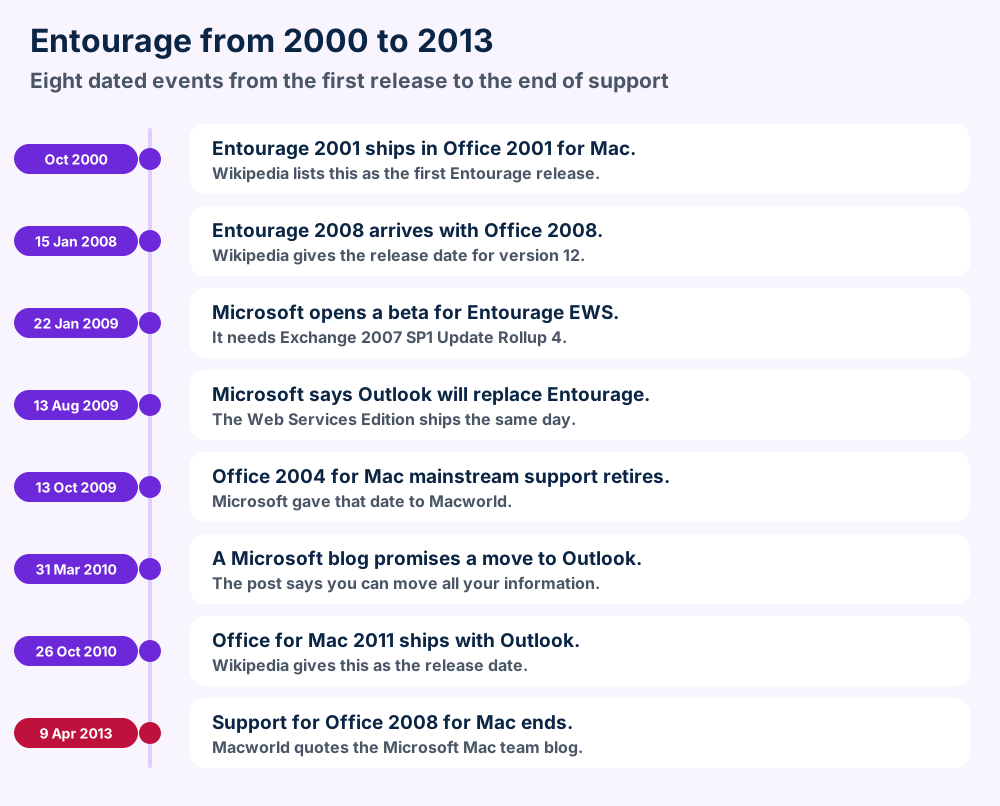
Microsoft Entourage is the Mac email and calendar program that Microsoft shipped in Office for Mac from Office 2001 to Office 2008. Microsoft said in August 2009 that Outlook for Mac would replace Entourage.
Your data sits in an identity folder in the Microsoft User Data folder. Microsoft Q&A states that Entourage 2008 is no longer supported. Outlook for Mac 2011 imports Entourage data natively.
Export an Entourage archive and copy Main Identity before you change anything. Then import into Outlook 2011 and move on from there.
Microsoft Entourage is the email program that Microsoft shipped in Office for Mac from Office 2001 to Office 2008.
Entourage kept mail, calendar, tasks, notes and contacts in one Mac window. Indiana University describes the later versions as an IMAP email client with a calendar, a task list and an address book.
Microsoft replaced Entourage with Outlook for Mac in Office for Mac 2011. People still search for the program because an old Mac or a backup holds years of mail in an Entourage database.
This page covers the versions and the status of Entourage. You also learn where the data sits and how to move it to Outlook for Mac.
Microsoft Entourage is the Mac mail and calendar program from Office 2001 to Office 2008. Outlook for Mac replaced Entourage in Office for Mac 2011.
Documents/Microsoft User Data.rge from File, ExportComparing mail clients? Microsoft Outlook is the program that took over from Entourage. Apple Mail is the client that ships with every Mac. Browse the email application guides for the rest.
Entourage shipped as version 2001, X, 2004 and 2008. Microsoft added the version 2008 Web Services Edition in August 2009 for Exchange users.
Microsoft built Entourage for the Mac side of Office. The program shipped with Office 2001 and Office X and then with Office 2004 and Office 2008.
Wikipedia lists the first release as October 2000 and the 2008 release as 15 January 2008. Wikipedia numbers those versions 9 and 12.
Outlook Express 5 for Mac came before Entourage. Microsoft article 870966 shows that Outlook Express 5.0 for Mac and the 2001 version used the same folder design.
Outlook Express 5 for Mac used a folder called Identities. Entourage 2001 used a folder called Office 2001 Identities. Read Outlook Express for the Windows client with a similar name.
Entourage 2008 Web Services Edition was a separate download for Exchange users. The Microsoft announcement of 13 August 2009 says it added syncing of Tasks, Notes and Categories.
Wikipedia numbers that edition version 13. The edition needs Office 2008 for Mac SP2 and Exchange 2007 SP1 Update Rollup 4 or later.
Office 2008 came with support. A Microsoft team blog post on getting help says buyers of Office 2008 got two free support calls.
The same post names the Entourage forums at officeformac.com and a help site from Microsoft MVPs. FileFix did not check whether those sites still exist.
| Version | Shipped with | Source |
|---|---|---|
| Version 2001 | Office 2001 for Mac | Wikipedia and Microsoft KB 268323 |
| Version X | Office X for Mac | Wikipedia and Microsoft KB 268323 |
| Version 2004 | Office 2004 for Mac | Wikipedia and Microsoft KB 268323 |
| Version 2008 | Office 2008 for Mac | Wikipedia and Microsoft KB 958267 |
| Web Services Edition | Separate download | Microsoft announcement of 2009 |
Outlook Express and Entourage share a family tree with Windows Live Mail and Windows Mail on the Windows side.
Yes. Microsoft said in August 2009 that Outlook for Mac would replace Entourage. A Microsoft Q&A answer states that version 2008 is no longer supported.
Microsoft retired Entourage. The Microsoft announcement of 13 August 2009 says Outlook for Mac "will replace Entourage for Mac" in the next version of Office for Mac.
Office for Mac 2011 shipped on 26 October 2010 per Wikipedia and carried Outlook for Mac in place of Entourage.
Microsoft told Macworld that Office 2004 for Mac mainstream support retires on 13 October 2009. Macworld also quotes the Microsoft Mac team blog for 9 April 2013 as the end of support for Office 2008 for Mac.
The 2008 version sits in that Office 2008 suite. A Microsoft Q&A answer from March 2018 states that the 2008 version and Outlook 2011 for Mac are no longer supported.
FileFix found no Microsoft page that sells or hosts Entourage today. Treat any download that promises the program with suspicion and check where it comes from. A file from a random site is a risk.
The Microsoft article on the Office 2008 12.1.3 update says it needs Mac OS X 10.4.9 or later. FileFix found no page that lists a current macOS as supported.
Microsoft points you to Outlook for Mac. A Q&A answer from 2018 also advises an upgrade to Outlook 2016 for Mac. Section 9 shows the import route.
Mac users who want a free built in option can use Apple Mail. MailMate and Postbox are two other Mac clients with their own guides.
| Item | What the source says | Source |
|---|---|---|
| Replacement | Outlook for Mac replaces Entourage | Microsoft announcement of 2009 |
| Office 2004 for Mac | Mainstream support retired 13 Oct 2009 | Microsoft statement via Macworld |
| Office 2008 for Mac | Support ended 9 Apr 2013 | Microsoft Mac team blog via Macworld |
| Version 2008 today | No longer supported | Microsoft Q&A 2018 |
| Download page | None found by FileFix | Microsoft pages checked |
Entourage combined mail, calendar, tasks, notes and contacts. Project Center handled projects and My Day showed events with Entourage closed.
Entourage packed several jobs into one window. Mail sat next to a calendar and a task list and an address book.
Macworld reviewed Entourage 2008 and named a few features that stand out. Those features give you the picture of what your old data holds.
Project Center was the Entourage feature for projects. Macworld says Microsoft left Project Center largely unchanged in Entourage 2008.
A blog post from Microsoft says it could not yet say if Outlook for Mac would keep Project Center. Macworld later reports that projects import into Outlook 2011.
My Day was a companion program that showed upcoming events and To Do items while Entourage stayed closed. Macworld says My Day could mark To Dos done and create Tasks but could not create events.
Contacts synced with the Apple Address Book. Calendar items and tasks went to iCal through Mac OS X Sync Services per Macworld.
Macworld notes that the calendar sync only worked one way in practice. The program published events to iCal but did not read other iCal calendars.
The 2008 release carried a junk mail filter that Microsoft updated. Macworld says the High setting caught almost all junk in its tests.
Macworld also says some rules from version 2004 did not work in the new version until you opened and saved them again. Check your rules after any upgrade.
| Feature | What the source says | Source |
|---|---|---|
| Project Center | Largely unchanged from Entourage 2004 | Macworld review |
| My Day | Shows events and To Dos beside Entourage | Macworld review |
| Address Book sync | Contacts sync with Apple Address Book | Macworld review |
| iCal sync | Publishes events and cannot read other calendars | Macworld review |
| Junk filter | Updated with a High setting | Macworld review |
| Account type | IMAP email client | Indiana University archive |
Macworld says Entourage lacked the automatic address and date detection of Apple Mail. It also had no stationery templates like the ones in Apple Mail.
Few new features came in the 2008 release per the same review. Most of the work went into speed and a steadier database.
Entourage 2008 Web Services Edition used Exchange Web Services in place of WebDAV. It needed Exchange 2007 SP1 Update Rollup 4 or later.
The program talked to Exchange in two ways over its life. Early versions used WebDAV. The 2008 Web Services Edition switched to Exchange Web Services.
The Microsoft blog post of 22 January 2009 on the January 2009 beta says Entourage then connected through EWS instead of WebDAV. EWS is the layer that Outlook Web Access and ActiveSync use.
The beta needed Exchange 2007 with Service Pack 1 and Update Rollup 4 or later. The same post warns people on older Exchange versions to skip the beta.
The August 2009 release kept the same floor. It also needed Office 2008 for Mac SP2 per the Microsoft announcement of 13 August 2009.
The beta asked for Office 2008 for Mac Standard or Special Media Edition with every update installed. Home and Student users were told not to install it.
Mac OS X 10.4.9 or later and 512 MB of memory were on the list. The post also asks for 1.5 GB of free space on an HFS+ volume.
Exchange keeps your server mail on the server. A Microsoft post on moving to a new Mac says Exchange users with nothing stored locally can skip the copy and let Exchange sync.
Items kept in On My Computer folders sit only in your database. Copy those with the steps in section 8.
Read Exchange Server for the server side. Lotus Notes and Zarafa cover two other groupware servers that Mac clients reached.
| Item | What the source says | Source |
|---|---|---|
| Connection type | EWS replaces WebDAV | Microsoft blog 22 Jan 2009 |
| Server floor | Exchange 2007 SP1 Update Rollup 4 | Microsoft blog and announcement |
| Mac Office floor | Office 2008 for Mac SP2 | Microsoft announcement 2009 |
| Local only mail | Copy it or lose it | Microsoft blog 9 Nov 2009 |
Outlook for Mac 2011 imports Entourage data natively. Macworld says it drops links between items and several calendar sync options.
Outlook for Mac 2011 took over every job. Microsoft promised in March 2010 that you could move all your existing information into Outlook for Mac.
Macworld confirms that Outlook 2011 imports data from Entourage 2004 and 2008 and the EWS edition. Outlook handles the conversion natively and Entourage can stay installed beside Office 2011.
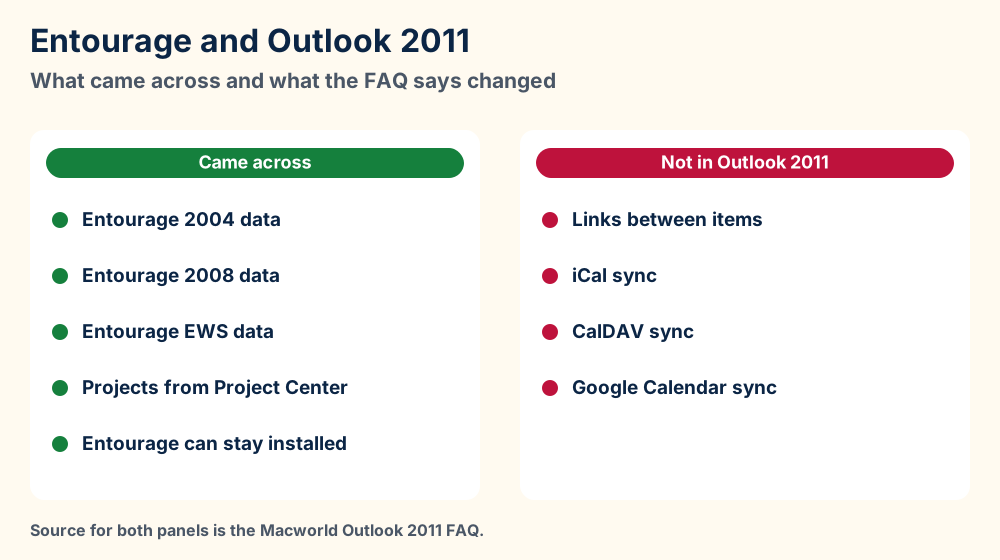
Macworld lists the gaps. Outlook 2011 has no links between items because Microsoft cited low usage and reliability.
Outlook 2011 also lacks iCal and CalDAV and Google Calendar sync per the same FAQ. Check your calendar plans before you switch.
Macworld says Outlook 2011 needs Exchange Server 2007 Service Pack 1 or later and uses EWS. It does not use WebDAV or MAPI.
Cached Exchange Mode cannot be switched off and Outlook checks for new mail every minute per the same FAQ. The FAQ adds that Outlook 2011 supports delegates and can connect without a VPN.
A Microsoft Q&A answer says data from version 2008 cannot go straight into Outlook 2016 for Mac. The answer points to Outlook 2011 as a stop on the way.
The current Microsoft page on archive files in Outlook for Mac lists .olm and .pst imports and no Entourage option. Read Microsoft Outlook for how the Windows and Mac versions differ.
| Question | Version 2008 | Outlook for Mac 2011 |
|---|---|---|
| Exchange link | WebDAV or EWS in the Web Services Edition | EWS only |
| Project Center | Yes | Projects import |
| Links between items | Yes | Removed |
| Source | Macworld and Microsoft | Macworld Outlook 2011 FAQ |
Your data sits in Documents, in the Microsoft User Data folder. Look for the identities folder that matches your Office version.
The data sits in a folder called Microsoft User Data inside the Documents folder. One folder for every Office version sits inside it.
Microsoft article 268323 names the default path for Entourage 2004 as Documents/Microsoft User Data/Office 2004 Identities/Main Identity under your user folder. Version X uses Office X Identities in the same place.
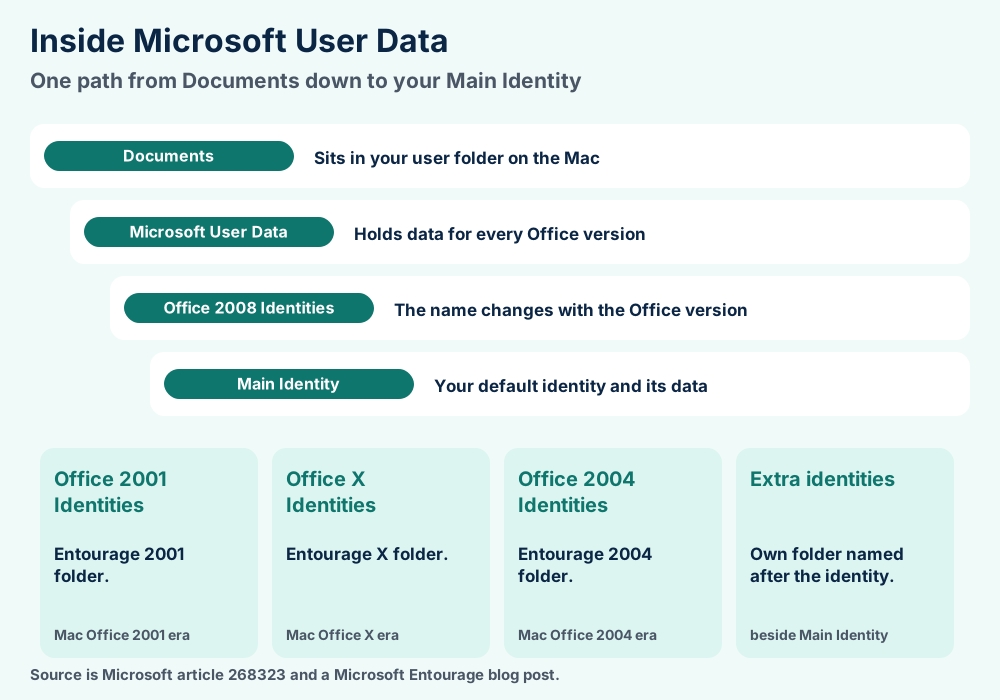
An identity is a separate set of Entourage data. Every identity gets its own folder named after it and sits beside Main Identity.
The article says the structure holds identities and mail and calendar and task items and newsgroup subscriptions and caches. It names no database file.
A Microsoft team blog post of 9 November 2009 puts the Entourage 2008 data at ~/Documents/Microsoft User Data/Office 2008 Identities. The folder Main Identity holds the default identity.
Open the program on the old Mac if other identity folders exist. It shows which identity you use.
Entourage 2001 let you keep the Microsoft User Data folder elsewhere with an alias in Documents. You had to name the alias exactly Microsoft User Data.
The same article says Entourage X data must stay in its installed location. FileFix found no Microsoft article that covers the later versions.
Microsoft article 870966 gives Macintosh HD:Documents:Microsoft User Data:Office 2001 Identities for Entourage 2001 on Mac OS 9.1 and later. Outlook Express 5.0 used Identities at the same level.
Create a new identity and name it Find Me when you cannot locate the folder. The article says that identity lands in the right place.
Comparing storage? Outlook for Windows keeps local mail in PST files and OST files. Outlook for Mac keeps a profile in OLK files. Read what a file format is for the general idea.
Export an Entourage archive with File and Export. Also copy the Main Identity folder from Office 2008 Identities to a second drive.
Copy before you change anything. Entourage gives you two ways to save your data and both take minutes.
Microsoft Q&A names the resulting file type as an Entourage archive with the extension .rge. Import that file back in version 2008 when you need it.
The Microsoft post on moving Entourage 2008 to a new Mac says to copy the Main Identity folder from Office 2008 Identities. Use a USB key or a network share.
Put that folder in the same path on the new Mac and open Entourage. The new Mac needs the Office 2008 service packs first so that it matches the old version.
Macworld says any new email marks the Entourage database as changed. Time Machine then backs up the full file every hour.
Its reviewer suggests excluding the Office 2008 Identities folder from Time Machine and backing it up another way. An exported archive does that job.
Quit Entourage and every Office program first. Use a fresh copy as a test. Copy the folder to a second drive and open a copy only on a duplicate of your data.
FileFix found no Microsoft page on stopping the database daemon before a copy. One reader comment on that blog suggests it. Treat it as a tip from a reader.
| Method | What you copy | Best for |
|---|---|---|
| Export archive | An .rge file from File, Export | A portable backup |
| Copy Main Identity | The identity folder in Microsoft User Data | A move to a Mac with the same Office |
Import Entourage data into Outlook for Mac 2011 with File and Import. Newer Outlook versions need an olm export from Outlook 2011 first.
Moving your data means going through Outlook for Mac 2011 first. Microsoft says no direct route from the 2008 version exists for Outlook 2016 for Mac.
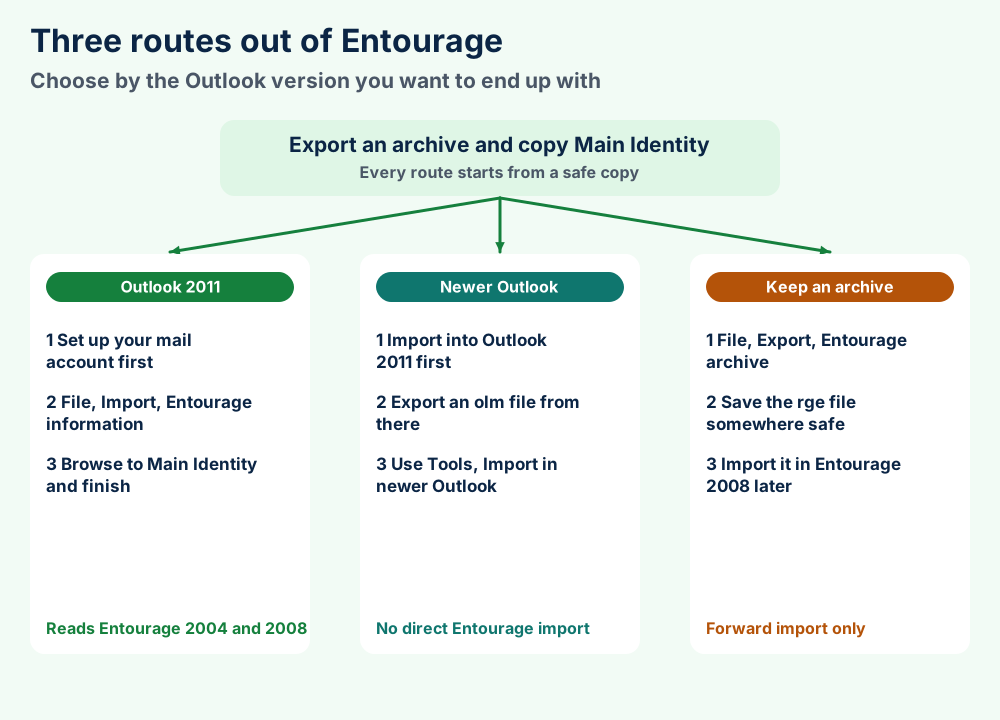
A university help sheet from DePaul University lists the menu path for Outlook 2011. Set up your email account first.
Select the right folder if you renamed an identity or made several. Macworld says Entourage can stay on the Mac while you check the result.
A Microsoft Q&A answer says importing Entourage 2008 data straight into Outlook 2016 for Mac is not possible. The suggested path imports into Outlook 2011 first and then moves on.
Export an .olm file from Outlook 2011 and use the steps on the Microsoft page on archive files in Outlook for Mac. The page says to open the Tools tab and select Import and then choose the Outlook for Mac archive file.
Imported items appear under On My Computer in the navigation panes. The same page says legacy Outlook for Mac support ends in October 2026.
Wikipedia says Entourage could not read Outlook PST files natively. Macworld says Outlook 2011 converts them to .olm and the Microsoft blog of 2010 promised that import.
Read PST files for the Windows side. FileFix found no Microsoft page that exports Entourage data straight to PST.
Wikipedia says some people used Thunderbird as a stop on the way and lost attachments. FileFix could not confirm that claim with a Microsoft or Mozilla page so test it on a copy.
Mac users who want to leave Microsoft can read Apple Mail or MailMate. Message files in MBOX files or EML files travel between many clients.
Export an archive first. Then compact the database with the Database Utility. Entourage 2004 stops near 2 million objects and version X stops near 2 GB.
Four faults cover most Entourage questions that Microsoft documented. Check them in this order.
Microsoft article 842878 explains the warning for Entourage 2004. A database holds up to 2 million objects and you see the warning near 1.9 million.
Entourage counts roughly 1 million items like messages and notes and contacts and events and tasks. At 2 million the account goes offline until the database shrinks.
Microsoft article 842265 says importing from Entourage 2001 to version X can leave out data with no error. Version X has a 2 GB limit on the combined identity data.
Check the identity folder size in Get Info. Hold the Option key while you start Entourage 2001 and choose Typical Rebuild and then Rebuild.
Delete mail until the folder drops under 2 GB when the rebuild does not help. Then try the import again.
The Microsoft Q&A thread of March 2018 explains that The program imports from older versions into newer ones only. Version 2008 offers no 2008 option.
Import the .rge archive and then drag folders from the imported archive into your folder list. A Microsoft Q&A answer gives that workaround.
The Microsoft article on the Database Utility says to quit all Office programs. Open the Database Utility in the Office 2011 folder then select the identity and click Rebuild.
Rebuilding deletes data that you did not sync with Exchange. The same article says Outlook 2016 for Mac has no manual repair.
Check the disk for damage first with a tool like Apple Disk Utility. The article also asks for free space of about twice the size of your database for a backup copy.
Still stuck with an Entourage folder? Send us the file details and we will look at your folder with you.
Entourage uses identity folders and RGE archives. Microsoft published no database spec. Outlook for Mac reads OLM and PST archives.
Microsoft never published a spec for the Entourage database. Its pages give folder names and file types and FileFix lists only those.
Documents/Microsoft User DataOffice 2001 Identities to Office 2008 IdentitiesMain Identity.rge Entourage archive.olm archive.pst archiveAn RGE file is the archive that the program writes when you export items. Microsoft Q&A lists the type as Entourage archive with the extension .rge.
Version 2008 imports RGE files along with identities from versions 2004 and X and 2001. That list comes from the import window in the Microsoft Q&A thread.
Outlook for Mac exports an .olm archive and imports the .olm type again. Outlook for Windows exports a .pst archive that Outlook for Mac can import per Microsoft.
Read PST files and OLK files for the file types that sit beside them. Contacts export as VCF contact files and calendar items as ICS files.
No Microsoft source we checked names the database file in Main Identity. So this page lists no inner file names.
Be wary of any tool that promises a perfect conversion. Test it on a copy of your data and compare item counts.
| File or folder | Role | Source |
|---|---|---|
Main Identity | Default Entourage data folder | Microsoft KB 268323 |
.rge | Entourage archive from File, Export | Microsoft Q&A |
.olm | Outlook for Mac archive | Microsoft Support |
.pst | Outlook for Windows archive | Microsoft Support |
Mail stores share a few designs. what a file format is covers the idea and the file format guides list every format FileFix documents.
Check Microsoft User Data. Section 7 lists the paths.
Go through Outlook 2011. Section 9 lists the steps.
Need the Outlook side? Microsoft Outlook explains the current client. OST files and PST files cover the Windows files.
Unsure about the old Windows twin? Outlook Express and Windows Live Mail show how Microsoft handled mail on a PC.
Leaving Microsoft for a Mac client? Apple Mail ships with macOS. MailMate and Postbox take other routes.
Have a mixed pile of old clients? Pegasus Mail and IncrediMail sit beside Opera Mail in the same guide set.
Weighing open options? Mozilla Thunderbird and SeaMonkey use standard mailbox files. Sylpheed is a lighter choice.
Chasing other mail platforms? Exchange Server and Lotus Notes cover servers. Proton Mail and Mulberry cover a hosted service and an old client.
Browsing wider? Use the FileFix category index or the FileFix home page for new guides. Try the macOS guides for system faults. Send us the file details when your Entourage folder behaves in a way this page leaves unanswered.